$49.99
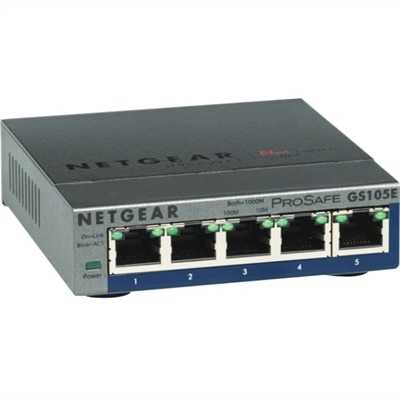
A 5-port Gigabit Ethernet switch featuring VLAN, QoS, IGMP snooping, link aggregation, and traffic monitoring.
In today's fast-paced digital landscape, robust and reliable network infrastructure solutions are essential for businesses striving to maintain seamless connectivity and optimize performance. Whether you're a small startup or a large enterprise, the right network infrastructure can empower your organization to efficiently manage data traffic, enhance collaboration, and support future growth. By investing in cutting-edge technologies and scalable solutions, you can ensure that your network remains secure, agile, and capable of meeting the demands of an ever-evolving technological environment. Explore our range of network infrastructure solutions designed to elevate your business operations to new heights.
A 5-port Gigabit Ethernet switch featuring VLAN, QoS, IGMP snooping, link aggregation, and traffic monitoring.
A dense, powerful rack-ready desktop engineered to optimize demanding computing environments.
Network infrastructure solutions help organizations create a dependable foundation for communication, collaboration, and access to essential applications. While the underlying environment may include physical equipment, software, security tools, and professional services, the experience for employees often begins with the devices they use every day. Laptops and desktops give teams a practical way to connect with colleagues, manage projects, attend meetings, and work with cloud-based applications, while monitors can make detailed tasks more comfortable by providing additional screen space and clearer organization. Accessories such as docks, keyboards, mice, webcams, headsets, adapters, and power equipment can complete a workstation and help reduce the small interruptions that add up during a busy day. When selecting solutions, consider how many people will use the environment, where they work, the applications they rely on, and how often they need to move between locations. A compact laptop may suit a consultant who carries work from a client office to a home workspace, while a desktop-based setup can be a sensible choice for a permanent office where employees handle demanding applications from a consistent location. A monitor with an adjustable stand, for example, can help an analyst keep reference material visible beside a primary work area; a docking accessory can let a mobile employee return to a desk and connect to displays and peripherals with minimal setup. For teams spread across offices, classrooms, retail locations, or home workspaces, dependable connectivity is equally important. Explore Wireless Network Solutions when employees need flexible access throughout a workplace, and look for equipment that supports a consistent experience across different rooms and locations. Compatibility deserves close attention: check operating system requirements, available ports, display connections, wireless standards, device management support, and the power needs of each component before building a complete setup. It is also helpful to map the environment from the user’s perspective. Someone joining a video meeting in a bright shared room may need a quality webcam and headset, while a designer, engineer, or financial professional may benefit from a larger display and a responsive computer that keeps complex applications moving smoothly.
A thoughtful approach to network infrastructure solutions balances performance, security, manageability, and room to grow. Speed matters because delays can interrupt a conversation, slow file access, and make everyday applications feel unreliable, but raw performance is only one part of the decision. Look for devices with enough processing capability and memory for the work being performed, along with displays that suit the size, detail, and duration of the user’s tasks. Security should be considered from the beginning rather than added after deployment. Features such as secure sign-in, encryption, firmware controls, automatic updates, endpoint protection, and centralized device management can help reduce exposure to unauthorized access and make it easier for an IT team to maintain consistent policies. A well-organized environment also supports business continuity: standardized configurations can simplify employee onboarding, replacement, troubleshooting, and support when a device is damaged or a team member changes roles. Scalability is another important consideration. A small organization may begin with a handful of laptops, monitors, and accessories, then add employees, locations, or specialized workstations as operations expand. Choosing compatible products and repeatable configurations can make that growth less disruptive, especially when new equipment needs to work alongside existing technology. Businesses should also account for the physical setting. Measure desk space, plan for cable routing, consider lighting and acoustics, and make sure employees have convenient access to power. In warmer seasons, portable equipment may move between offices, patios, and home workspaces; during cooler months, employees may spend more time working from fixed desks, making ergonomic accessories and larger displays especially useful. Education teams, health practices, creative studios, professional offices, and small businesses can each use these solutions differently, but the goal remains similar: provide reliable tools that help people communicate, access applications, protect information, and stay productive without unnecessary friction. With the right mix of computers, displays, accessories, software controls, and support services, an organization can build a connected workplace that feels straightforward to use today and prepared for changing needs ahead.
Add the products you would like to compare, and quickly determine which is best for your needs.