Network Security Equipment

Filters

In today's digital landscape, safeguarding your network is more crucial than ever. Network security equipment plays a pivotal role in protecting sensitive data and ensuring seamless connectivity across all devices. Whether you're managing a small business or overseeing a large enterprise, having the right tools to defend against cyber threats is essential. Explore our comprehensive selection of top-tier network security solutions designed to enhance your infrastructure's resilience and provide peace of mind in an increasingly connected world.

$27.99

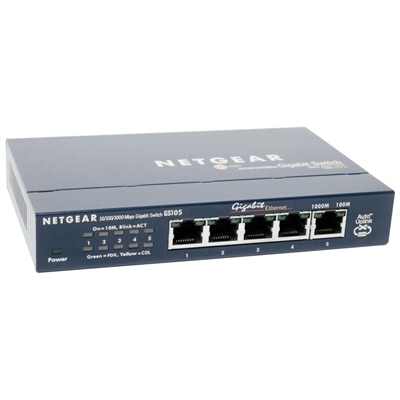
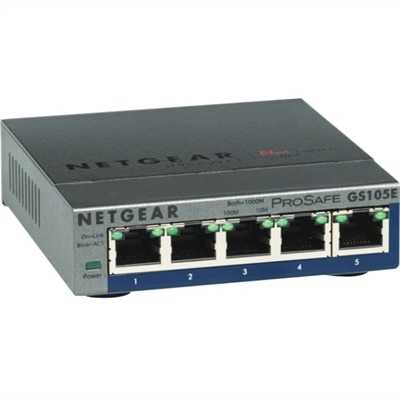
A durable, fanless Ethernet switch with PoE, offering silent operation and easy plug-and-play connectivity.

$27.99
A durable, fanless Ethernet switch with PoE, offering silent operation and easy plug-and-play connectivity.
$379.99

A high-performance WiFi 6 router with built-in DOCSIS 3.1 modem for ultra-fast, multi-device connectivity.

$379.99
A high-performance WiFi 6 router with built-in DOCSIS 3.1 modem for ultra-fast, multi-device connectivity.
$9754.79

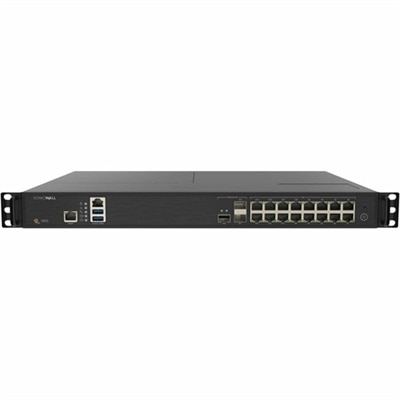
A next-gen firewall appliance delivering advanced threat prevention, centralized management, and multi-gigabit performance for enterprises.

$9754.79
A next-gen firewall appliance delivering advanced threat prevention, centralized management, and multi-gigabit performance for enterprises.
$327.74

A rugged media converter extending network reach up to 10 km with a durable steel enclosure.

$327.74
A rugged media converter extending network reach up to 10 km with a durable steel enclosure.
$1034.96

A rack-mountable switch offering high-speed connectivity and unified security for growing network demands.

$1034.96
A rack-mountable switch offering high-speed connectivity and unified security for growing network demands.
$1814.96

A feature-rich, rack-mountable switch ideal for small to medium businesses and SD-Branch deployments.

$1814.96
A feature-rich, rack-mountable switch ideal for small to medium businesses and SD-Branch deployments.
$259.99

A rack-mountable, fanless smart switch with 24 Gigabit Ethernet ports and cloud management capabilities.

$259.99
A rack-mountable, fanless smart switch with 24 Gigabit Ethernet ports and cloud management capabilities.
$395.00

A high-performance desktop firewall with 10 Gigabit Ethernet interfaces, scalable storage, and advanced security features.

$395
A high-performance desktop firewall with 10 Gigabit Ethernet interfaces, scalable storage, and advanced security features.
$42755.00

A rack-mountable firewall appliance offering high port density, advanced threat protection, and intuitive management.

$42755
A rack-mountable firewall appliance offering high port density, advanced threat protection, and intuitive management.
$2159.99

A stackable managed switch offering 16x10G ports, seamless stacking, and advanced high availability features.

$2159.99
A stackable managed switch offering 16x10G ports, seamless stacking, and advanced high availability features.
$1278.20

An analog KVM switch offering high security and real-time video response for secure environments.

$1278.2
An analog KVM switch offering high security and real-time video response for secure environments.
$1101.99

A desktop security appliance offering advanced threat protection with GigE, 2.5 GigE, and dual-band Wi-Fi.

$1101.99
A desktop security appliance offering advanced threat protection with GigE, 2.5 GigE, and dual-band Wi-Fi.
$8694.40

A black rack-mountable Ethernet switch offering 48 multigigabit ports and 90 watts PoE per port.

$8694.4
A black rack-mountable Ethernet switch offering 48 multigigabit ports and 90 watts PoE per port.
$289.99

A desktop rack-mountable switch offering PoE for seamless connectivity to multiple network devices.

$289.99
A desktop rack-mountable switch offering PoE for seamless connectivity to multiple network devices.
$458.99

A desktop firewall appliance offering 10 Gigabit Ethernet interfaces and advanced real-time threat protection.

$458.99
A desktop firewall appliance offering 10 Gigabit Ethernet interfaces and advanced real-time threat protection.
$349.99

A compact 8-port switch with 2.5G speed, PoE++ support, and advanced network management features.

$349.99
A compact 8-port switch with 2.5G speed, PoE++ support, and advanced network management features.
$1626.52

A secure KVM switch with dual-head, 4-port, UHD 4K support, and NIAP version 4.0 certification.

$1626.52
A secure KVM switch with dual-head, 4-port, UHD 4K support, and NIAP version 4.0 certification.
$3143.16

A 16-port Cat5 KVM switch offering dual power supplies and remote access for seamless network management.

$3143.16
A 16-port Cat5 KVM switch offering dual power supplies and remote access for seamless network management.
$6602.48

A 48-port console server with dual AC power for secure remote IT asset management.

$6602.48
A 48-port console server with dual AC power for secure remote IT asset management.
$49.99

A reliable, energy-efficient Ethernet switch with 8 ports, PoE support, and desktop wall-mountable design.

$49.99
A reliable, energy-efficient Ethernet switch with 8 ports, PoE support, and desktop wall-mountable design.
$109.99

A durable, fanless Ethernet switch offering plug-and-play connectivity for small office and home networks.

$109.99
A durable, fanless Ethernet switch offering plug-and-play connectivity for small office and home networks.
$1096.89

A 1U power distribution unit with remote management, local monitoring, and multi-tier user access.

$1096.89
A 1U power distribution unit with remote management, local monitoring, and multi-tier user access.
$2658.24

A rack-mountable 8-port console server with ARM processor for secure remote IT asset management.

$2658.24
A rack-mountable 8-port console server with ARM processor for secure remote IT asset management.
$4906.67

A rack-mountable console server offering secure remote management with 48 ports and dual AC power.

$4906.67
A rack-mountable console server offering secure remote management with 48 ports and dual AC power.

Network Security Equipment

Building a dependable security-focused technology setup starts with choosing computing devices that can support the people, applications, and daily routines behind it. Laptops and desktops serve as the primary workstations for reviewing alerts, managing access policies, analyzing activity, and keeping business operations moving when a team works from different locations. When comparing options, begin with the number of people who will use the system, the type of software they rely on, and how much multitasking their work requires. A device used for occasional account administration may need a different configuration from one that remains open throughout the day with monitoring dashboards, communication tools, documentation, and business applications running together. Look for current processors, sufficient memory, fast solid-state storage, and an operating system that receives regular security updates. Built-in security features such as biometric sign-in, hardware-based protection, secure boot support, and privacy controls can add meaningful layers of defense without making everyday work feel complicated. For organizations with several users, selecting similar laptop or desktop configurations can simplify setup, maintenance, and support. It is also worth considering serviceability, warranty coverage, battery life for mobile employees, and the availability of business-friendly accessories. A security-conscious workstation should feel steady and responsive, whether it is used in a quiet home office, a shared workplace, or a small retail environment where every minute of downtime is noticeable.

Monitors and accessories can make a surprisingly large difference in security-related work. A clear, adjustable monitor helps users review detailed logs, compare activity across multiple windows, and notice unfamiliar patterns without constantly resizing or shifting applications. A second display may be useful for keeping reference material, team messages, or system documentation visible while the main task remains open. When choosing a monitor, consider screen size, resolution, height and tilt adjustment, low-glare performance, and comfortable viewing over long sessions. Ergonomic improvements are practical security investments because tired users are more likely to overlook warnings or rush through important steps. Reliable keyboards, mice, webcams, headsets, docking accessories, and privacy tools can also help create a more controlled workspace. A docking setup gives mobile employees a consistent desk experience while allowing them to disconnect cleanly when working elsewhere. Privacy screens can reduce shoulder-surfing in open offices, airports, and shared rooms, while a quality webcam cover offers a simple way to manage camera visibility. Keep physical placement in mind as well: screens should not face public walkways, unattended devices should be locked, and accessories should be labeled when several people share the same area. These small habits work alongside software controls to help protect sensitive information during ordinary routines, from opening the first dashboard in the morning to closing a laptop at the end of the day.

The right purchase depends on the size and character of the environment. A home-based professional may prioritize a lightweight laptop, strong battery life, a comfortable monitor, and straightforward privacy features. A growing business may benefit from standardized desktops or laptops that make user onboarding easier, along with displays and docking accessories that support focused work across multiple desks. Remote teams should pay close attention to camera and microphone quality, device management capabilities, secure sign-in options, and the ability to maintain consistent settings wherever employees work. Before purchasing, document the number of users, expected application load, internet service speed, work locations, required display connections, and the organization’s approach to updates and access control. It is also helpful to plan for future users rather than selecting devices that only meet today’s minimum needs. A small amount of extra performance can extend useful life and reduce disruption as applications become more demanding. Families purchasing technology for a student, remote worker, or home-based business owner can use the same approach: choose a device that supports the intended tasks, add accessories that encourage good workspace habits, and make security settings part of the initial setup rather than an afterthought. For broader assistance with planning and implementation, explore Network Security Services. With thoughtfully selected laptops, desktops, monitors, and accessories, teams can create a more organized, comfortable, and security-minded foundation for everyday computing through the cooler months and beyond.

FAQs:

When selecting network security hardware for a small business, prioritize devices that offer comprehensive protection such as firewalls, intrusion prevention, and VPN capabilities. Look for user-friendly management interfaces, scalability for future growth, and the ability to integrate with your current network infrastructure. Unified threat management (UTM) appliances are a popular choice for small businesses seeking an all-in-one solution.
Most modern network security equipment is designed for seamless integration with a wide range of home and office networks. Many devices feature plug-and-play setup and intuitive configuration processes, making it straightforward to enhance your network security without significant technical expertise.
Dedicated network protection devices are beneficial for a variety of users, including remote workers, small business owners, educators, and families. Anyone who values privacy, secure access to online resources, and protection from cyber threats can benefit from implementing these devices in their network environment.
Yes, many network security hardware solutions, such as unified threat management (UTM) appliances, combine several security features into a single device. These often include firewalls, intrusion prevention systems, content filtering, and VPN gateways, providing comprehensive protection and simplified management.
It’s a good practice to regularly review and update your network appliance hardware, especially as cyber threats evolve and new features become available. Many manufacturers provide firmware updates to address vulnerabilities and improve performance, so checking for updates and assessing your security needs every 12 to 24 months is recommended.

Add the products you would like to compare, and quickly determine which is best for your needs.
Add the products you would like to compare, and quickly determine which is best for your needs.