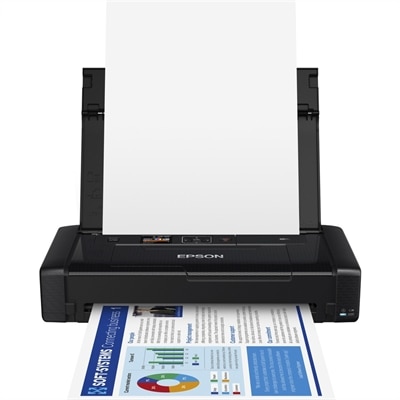
Portable Inkjet Printers
Portable inkjet printers offer a convenient solution for on-the-go printing needs, whether you're working remotely, traveling, or simply need flexibility in your workspace. Designed for easy transport and quick setup, these compact devices make it simple to print documents, photos, and more wherever you are. Discover a wide selection of portable inkjet printers that combine mobility with reliable performance to keep you productive anytime, anywhere.
This product is not available
Check out the following recommendations.




Portable Inkjet Printers
Portable inkjet printers are compact printers designed to produce documents and, on compatible models, photos away from a permanent desk setup. They use liquid ink deposited through fine nozzles onto paper, bringing familiar inkjet printing to a form that can travel between a home office, a client appointment, a classroom, or a temporary workspace. Depending on the model, power comes from an electrical outlet, a rechargeable battery, or an optional battery accessory, while connections may include USB, Wi-Fi, or direct wireless printing from a compatible mobile device. Battery power and wireless connectivity are separate features: a wireless printer may still need an outlet, and a battery-powered printer may need a cable to receive a print job. That distinction matters when printing a revised contract at a kitchen table or preparing handouts in a room without conveniently placed outlets. These printers suit consultants, field professionals, traveling instructors, college students, and households that need occasional printing without dedicating a desk to a larger machine. Their appeal is practical rather than purely about size. A paper copy can make a signature easier to collect, give a client something tangible to review, or put a schedule in someone’s hands when a phone screen is inconvenient. Many portable inkjet printers handle standard letter-size documents, although supported paper dimensions, tray capacity, and printable margins vary. Photo printing and specialty media support also depend on the printer, ink, and paper combination. Scanning and copying are not universal features, so a small printer should not automatically be treated as an all-in-one device. Portability is best understood as a balance of packed weight, operating footprint, power options, and everyday output needs. A machine that moves easily from a closet to a dining table serves a different purpose from one carried through airports every week. For spaces where a smaller footprint matters more than battery operation, Compact Printers offer a related category for home offices, study areas, and shared work surfaces.
The physical fit of a portable inkjet printer includes more than its closed dimensions. Paper supports, output trays, cable connections, and an attached battery can increase the space needed during use, especially on a narrow counter or hotel-room desk. Enough clearance for paper to enter and exit freely helps prevent curled sheets from catching against a wall or bag. Packed weight is equally important because the charger, spare ink, protective case, and paper add to what travels with the printer. Many housings use molded plastic to keep weight manageable, but low weight does not establish resistance to drops, dust, or moisture. A padded compartment protects the exterior from everyday bumps, while a secure cover or folded tray helps keep exposed parts from snagging during transport. For someone moving between appointments, a stable, level printing surface and a separate pocket for clean paper can matter as much as the printer’s dimensions. Connection methods shape that routine, too. USB can provide a straightforward connection to a compatible laptop, while Wi-Fi can support printing across a local wireless connection. Wi-Fi Direct, when supported, allows a compatible device to connect to the printer without joining a shared router. Mobile printing depends on operating-system compatibility, supported print services, and sometimes an app; wireless capability alone does not guarantee that every phone or tablet can print every file. Guest Wi-Fi restrictions can also complicate connections in hotels or shared offices. Battery specifications deserve similar context. Output per charge varies with print coverage, connection activity, settings, and battery condition, so a rating is not a promise of identical performance for every workload. Charging methods differ, and a USB connection does not necessarily mean the printer charges through that port. The most comfortable setup matches the actual day: a few signed forms between appointments, a short stack of meeting notes, or occasional photos printed near an outlet. Portable designs generally favor manageable size over large paper capacity and sustained high-volume output, making intended use an important part of their everyday convenience.
Print quality, paper choice, and routine care determine how well a portable inkjet printer performs after the novelty of its small size wears off. Plain inkjet-compatible paper suits drafts, itineraries, worksheets, and many business documents, while coated photo paper can improve color depth and detail when the printer supports it. Paper weight, thickness, finish, and size must stay within the printer’s specifications; adhesive labels and other specialty sheets require explicit compatibility rather than an assumption that anything paper-based will feed correctly. A portable document inkjet is also different from an industrial handheld marking device designed to print directly on objects. Its normal task is feeding supported sheets through a controlled paper path. Text clarity matters for small type, signatures, and fine lines, while color accuracy and smooth tonal transitions become more noticeable in photos, charts, and presentation graphics. Draft settings may be sufficient for working notes, whereas a polished handout or photograph usually benefits from a more deliberate quality setting and the appropriate media selection. Ink chemistry varies, and resistance to water, smudging, or fading depends on both the ink and the paper; freshly printed pages should dry before being stacked tightly or slipped into a sleeve. Inkjet nozzles can become clogged after long periods of inactivity, so manufacturer-recommended use and maintenance help preserve consistent output. Cleaning cycles consume ink, making repeated cleaning without checking the underlying issue less useful than following the prescribed troubleshooting sequence. For travel, shutting the printer down properly allows the printhead to park as designed, and transport instructions should determine its orientation and whether cartridges remain installed. Paper kept flat and dry feeds more reliably than sheets that have absorbed moisture or become bent inside a backpack. Avoid leaving the printer or ink in a hot vehicle, and follow the specified storage temperatures. For a student moving between living spaces or a professional who regularly needs a paper copy away from the office, a portable inkjet printer can also be a thoughtful practical gift when device compatibility and printing habits are known. Its lasting usefulness comes from fitting a real routine: clean pages, dependable connections, manageable upkeep, and a size that makes bringing a printer along feel reasonable.
FAQs:
When selecting a portable inkjet printer for travel, consider features such as wireless connectivity options like Bluetooth or Wi-Fi, battery life for printing on the go, compatibility with both laptops and smartphones, and the ability to handle various paper types. Compactness and lightweight design are also important for easy transport.
Yes, many portable inkjet printers support direct printing from Android phones via Bluetooth or dedicated mobile apps. This allows you to print documents, photos, and more without needing a computer, making it especially convenient for mobile professionals and students.
Portable inkjet printers are ideal for business travelers, remote workers, students, event planners, and anyone who needs to print documents or photos away from a traditional office setting. They’re also a thoughtful gift for graduates or entrepreneurs who value mobility and efficiency.
Many portable inkjet printers are designed to handle both documents and photos, offering vibrant color reproduction and borderless printing options. Be sure to check the printer’s specifications for supported media types and print quality to ensure it meets your needs.
To keep your portable inkjet printer performing well, regularly update its firmware, use genuine ink cartridges, and clean the print heads as recommended by the manufacturer. Store the printer in a protective case when traveling to prevent dust and damage.