Small Business POS
Small business POS solutions empower entrepreneurs to streamline transactions, manage sales, and enhance customer experiences with ease. Discover a variety of small business POS options designed to fit the unique needs of growing companies, whether you operate a retail store, café, or service-based business. Find the right tools to support your daily operations and help your business thrive in today’s competitive marketplace.
This product is not available
Check out the following recommendations.




Small Business POS
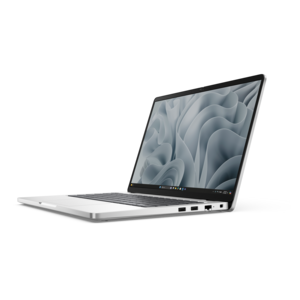
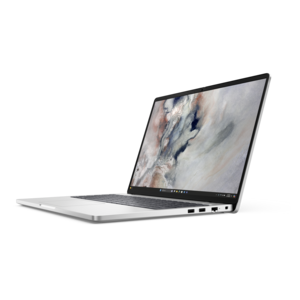
Small business POS hardware brings together the computers, displays, and accessories that support everyday checkout tasks. A POS setup typically pairs a computer with compatible checkout software and payment peripherals, giving employees a workspace for entering purchases, reviewing orders, and helping customers complete transactions. For a neighborhood boutique, that workspace might sit on a narrow counter beside the wrapping station. In a café, it may face a steady stream of customers while employees move between the register and the pickup area. A salon reception desk has different demands, with appointment details and customer records sharing screen space with checkout. These settings make intended use just as important as computing performance. A compact desktop can anchor a permanent checkout station, while a laptop can support a business that moves between a studio, a reception area, and local pop-up events. An all-in-one computer combines the display and computer in a single enclosure, potentially leaving more room for bags, paperwork, and customer interactions. None of these formats automatically includes payment processing or industry-specific functions; those capabilities depend on the software, connected accessories, and service agreements used with the hardware. A useful distinction is that the computer runs the checkout application, while a compatible payment device handles supported card or mobile-wallet interactions. Matching those components helps keep the setup appropriate for the business rather than simply choosing the largest screen or most powerful computer. Small business owners, counter staff, receptionists, and managers may all use the same workstation during a day, so a clear display, comfortable input devices, and an uncluttered layout have practical value. Even routine moments matter: reading an order while a customer adds another purchase, switching to an appointment calendar, or preparing a receipt without moving several objects out of the way. Well-suited hardware supports those interactions without dominating the counter or making the employee turn away from the customer unnecessarily. It also gives the workstation a defined place within the room, whether checkout is the main activity or one part of a multipurpose desk.
The fit of small business POS equipment involves both physical dimensions and software requirements. Counter depth, display height, stand design, and the space needed for cables all influence how naturally a workstation fits into a busy room. A monitor that looks comfortable on an office desk may feel oversized on a shallow reception counter, particularly when customers need room to set down a bag or sign a document. Adjustable tilt and height can improve visibility for employees of different heights, while a stable base helps keep the screen steady during frequent interaction. Touch input can be convenient for supported checkout applications, but it is not a substitute for checking software compatibility or considering tasks that involve substantial typing. A keyboard and mouse remain useful for entering customer details, preparing documents, and handling administrative work between transactions. Screen finish and placement matter, too: overhead fixtures or afternoon sunlight can create reflections that make small text harder to read. For a laptop used at temporary checkout locations, weight, hinge construction, charger size, and battery specifications affect everyday portability. Battery runtime varies with brightness, connected accessories, and workload, so a published estimate is not a promise of a full business day away from an outlet. Performance needs also vary. A straightforward checkout application may place different demands on a computer than a workspace that keeps scheduling, accounting, email, and several browser windows open at once. The operating system, processor, and memory should meet the requirements of the intended applications, including any supported peripheral drivers. Connections deserve equal attention because receipt printers, scanners, keyboards, and payment devices may require particular ports or adapters. A docking station can simplify connections for some laptop setups, provided the computer, dock, and accessories support the required functions. Compatibility is especially important when reusing existing peripherals: a matching connector alone does not establish that a device will work with a particular checkout application. Manufacturer specifications and software support documentation provide a firmer basis for matching the components.
Durability and care become especially noticeable at a checkout station because the same surfaces may be touched hundreds of times during a working week. Housing materials, hinge strength, stand stability, and cable strain relief can affect how equipment handles repeated use, although appearance alone does not establish ruggedness. A metal enclosure may feel substantial, while a lighter enclosure may be easier to carry; neither should be assumed to withstand spills or drops without an applicable manufacturer rating. In cafés and other settings where drinks are nearby, separating electronics from beverage preparation areas helps reduce exposure to splashes and sticky residue. Cables routed away from customer walkways and kept clear of drawer mechanisms are less likely to be tugged or pinched. Ventilation openings also need breathing room rather than being pressed against a wall or surrounded by paperwork. Cleaning methods should follow the equipment manufacturer's directions, particularly for touchscreens and coated displays. Spraying liquid directly onto electronics or using an unsuitable cleaner can damage surfaces and allow moisture into openings. Shared workstations also benefit from thoughtful screen positioning and account controls. Customer information should not be plainly visible to people waiting nearby, and employee permissions should reflect the tasks each person needs to perform. Hardware alone does not establish payment security or compliance; supported software, updates, access settings, and the payment provider's requirements remain part of the setup. Similarly, functions such as appointment booking, transaction reporting, digital receipts, or continued operation during an internet interruption depend on the chosen application and service. Offline payment behavior can have restrictions and should not be assumed from a computer's specifications. Beyond the checkout counter, complementary Small Business Tools can support the administrative work that surrounds customer transactions. A workstation may serve as the register during open hours and become the place for reviewing records or organizing tomorrow's appointments after closing. That overlap makes comfortable viewing, dependable peripheral connections, manageable maintenance, and the right physical footprint lasting considerations for small business POS hardware.
FAQs:
When selecting a POS laptop, consider features such as portability, battery life, compatibility with POS software, and the availability of multiple ports for connecting peripherals like barcode scanners and receipt printers. A durable build and responsive touchscreen can also enhance the user experience for staff and customers alike.
A POS system can automatically track stock levels as sales are made, generate alerts when items are running low, and provide detailed reports on inventory turnover. This helps small business owners maintain optimal stock, reduce manual errors, and make informed purchasing decisions.
Yes, many modern POS systems are designed to integrate with accounting software, e-commerce platforms, and customer relationship management (CRM) tools. This integration streamlines operations, improves accuracy, and allows for a more holistic view of your business performance.
Small POS systems are ideal for a variety of businesses, including retail shops, cafés, food trucks, salons, and service providers. They are also a great option for entrepreneurs who participate in pop-up events, markets, or mobile services, offering flexibility and ease of use.
A Dell POS system can help you efficiently manage increased transaction volume during seasonal promotions by speeding up checkout, tracking promotional sales, and providing real-time sales data. This allows you to quickly adjust your strategies and ensure a smooth customer experience during busy periods.