Storage Expansion Cards
Unlock the full potential of your devices with storage expansion cards, designed to seamlessly enhance your digital experience. Whether you're looking to store more photos, videos, or essential files, these versatile solutions provide the extra space you need without compromising on speed or performance. Ideal for tech enthusiasts and everyday users alike, storage expansion cards are a convenient way to boost capacity and ensure that your data is always within reach. Explore a variety of options tailored to meet the demands of modern technology, and find the perfect fit for your storage needs.
This product is not available
Check out the following recommendations.




Storage Expansion Cards
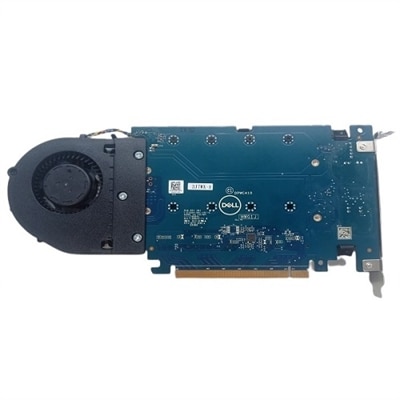
Storage expansion cards provide a practical way to add capacity when a computer or gaming console no longer has enough room for applications, creative projects, photos, videos or downloaded games. Unlike an external drive that sits beside a device and connects through a cable, an internal expansion card installs into a compatible slot inside a desktop computer and can provide a direct connection to one or more additional drives. Many PCIe NVMe expansion cards are designed to hold M.2 solid-state drives, giving desktop users a way to increase fast storage while making better use of an available PCI Express slot. Some cards support a single M.2 drive, while others can accommodate multiple drives, making them useful for people who work with large media libraries, computer-aided design files, music projects, high-resolution photographs or sizable game installations. PCIe SATA cards take a different approach by adding SATA connections for compatible hard disk drives or 2.5-inch solid-state drives. They can be a good fit for a desktop that has limited onboard connections or for a system being upgraded with several internal drives. Before choosing a card, check the computer’s available slot type, the physical clearance inside the case, motherboard compatibility and the operating system requirements. PCIe generations are generally designed to work across generations, but supported speeds may vary depending on the computer, card and installed drive. A card may also require an available power connection, airflow around the expansion area or software configuration after installation. Reviewing the manufacturer’s specifications for lane requirements, drive formats, boot support and maximum capacity can help avoid an installation that looks compatible at first but does not deliver the expected performance. For additional options in this category, explore PCI Express Cards.
Storage expansion cards are also available for select gaming consoles, where a custom-designed card can add playable space without requiring games to be moved back and forth as often. Console expansion cards are made for a specific system family and connect through a dedicated expansion port, with performance intended to closely match the console’s internal storage. That distinction matters: a general-purpose PC expansion card is not interchangeable with a console card, and a console card will not provide a universal upgrade for a desktop computer. Shoppers should confirm the exact console model and generation before purchasing, then compare available capacities based on the size of their game library and how frequently they download large titles. A smaller capacity may suit a player who rotates through a handful of favorite games, while a larger card can be more convenient for households with several players, extensive downloadable libraries or limited internet access. PC users can make a similar decision by considering the type of files they create and how often they need to access them. A fast NVMe-based setup can help with tasks that involve frequent file transfers, application loading or large project folders, while a SATA-based setup may offer a straightforward way to add dependable capacity to an older or more expandable desktop. Keep in mind that an expansion card does not automatically make every drive faster; the final experience depends on the installed drive, the PCIe interface, the motherboard, cooling and the workloads being performed. It is also helpful to separate everyday applications and active projects from long-term archives, since organization and backup habits remain important even after adding substantial space. A storage expansion card can reduce the need to uninstall games or constantly shuffle files, but it should complement a reliable backup plan rather than replace one.
These products can be useful for home office users, students, content creators, PC builders and gamers who have outgrown the capacity included with a desktop or console. Someone returning to a creative hobby during the cooler months may appreciate extra room for photographs, video clips and editing files, while a family sharing a gaming system may value the convenience of keeping more installed titles ready to play. Storage expansion cards can also make thoughtful gifts for a person who enjoys building or upgrading a desktop, provided the recipient’s computer specifications are checked first. Compatibility is the most important part of that decision, so note the motherboard model, available PCIe slot, supported drive type and interior space before selecting a card. For console users, verify the console family and expansion format rather than relying on appearance alone. Installation may involve opening a desktop case, securing the card, fitting a drive and initializing the new capacity through the operating system; users who are not comfortable working inside a computer may prefer professional assistance. After installation, formatting and partitioning choices can affect how the new space is organized, and firmware or driver updates may be recommended for certain configurations. It is wise to leave room for future growth when comparing capacities, especially because modern games, video files and creative applications can become larger over time. Whether the goal is to add fast M.2 capacity to a desktop, connect additional SATA drives or expand a compatible console library, the right storage expansion card can make a device feel less constrained and keep frequently used files and games close at hand.
FAQs:
Storage expansion cards are designed for a wide range of devices, including laptops, desktops, gaming consoles, and some tablets. Compatibility depends on the type of card—options like SD cards, PCIe NVMe cards, and specialized expansion cards are available for different systems. Always check your device’s specifications to ensure the expansion card you choose is supported.
Installing a storage expansion card can significantly enhance your computer’s performance, particularly when using high-speed options such as PCIe NVMe cards. These cards can improve data transfer rates, reduce load times for applications and games, and help your system handle large files more efficiently. The overall impact will depend on the card’s speed and your device’s capabilities.
Most storage expansion cards are designed for easy installation, with many models offering plug-and-play functionality. For example, SD cards simply slide into their designated slot, while PCIe cards may require opening your desktop case and inserting the card into a compatible slot. Detailed instructions are typically provided to guide you through the process, making it accessible even for users with limited technical experience.
Yes, many storage expansion cards, such as SD cards or portable NVMe drives, can be used to transfer files between compatible devices. This makes them a convenient choice for moving photos, documents, or other data from one computer or device to another without relying on cloud services or internet connections.
When selecting a storage expansion card for gaming, prioritize cards with fast read and write speeds to ensure quick load times and smooth gameplay. Compatibility with your gaming system is crucial, as is choosing a card that matches the performance of your console or PC’s internal storage. Features such as durability and heat management can also be important for frequent or intensive gaming sessions.