$1699.99
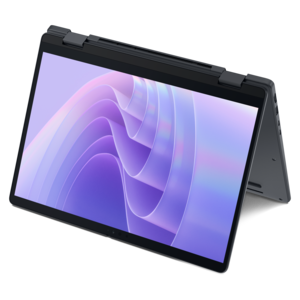
A sleek laptop delivering smooth AI experiences and accelerated creative workflows for demanding high-performance users.
Elevate your audio content with the right setup from our selection of tools for podcast creators. Whether you’re launching your first episode or refining a popular series, finding reliable equipment is essential for producing professional-quality sound and streamlining your workflow. Explore a wide variety of microphones, headphones, mixers, and accessories designed to help you record, edit, and share your voice with clarity and confidence. Discover tools for podcast creators that fit every skill level and studio space, making it easier than ever to bring your ideas to life.
A sleek laptop delivering smooth AI experiences and accelerated creative workflows for demanding high-performance users.
A remarkably thin 2-in-1 laptop combining portability and performance with Series 3 Intel Core Ultra processors.
Tools for podcast creators bring together the equipment used to capture clear speech, follow a conversation, edit recordings, and prepare episodes for listeners or viewers. A typical podcast setup centers on a laptop or desktop, a microphone, headphones, and the accessories that keep each recording session comfortable and organized. For video podcasts, a webcam, lighting, and a monitor also help shape the finished presentation. The right combination depends on the format: a solo host recording a weekly commentary has different needs from two people sharing a desk or a producer interviewing guests remotely. Computers used for audio recording benefit from responsive performance, enough memory to keep recording and communication applications running together, and sufficient drive capacity for original recordings and finished episodes. Video adds larger files and more demanding editing tasks, making processing performance and graphics capabilities more important. A laptop suits creators who move between a home office, rehearsal space, and interview location, while a desktop fits a dedicated workspace where equipment can remain connected between sessions. Fan noise is another practical consideration when a computer sits close to an open microphone, particularly during demanding tasks. Connection types matter just as much as computing power. A microphone, camera, external drive, and headphones can quickly occupy several ports, so compatible connections help keep a compact setup manageable. A larger monitor gives an editor room to see an audio timeline, recording levels, and episode notes without constantly switching windows. For someone trimming an hour-long conversation, that extra workspace can make pauses, overlapping voices, and transitions easier to examine. Podcast equipment also serves educators, independent journalists, small business owners, hobbyists, and teams producing internal interviews or training content. Across these uses, the most useful setup supports the actual recording routine rather than adding complexity. Equipment that is easy to position, connect, and use consistently helps a creator spend less time rearranging a desk and more time concentrating on the conversation.
Microphones and headphones form the core of a podcast audio setup because they influence both what gets recorded and what the host can hear during a session. A USB microphone connects directly to a compatible computer and can simplify a single-person workspace. An XLR microphone generally connects through an audio interface, which provides microphone inputs and recording-level controls; that arrangement can accommodate multiple speakers when the interface has enough inputs. Dynamic microphones are often used for close spoken-word recording, while condenser microphones can capture subtle vocal detail but may also make room reflections and background sounds more noticeable. Neither type replaces a suitable recording environment. In a spare bedroom with curtains and a rug, voices may sound less reflective than they do in a kitchen with bare walls and hard counters. Microphone pickup pattern, placement, and distance from the speaker all influence the result. A directional microphone positioned near the host can help emphasize speech over surrounding sound, although it cannot make a noisy room silent. Pop filters and foam windscreens help soften bursts of air on sounds such as “p” and “b,” while a compatible shock mount can reduce vibrations transmitted through a desk or stand. A boom arm keeps the microphone within comfortable speaking distance without occupying the space needed for notes or a keyboard. Its weight capacity, joint stability, and clamp fit are important, especially on a thin desktop or a surface with a deep edge. Closed-back headphones help limit sound leaking into the microphone and let a host notice distracting hum, clothing rustle, or a guest whose voice is much quieter than everyone else’s. For longer interviews, adjustable headbands, cushioned ear pads, and a fit that does not press too firmly against glasses can matter as much as sound quality. Durable housings, secure connectors, and replaceable pads or cables can support regular use. For creators receiving equipment as a gift, compatibility with their computer and existing microphone connections makes accessories more useful than a feature list alone.
Video podcast equipment extends that same attention to clarity into the visual setting. A webcam with reliable focus and exposure can keep a host’s face visible as daylight changes, while a stable mount helps maintain a consistent angle throughout an interview. Soft, diffused lighting can reduce harsh facial shadows and make a small recording corner feel more intentional without requiring an elaborate backdrop. Creators who demonstrate objects or share an on-screen presentation may also benefit from a second display, leaving speaking notes and recording controls separate from the material shown to viewers. For remote conversations, hardware works alongside recording and editing software rather than replacing it. Some recording applications capture each participant locally before transferring the files, which can reduce the effect of an unstable call connection on the final recording. Separate tracks give an editor more control over individual voices, and headphone monitoring helps catch problems while there is still time to address them. Audio editing benefits from accurate listening, while video editing also calls for a display suited to reviewing detail and consistent color. Related workspace accessories on Tools For Tech Enthusiasts can complement a creator’s broader computing setup. Everyday construction and care deserve attention, too. A securely built stand should resist shifting when someone reaches for a glass of water, and frequently handled cables benefit from flexible jackets and strain relief around their connectors. Portable equipment is easier to protect in padded compartments that keep microphone grilles and camera lenses from rubbing against other gear. Removable fabric covers and replaceable cushions can make shared equipment easier to maintain, provided cleaning follows the manufacturer’s directions. Liquids should stay away from connections, and microphones and lenses need gentle handling rather than aggressive wiping. Cable routing also affects comfort and durability: a little slack at a moving boom arm prevents tension, while a clear path around the chair reduces accidental pulls. Whether the setting is a quiet home office or a temporary interview space, well-matched podcast tools support repeatable recording habits, comfortable sessions, and a finished conversation that is easier to hear and follow.
Add the products you would like to compare, and quickly determine which is best for your needs.