$2799.00
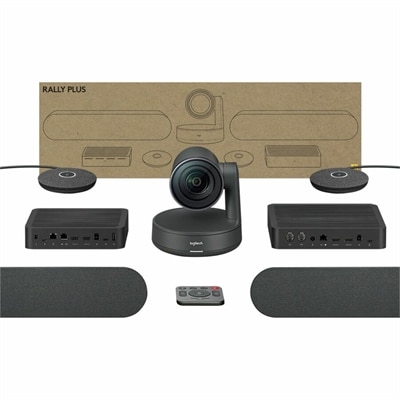
A 4K conference camera system with PTZ control, modular speakers, beamforming microphones, and intelligent meeting automation.
Enhance your virtual meetings with our top-of-the-line video conference cameras, designed to provide exceptional clarity and ease of use for all your remote communication needs. Whether you're connecting with colleagues, clients, or loved ones, these cameras ensure you present yourself professionally and stay engaged with high-quality visuals. Explore our range of video conference cameras to find the perfect match for your setup, ensuring every call is as productive and seamless as possible.
A 4K conference camera system with PTZ control, modular speakers, beamforming microphones, and intelligent meeting automation.
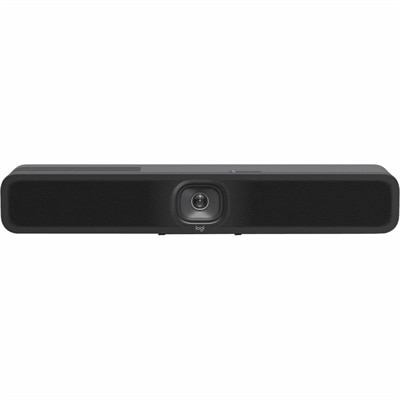
A 1080p conference camera with full-duplex speakerphone audio, autofocus, remote pan-tilt-zoom, and echo cancellation.
Video conference cameras are dedicated cameras that capture live video for online meetings, connecting people at individual desks, shared workspaces, and conference room tables. Unlike a laptop’s fixed built-in camera, an external camera offers more flexibility in placement, framing, and viewing angle. Some models focus on one person seated at a monitor, while others provide the wider coverage needed to show several participants across a table. They support everyday conversations such as team check-ins, client presentations, remote interviews, virtual tutoring, and family catch-ups. The most useful features depend on the space and the way people participate: a narrow view can keep attention on a single speaker, while a wider field of view can bring nearby colleagues into the picture without crowding everyone around a laptop. Resolution describes the detail a camera can capture, with 1080p and 4K among the common options, but the image seen by other participants also depends on lighting, connection quality, and the meeting platform’s settings. Higher resolution can preserve more detail when a supported camera crops its image, though it does not guarantee that a call will be transmitted in 4K. Frame rate affects the smoothness of movement, particularly when someone gestures, demonstrates a small object, or moves between a chair and a presentation area. Autofocus helps keep faces or objects sharp as their distance from the lens changes, while fixed-focus designs are intended to stay sharp within a set range. Automatic exposure and white balance adjust brightness and color as conditions shift throughout the day. In a home office with a window beside the desk, those adjustments can make the difference between a clearly visible face and one lost in shadow. Cameras with effective high dynamic range processing may also handle bright backgrounds more gracefully, although soft light directed toward the speaker remains helpful. Together, these characteristics shape a more natural picture, whether the conversation lasts five minutes or fills an afternoon.
Room size and seating arrangements give video conferencing cameras much of their practical context. A compact workspace usually needs a camera positioned near eye level, with a view that includes the speaker’s face and shoulders rather than the entire room. A small meeting area may need enough coverage for people seated side by side, while a deeper room puts greater emphasis on capturing participants farther from the lens. A very wide angle can include more seats but may make distant faces appear smaller or introduce stretching near the edges. Field-of-view specifications are worth reading carefully because horizontal and diagonal measurements describe different dimensions of the image. Adjustable framing helps balance room coverage with a closer view of the conversation. On supported models, automatic framing changes the composition as people enter or leave, while speaker tracking attempts to follow the active speaker; these are distinct functions, and their behavior varies by camera and software. Pan, tilt, and zoom capabilities provide another way to adjust the view. Optical zoom changes magnification through the lens, whereas digital zoom crops and enlarges the captured image, potentially reducing visible detail. Sound deserves equal attention because a clear picture cannot compensate for muffled speech from the far end of a table. Some conference cameras include microphones, and some integrate both microphones and speakers, but others require separate audio equipment. Microphone pickup range, room acoustics, and the distance between participants and the microphone all affect intelligibility. Hard floors and bare walls can make voices echo, while soft furnishings can help reduce reflections. For individual desks, a headset can keep conversations more private and limit distracting background sound. Shoppers comparing desk-focused options can also explore Logitech Webcams for Video Conferencing for personal workspaces and small shared settings. Across these setups, the camera’s intended coverage matters more than a single impressive specification: a well-framed, evenly lit conversation is easier to follow than a distant view of an otherwise empty room.
Physical fit, connection requirements, and everyday handling determine how comfortably a conference camera becomes part of a workspace. Monitor clips need to suit the display’s thickness and shape without covering the screen, interfering with a built-in sensor, or placing unnecessary pressure on a thin bezel. A stable desktop stand offers flexibility on a shelf or table, while compatible tripod threads and wall-mount options can support more permanent positioning. Placement close to the screen’s viewing area makes it easier to look toward other participants without appearing to glance far away from the lens. Cable length and routing also matter, especially on a standing desk where the surface moves; sufficient slack helps prevent tugging at the connector, and a tidy route keeps cords away from chair wheels. Many cameras connect through USB, but connector shape alone does not establish compatibility. Supported operating systems, port requirements, required adapters, and access to optional camera software can all affect which features work. Basic video may operate without additional software, while advanced framing, image adjustments, or firmware updates may require it. Lightweight plastic housings are practical for portable setups, and metal components can add rigidity at mounts or joints, though material alone does not determine durability. Secure hinges, a dependable clip, and protected cable connections are especially useful for a camera that travels between home and the office. A padded pouch helps protect the lens and mounting hardware in a laptop bag. For routine care, a clean, soft microfiber cloth can remove fingerprints and dust from the lens; cleaning products and methods should follow the manufacturer’s directions, with liquids kept away from openings. A physical privacy shutter can cover the lens between calls, but it does not necessarily mute a microphone, so separate audio controls still matter. These practical details suit frequent remote workers, educators, students, consultants, and anyone who wants a more comfortable way to appear on screen. For a graduation or a new home office, a thoughtfully chosen camera can also be a useful gift when its connections and mounting style match the recipient’s existing setup.
Add the products you would like to compare, and quickly determine which is best for your needs.