WiFi 7 Access Points
Upgrade your connectivity with the latest WiFi 7 access points, designed to support seamless streaming, smooth gaming, and efficient multitasking across all your devices. Experience fast wireless performance for your home or office setup, ensuring reliable connections for laptops, desktops, and smart accessories. Discover a range of WiFi 7 access points that make it easy to stay productive and connected in any environment.
This product is not available
Check out the following recommendations.




WiFi 7 Access Points
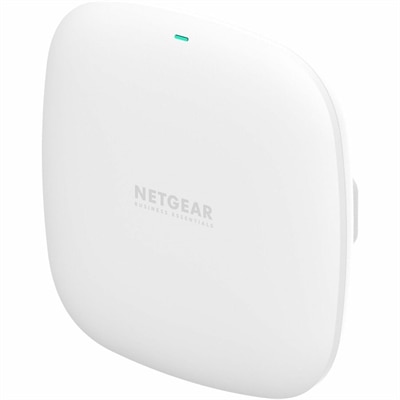
Wi-Fi 7 access points, also known as 802.11be access points, are designed to provide faster, more responsive wireless connectivity for homes, offices, studios, classrooms and other busy spaces. They work with compatible Wi-Fi 7 devices while remaining backward compatible with many earlier generations of Wi-Fi, making them a practical foundation for gradually upgrading a wireless environment. The standard introduces several important improvements, including support for channels up to 320 MHz wide, Multi-Link Operation (MLO) and more efficient use of available spectrum. Wider channels can move more data at once, while MLO allows compatible devices to use multiple frequency bands simultaneously to help reduce latency and maintain a steadier connection when wireless traffic changes. Under ideal conditions, the Wi-Fi 7 standard can support theoretical aggregate speeds of up to 46 Gbps, although actual performance depends on the access point, client device, wired connection, channel conditions, distance, construction materials and internet service. In everyday use, these access points can help a household handle simultaneous 4K or 8K streaming, video calls, cloud applications, large file transfers, online gaming and smart-home activity with less congestion. In a small office, they can help employees move between workspaces while staying connected, support wireless collaboration and give visitors a reliable guest connection without placing every device on the same access profile. A Wi-Fi 7 access point is particularly well suited to spaces where many people and devices compete for bandwidth, such as open-plan offices, creative workrooms, home offices, shared living areas and learning environments. For a broader selection organized around workplace connectivity, explore Office Wireless Access Points.
When comparing Wi-Fi 7 access points, begin with the layout and the devices that will use them rather than choosing based only on the highest advertised speed. Tri-band models can use the 2.4 GHz, 5 GHz and 6 GHz bands, with the 6 GHz band offering additional capacity and less interference in areas where it is available. A device with a strong 6 GHz implementation can be helpful for nearby Wi-Fi 7 laptops, desktops and mobile devices that need high throughput, while the 2.4 GHz band remains useful for longer-range connections and many smart-home accessories. Check local 6 GHz availability and device compatibility, since the performance advantages of this band vary by region and client hardware. MLO benefits are also realized only when the connecting device supports the feature, though an access point can still serve earlier Wi-Fi generations. Wired uplink capability deserves close attention: a multi-gigabit Ethernet port, such as 2.5 GbE, 5 GbE or 10 GbE, can help prevent the cable feeding the access point from becoming a bottleneck. If an access point has very high wireless capacity but is connected through a slower wired link, connected devices may not be able to approach its full potential. Power delivery is another practical consideration. Many ceiling- or wall-mounted access points support Power over Ethernet Plus (PoE+), allowing power and data to travel through one Ethernet cable instead of requiring a nearby electrical outlet. This can create a cleaner installation and make it easier to position the access point where coverage is strongest, though the existing network hardware or a separate PoE injector must provide compatible power. Before purchasing, confirm the required PoE standard, Ethernet cable category, mounting method and included accessories. Some units are intended for a discreet ceiling installation, while others can sit on a wall or shelf; the right form factor depends on the room, cable path and desired coverage pattern.
A Wi-Fi 7 access point can be a strong choice for a technology-forward household, a home office with frequent video meetings, a small business handling cloud-based work or anyone building a wireless environment that can accommodate newer devices over time. It may also be a thoughtful gift for a remote worker, creator or home technology enthusiast who is refreshing a workspace, provided the recipient has a compatible wired connection and can install or manage the unit. In a home, placement often matters as much as specifications. Positioning an access point near the center of the area it serves, away from dense masonry, metal shelving, appliances and enclosed cabinets, can help produce more even coverage. In a larger home or a business with multiple rooms, additional access points may be needed, and they should be planned to minimize overlap and interference while preserving a wired connection whenever possible. Look for management tools that make it straightforward to create separate employee, household and guest networks, apply security settings, view connected devices, update firmware and identify areas of weak coverage. Current security support, strong administrative credentials and automatic or clearly documented firmware updates are important for protecting connected devices. It is also useful to confirm whether management occurs through a local interface, a mobile application, a desktop utility or a subscription-based service, since that choice affects ongoing convenience and cost. Remember that an access point extends wireless connectivity; it does not replace an internet subscription or necessarily replace the gateway that connects a home or office to the internet. The best match combines Wi-Fi 7 features with the available wired capacity, compatible client devices, room layout and management preferences, delivering a dependable connection that feels quick and consistent during busy periods as well as quieter moments.
FAQs:
WiFi 7 access points offer significant improvements in speed, capacity, and reliability compared to previous WiFi generations. They utilize wider 320 MHz channels, advanced 4096-QAM modulation, and Multi-Link Operation (MLO) to deliver faster connections, lower latency, and better performance in crowded environments. This makes them ideal for streaming 8K video, online gaming, virtual reality, and supporting a large number of connected devices simultaneously.
Yes, WiFi 7 access points are designed to be backward compatible with previous WiFi standards, including WiFi 6, WiFi 5, and older devices. This means you can upgrade your network infrastructure without worrying about losing connectivity for your existing smartphones, laptops, or smart home equipment.
WiFi 7 access points are particularly beneficial for households and offices with many connected devices, tech enthusiasts who want the latest performance, remote workers who handle large files or video conferencing, and gamers who require low latency. They are also a great choice for anyone looking to future-proof their network as new devices and technologies emerge.
When selecting a WiFi 7 access point, consider the size and layout of your space, the number of devices you need to support, and the types of activities you do online. Features like multi-gigabit Ethernet ports, PoE+ support, and tri-band operation (2.4 GHz, 5 GHz, and 6 GHz) can enhance performance and flexibility. It’s also important to ensure your wired infrastructure can support the higher speeds offered by WiFi 7.
A WiFi 7 access point is primarily focused on providing high-speed wireless connectivity within a specific area, while a VPN router combines networking features with built-in Virtual Private Network (VPN) capabilities for enhanced privacy and security. Some advanced access points can be integrated with VPN functionality, but their main role is to deliver fast, reliable wireless access for all your connected devices.