$99.99
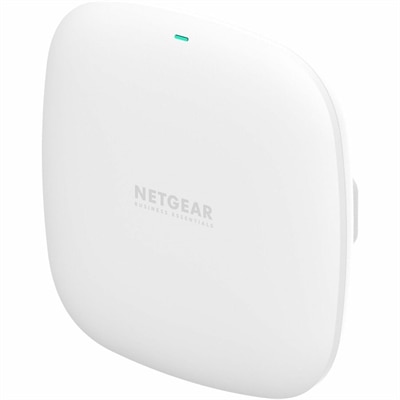
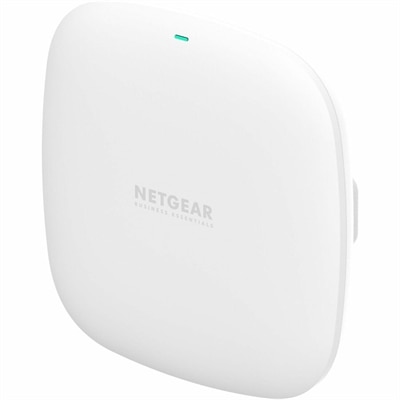
A compact indoor Wi-Fi 6 access point delivering dual-band connectivity and up to 1.8Gbps throughput.
Office wireless access points provide reliable connectivity and seamless network coverage to support the demands of modern workplaces. Designed to enhance productivity and enable efficient collaboration, these solutions help businesses maintain a strong and stable connection for multiple devices across various office environments. Explore a wide selection of office wireless access points to find the right fit for your organization's networking needs.
A compact indoor Wi-Fi 6 access point delivering dual-band connectivity and up to 1.8Gbps throughput.
Office wireless access points help extend a reliable Wi-Fi connection across workspaces where a single router may not provide consistent coverage. Unlike a basic range extender, a business-oriented access point is designed to connect to the wired network through an Ethernet cable and create a dedicated wireless coverage area for employees, visitors, and connected office equipment. This makes it useful in open-plan offices, reception areas, conference rooms, studios, clinics, classrooms, retail spaces, and home offices that need dependable connectivity beyond one room. When comparing office wireless access points, consider the size and layout of the space, the materials between rooms, the number of people who may connect at the same time, and the types of devices they use. A compact office with a few laptops may have different requirements from a busy workplace where dozens of laptops, smartphones, tablets, wireless printers, displays, and accessories are active throughout the day. Wi-Fi 6 and Wi-Fi 7 access points can help manage busy environments by improving efficiency, reducing congestion, and supporting more simultaneous connections. Dual-band models typically use 2.4 GHz and 5 GHz frequencies, while tri-band designs add another band to help distribute traffic. The 2.4 GHz band can travel farther through walls, while the 5 GHz and newer bands are often better suited to demanding tasks such as video meetings, large file transfers, cloud applications, and high-resolution media. A well-placed access point can turn a frustrating corner of an office—where a video call freezes near a concrete wall or a laptop repeatedly drops its connection—into a steady, productive workspace. For broader selection and additional options, explore WiFi Access Points.
Placement and installation are just as important as wireless specifications. Office wireless access points are commonly mounted on a ceiling or high on a wall, where the signal can spread more evenly across desks, hallways, and shared areas. Keeping the unit away from thick masonry, metal shelving, large appliances, and enclosed cabinets can help reduce interference and improve coverage. Power over Ethernet, often called PoE, allows a compatible access point to receive power and network data through one Ethernet cable. This can create a cleaner installation by avoiding a nearby electrical outlet and reducing visible cords, particularly when the best location is overhead or several feet away from a desk. Before choosing a model, confirm that the existing wired equipment or PoE adapter can provide the required power and that the access point supports the desired connection speed. Wired uplink speed also matters: a fast wireless radio can be limited if the cable connection feeding it is slower than the traffic it needs to carry. For offices with more than one access point, centralized management can simplify setup and make it easier to apply settings, monitor performance, update software, and identify areas with weak coverage. Features such as automatic channel selection, roaming support, traffic prioritization, and usage reports can help employees move from a meeting room to a work area without manually reconnecting. Capacity deserves close attention as well. A product may advertise a large coverage area, but real-world performance depends on walls, interference, building shape, and the number of active devices. Choosing an access point with high device density support gives busy teams more room for growth as additional laptops, phones, displays, and connected accessories join the office environment.
Security and user separation are essential considerations for any workplace Wi-Fi installation. Look for current wireless encryption standards, secure administrator controls, firmware update support, and the ability to create separate access for staff and visitors. A guest network can allow customers, contractors, or visiting colleagues to browse online without exposing internal office resources. VLAN support and guest isolation can further separate traffic, helping keep employee activity and business information apart from visitor connections. Some access points also provide multiple wireless networks, making it possible to create distinct profiles for employees, guests, voice devices, or specialized office equipment while applying different access rules to each one. Strong administrator passwords, multi-factor authentication where available, and regular software updates add important layers of protection. It is also wise to review compatibility with the office router, wired switches, management software, and existing Wi-Fi equipment before purchasing, especially when expanding an established installation. Small businesses may appreciate an access point that can be configured through a straightforward mobile or web application, while larger offices may prefer more detailed controls for multiple locations and many connected users. For a home office, a dedicated access point can provide a more stable connection for a laptop, desktop, monitor, printer, and video calls without relying on a router placed at the opposite end of the house. During the cooler months, when more work and study take place indoors, dependable coverage can make a shared office feel calmer and more organized, with fewer interruptions caused by stalled meetings or dropped connections. The right office wireless access point balances coverage, capacity, installation flexibility, security, management, and compatibility, helping create a consistent wireless experience that supports everyday work as the office grows.
Add the products you would like to compare, and quickly determine which is best for your needs.