Avamar: Backups fail with an I/O error: Unable to read(3) "some file" (code 2: The system cannot find the file specified)
Summary: If an Avamar backup fails with "avtar error 5737: Input Output (I/O) error - Unable to read file (code 2: The system cannot find the file specified)", check the Windows Event Viewer for a matching Input Output (I/O) error. (Work with the Microsoft Support team to resolve) ...
This article applies to
This article does not apply to
This article is not tied to any specific product.
Not all product versions are identified in this article.
Symptoms
An Avamar backup fails, and avtar reports the following error:
avtar Error <5737>: I/O error: Unable to read(3) "some file or directory" (code 2: The system cannot find the file specified).Cause
Windows experienced an I/O issue.
To confirm:
1. Go to Control Panel --> Event Viewer --> System:
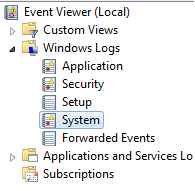
2. Find the event that happened at the same time as the
avtar error.
-
-
Match the
avtarerror and Event Viewer error timestamps. -
There should be an Event viewer error indicating that Windows had an I/O error
-
Resolution
Contact Microsoft to resolve the Windows I/O error.
Once the I/O error is resolved, the Avamar backups will succeed.
Affected Products
AvamarProducts
Avamar, Avamar Client, Avamar Client for WindowsArticle Properties
Article Number: 000041410
Article Type: Solution
Last Modified: 20 Mar 2026
Version: 6
Find answers to your questions from other Dell users
Support Services
Check if your device is covered by Support Services.