Unknown Device seen after Window Updates the Sensor Driver
Summary: The following article provides information about an issue with the device manager showing an unknown device (UBLOXVCP\PNP0501). This happens after updating the sensor driver through Windows Update. This article helps you troubleshoot the issue. ...
This article applies to
This article does not apply to
This article is not tied to any specific product.
Not all product versions are identified in this article.
Symptoms
Device Manager reports an unknown device after the sensor driver updates
Device Manager may display an unknown device (UBLOXVCP\PNP0501) after Windows Update runs. It happens when the operating system automatically updates the u-blox sensor driver and Virtual Communications (COM) Port (VCP) driver.
This affects you if you are using the following platform and operating system:
- Latitude 7214 Rugged Extreme laptop
- Windows 10 (build 19044.1202)
Cause
This means that you cannot use the COM port to transmit National Marine Electronics Association (NMEA) data during Global Positioning System (GPS) positioning.
Microsoft no longer supports this update and has removed the VCP driver verson 2.24 certification from their Operating System through Windows Updates.
Resolution
Note: You must have administrator rights on your laptop to make any operating system changes or update any software.
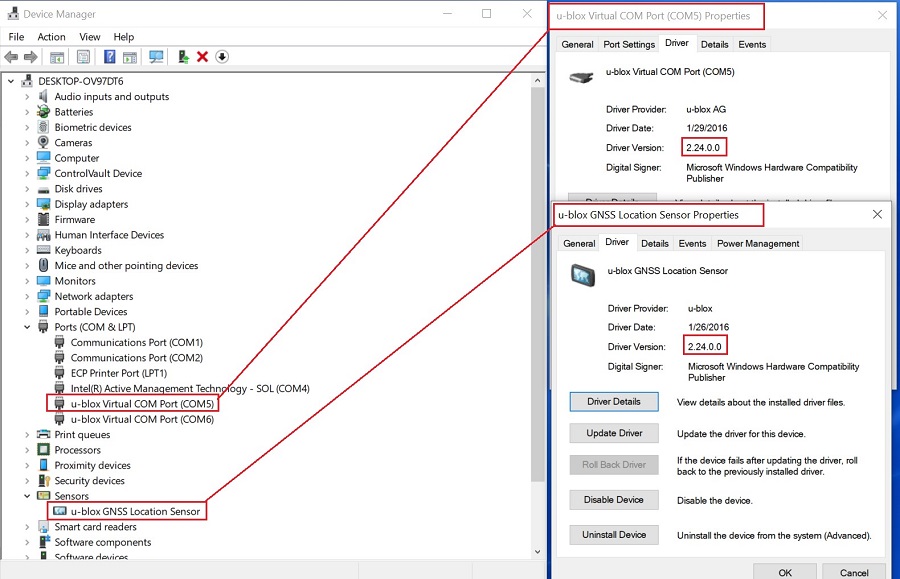
- Update the modem or communications driver to
u-blox GPS Communication Driver, version2.24.0.0, A00or later. Use the instructions in the following link to download and install theu-blox-GPS-Communication-Driver_TX5Y1_WIN64_2.24.0.0_A00_02.exeinstallation file:- Dell Knowledge Base Article: How to Download and Install Dell Drivers
- The correct driver version is now visible in Device Manager.
Affected Products
Latitude 7214 Rugged ExtremeArticle Properties
Article Number: 000193379
Article Type: Solution
Last Modified: 06 May 2025
Version: 6
Find answers to your questions from other Dell users
Support Services
Check if your device is covered by Support Services.