Wyse 5070 Displays Fatal Error on Boot When Updating to Dell ThinOS Version 9.x
Summary: When updating the Wyse 5070 to ThinOS version 9.x, the BIOS must also be version 1.3.1 or later.
This article applies to
This article does not apply to
This article is not tied to any specific product.
Not all product versions are identified in this article.
Symptoms
Affected Platforms:
- Wyse 5070
Affected Operating Systems:
- Dell ThinOS 9.x
Cause
When updating the Wyse 5070 to ThinOS 9.x, if the BIOS is a revision earlier than 1.3.1, a fatal error occurs upon boot.
Resolution
Upgrade the Wyse 5070 BIOS to 1.3.1 or later before updating to ThinOS 9.x.
Check for a Trusted Platform Module (TPM) or Platform Trust Technology (PTT) option in the BIOS. This is located within the Security category.
Note: The PTT is only present in Wyse devices that are purchased for use in China or Russia.
If there is a TPM or PTT option in the BIOS, then there is no further action required.
If there is not a TPM or PTT option in the BIOS, update the BIOS to the latest revision and then update ThinOS. ThinOS 1.3.1 or later enables the TPM or PTT.
If the operating system was updated before the BIOS, clear the TPM or PTT.
To clear the TPM or PTT:
- Boot the affected unit into the BIOS by tapping F2 during boot.
- From the BIOS, click to expand Security and then click TPM 2.0 Security.
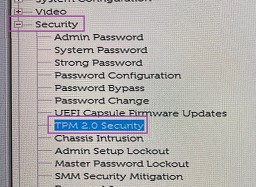 Note: TPM 2.0 Security may be titled differently in Wyse devices that are purchased for use in China or Russia.
 - Click Unlock.

- Populate a password if prompted, and then click Clear.
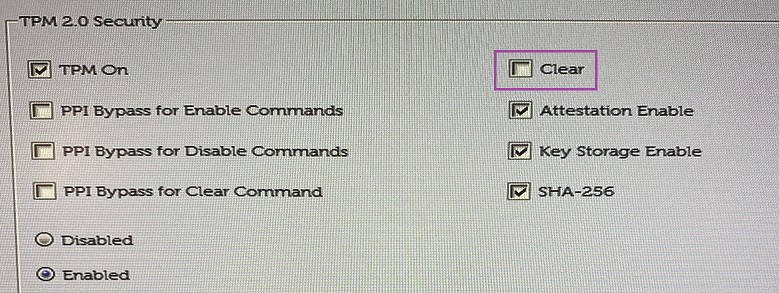
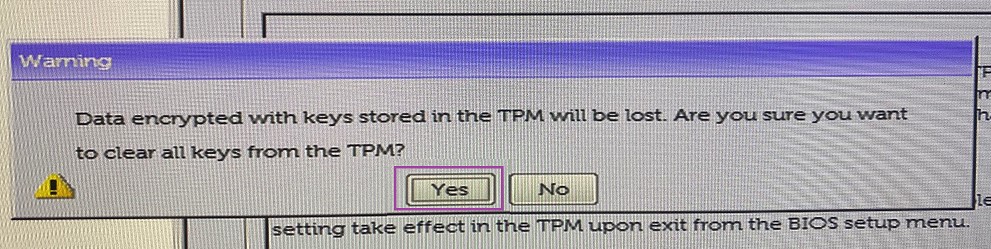
- When prompted to clear all keys, click Yes.
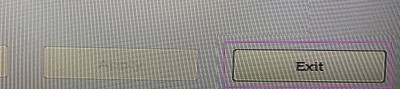
- Click Exit.
 Note:
Note:- Follow the steps in the Dell Wyse ThinOS Version 9.1 Migration Guide for recovering the Wyse 5070 using the Merlin image.
- For more information, reference the Dell Wyse ThinOS Version 9.1 Migration Guide available from Wyse 5070 Thin Client Documentation.
Affected Products
Wyse 5070 Thin Client, Dell ThinOSArticle Properties
Article Number: 000182295
Article Type: Solution
Last Modified: 17 Jun 2025
Version: 14
Find answers to your questions from other Dell users
Support Services
Check if your device is covered by Support Services.