SupportAssist for Home PCs Missing Text Instead of Displaying in Chinese Simplified
Summary: Learn what to do when a computer running Windows 11 in a Chinese Simplified language displays SupportAssist for Home PCs with missing text or in English.
Symptoms
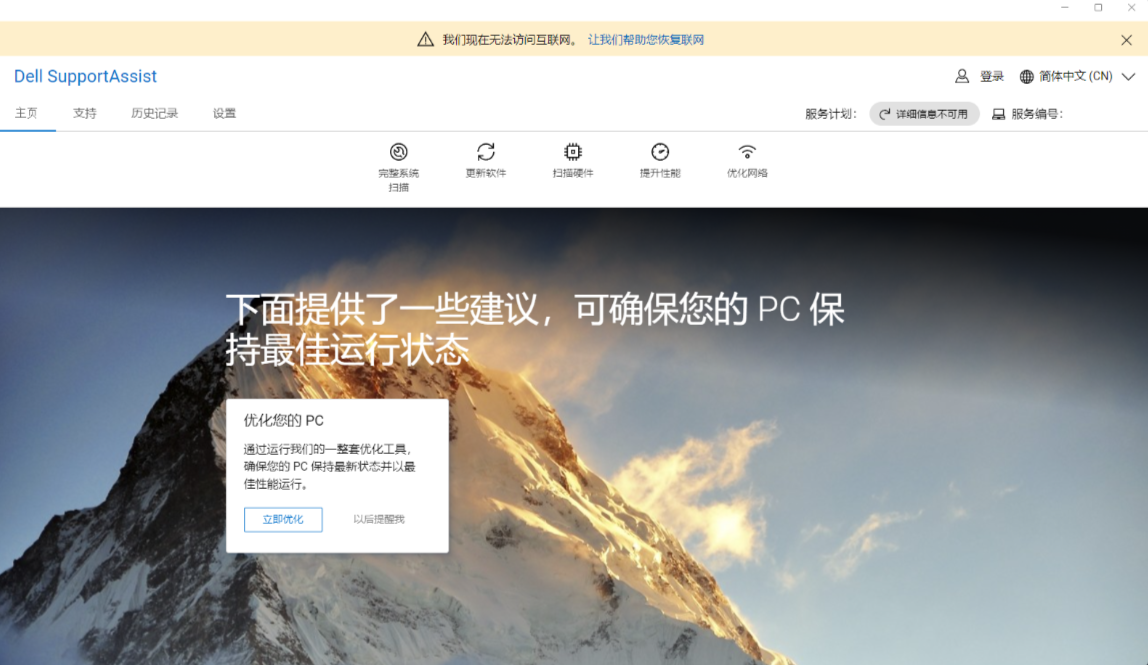
SupportAssist for Home PCs has missing text or displays text in English when the Windows 11 operating system language is set to Chinese (Simplified, Mainland China) or Chinese (Simplified, Singapore). The text in SupportAssist for Home PCs matches the Windows 11 operating system language settings with all other languages.
The following image shows SupportAssist for Home PCs with missing text and some text in English when the operating system is set to Chinese (Simplified).
Affected Software:
- SupportAssist for Home PCs
Affected Versions:
- 4.10.0.x
Affected Operating System:
- Windows 11
Cause
SupportAssist for Home PCs is expected to use the zh-CN language setting. Instead, it is using zh-HANS-CN which causes this behavior.
Resolution
Long-term solution:
- Back up all personal data. For more information, refer to Back Up and Recovery.
- Connect the AC adapter if updates are being run on a laptop.
Updating to SupportAssist for Home PCs version 4.10.1 or later on the computer resolves the issue. To download and install the update, refer to SupportAssist for Home PCs.
Workaround:
Change the display language in SupportAssist for Home PCs by selecting the appropriate language from the dropdown list in the upper-right of the application.
The following images show SupportAssist for Home PCs after the appropriate language is selected in the dropdown.