List of Wireless Networks Not Available on SupportAssist OS Recovery Tool
Summary: The list of wireless networks is not available on the Network selection page when SupportAssist OS Recovery Tool is launched from the Media key.
This article applies to
This article does not apply to
This article is not tied to any specific product.
Not all product versions are identified in this article.
Symptoms
Here you find more information about SupportAssist and its features.
List of Wireless Networks Not Available on Dell SupportAssist operating system Recovery Tool
When SupportAssist OS Recovery Tool is launched using Media key, for few platforms on the Network selection page list of wireless networks available is empty even though wireless networks are present. So, users are not able to connect to the Internet using the wireless connection.
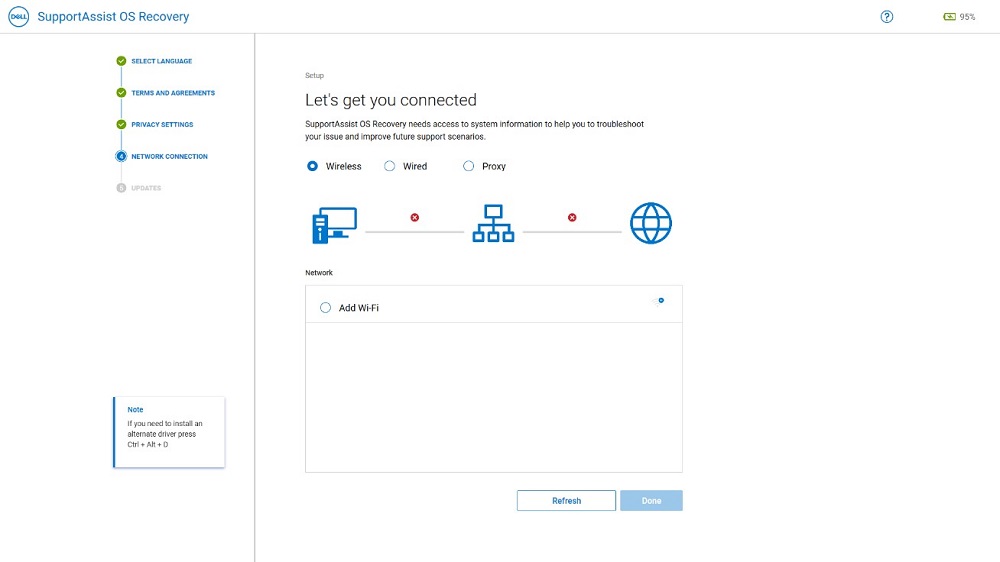
(Figure 1: SupportAssist OS Recovery Tool)
Impacted Platform Configurations:
- Insp DT 24 5400/5401, Latitude 3320
Affected Versions:
- The SupportAssist OS Recovery Tool of version 5.5.0.16041
Cause
Resolution
If list of wireless networks is empty, user can use Ethernet cable to establish a wired connection. This provides both the capability to perform cloud reset and offline reset.
To set up a wired connection:
- Use Ethernet cable to connect the System to the router.
- Select Wired option on the Network Selection page.

(Figure 2: SupportAssist OS Recovery Tool)
- Provide necessary information about the page.
- Click Apply.
Affected Products
Inspiron 5400 AIO, Inspiron 5401 AIO, Latitude 3320, SupportAssist OS RecoveryArticle Properties
Article Number: 000192230
Article Type: Solution
Last Modified: 30 Sep 2025
Version: 2
Find answers to your questions from other Dell users
Support Services
Check if your device is covered by Support Services.