Data Protection Advisor:如何收集历史数据
This article applies to
This article does not apply to
This article is not tied to any specific product.
Not all product versions are identified in this article.
Instructions
DPA 报告中的缺口或缺失数据
在 DPA UI 中收集历史数据的步骤:
历史数据收集可用于以下备份应用程序:
Avamar、BackupExec、DB2、HP DataProtector、NetWorker、NetBackup、Oracle RMAN、SAP HANA 和 TSM
历史数据收集仅限于作业监视功能。不支持其他功能。
经典 UI:
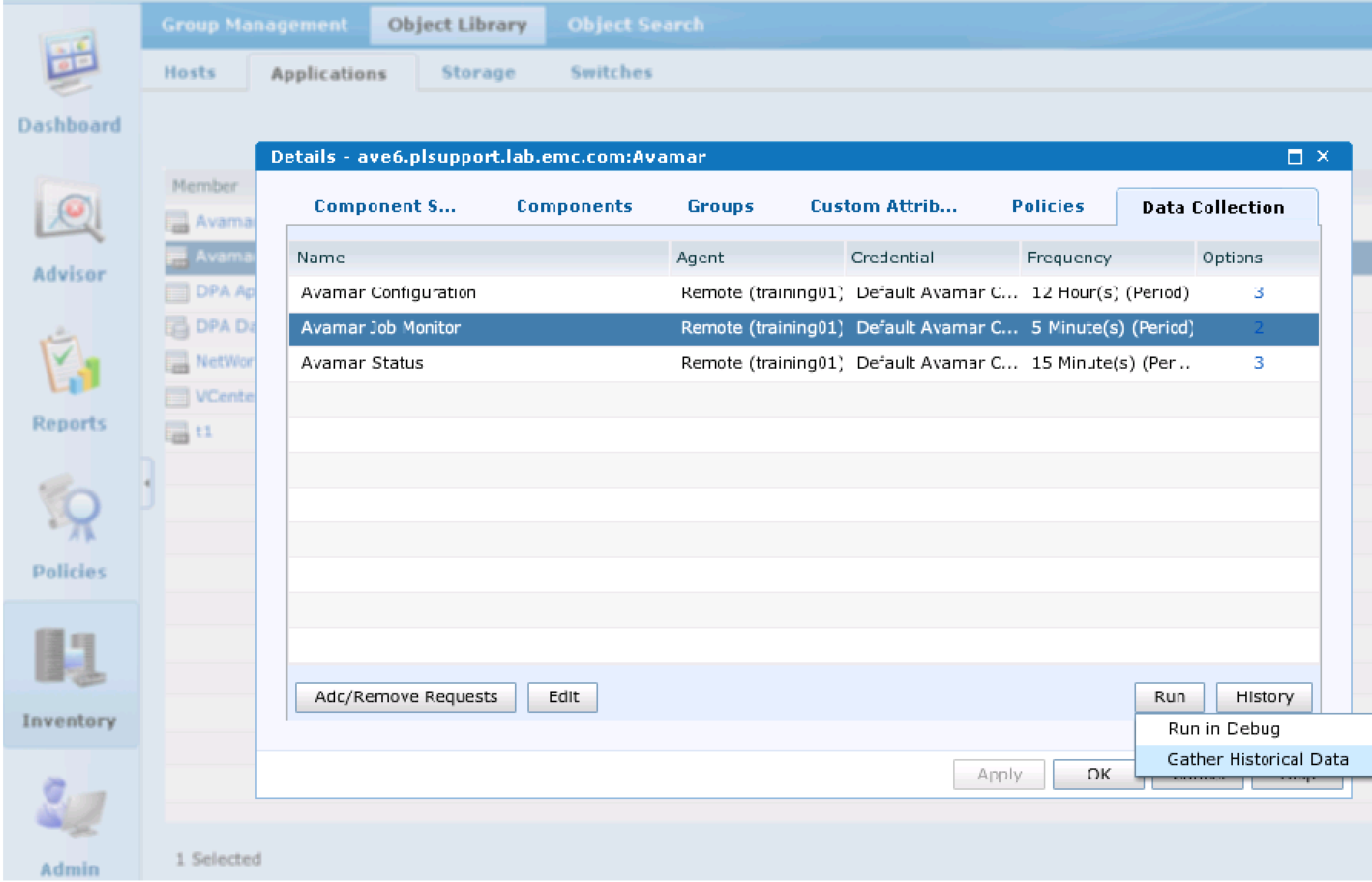
从 DPA UI> Inventory> Object Library> Applications> 选择缺失数据的备份服务器> 选择 Data Collection 选项卡> 突出显示作业监视请求> 右键单击“Run”按钮> 选择 Gather Historical Data
从 Gather Historical Data 窗口> 选择缺失数据的时间段。
DPA 支持建议一次运行不超过 3-5 天的历史数据收集。
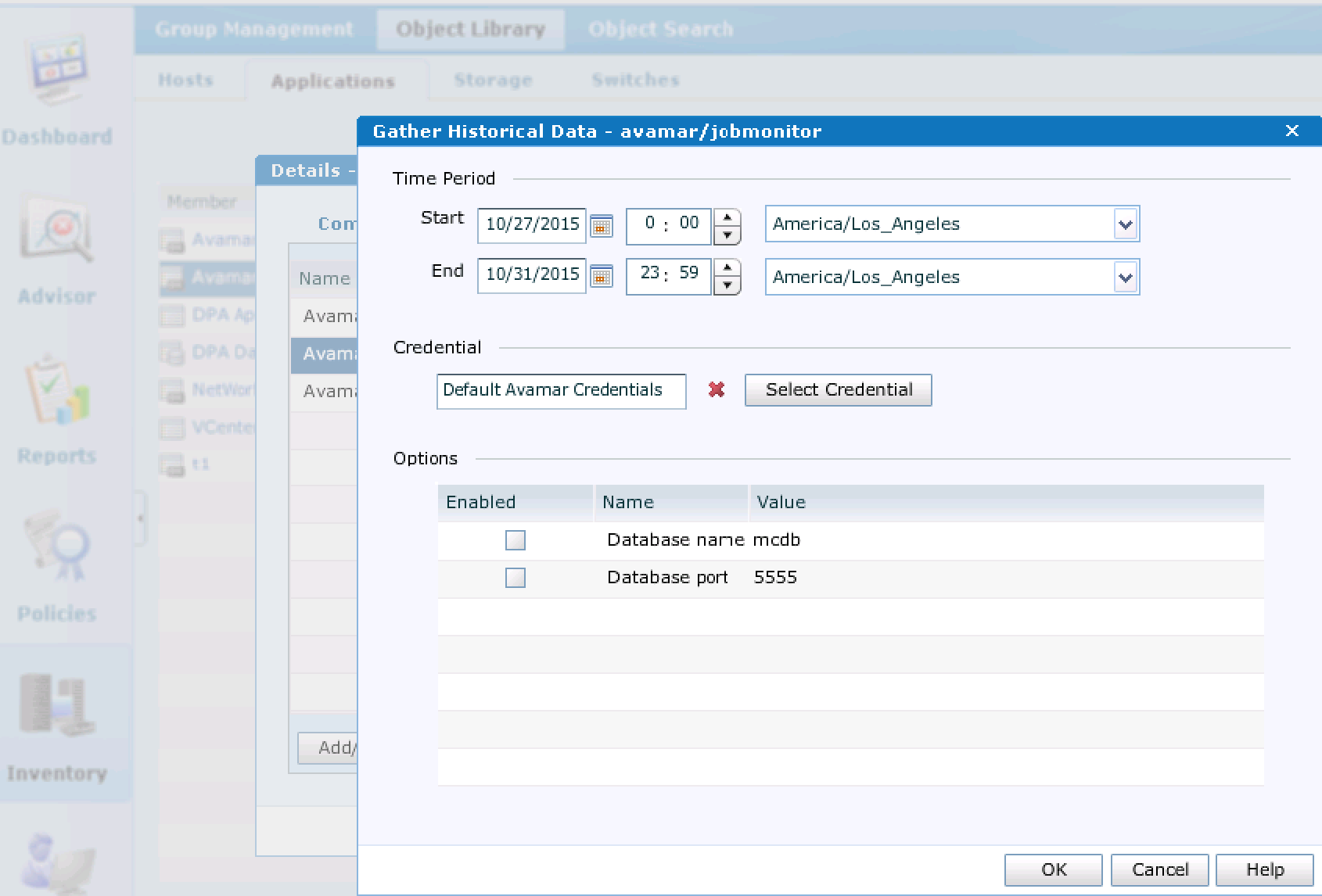
单击 OK。
要检查数据收集的状态,请单击 History 按钮。
让数据收集运行一段时间内。
要检查是否已处理历史数据收集,请运行 DPA 报告卡。
白色单元格表示该特定日期没有收集任何数据。
绿色单元格表示成功备份。
红色单元格表示失败备份。
在 DPA UI 中收集历史数据的步骤:
历史数据收集可用于以下备份应用程序:
Avamar、BackupExec、DB2、HP DataProtector、NetWorker、NetBackup、Oracle RMAN、SAP HANA 和 TSM
历史数据收集仅限于作业监视功能。不支持其他功能。
经典 UI:
从 DPA UI> Inventory> Object Library> Applications> 选择缺失数据的备份服务器> 选择 Data Collection 选项卡> 突出显示作业监视请求> 右键单击“Run”按钮> 选择 Gather Historical Data
从 Gather Historical Data 窗口> 选择缺失数据的时间段。
DPA 支持建议一次运行不超过 3-5 天的历史数据收集。
单击 OK。
要检查数据收集的状态,请单击 History 按钮。
让数据收集运行一段时间内。
要检查是否已处理历史数据收集,请运行 DPA 报告卡。
白色单元格表示该特定日期没有收集任何数据。
绿色单元格表示成功备份。
红色单元格表示失败备份。
Affected Products
Data Protection AdvisorProducts
Data Protection AdvisorArticle Properties
Article Number: 000022929
Article Type: How To
Last Modified: 03 Mar 2025
Version: 4
Find answers to your questions from other Dell users
Support Services
Check if your device is covered by Support Services.