NVP-vProxy 備份未使用 hotadd 模式,並顯示錯誤:虛擬磁碟 [磁碟名稱] 不支援 HotAdd 模式
Summary: NetWorker VMware Proxy (NVP) VM 備份失敗,虛擬磁碟 [磁碟名稱] 不支援 HotAdd 模式,因為磁碟是 IDE 虛擬磁碟。 HotAdd 模式無法與 IDE 虛擬磁碟搭配使用,因此如果 NBD 傳輸模式未列為回覆傳輸模式,備份會失敗。
This article applies to
This article does not apply to
This article is not tied to any specific product.
Not all product versions are identified in this article.
Symptoms
- vProxy 應用裝置僅使用 hotadd 向 NetWorker 註冊。NBD 會話設定為 0 (停用)。
- VM 備份失敗,表示虛擬磁碟 [磁碟名稱] 不支援 HotAdd 模式。
- 無法備份的 VM 磁碟在 VMware 中設定為 IDE 磁碟。
- vProxy /opt/emc/vproxy/runtime/logs/vbackupd/vbackupd-vddk.log報告:
VDDK: INFO: error Mounting VM using transport hotadd failed : Cannot use hotadd transport to mount Virtual Machines with disks that are not SCSI or SATA (adapter type: ide).
VDDK: INFO error Cannot use mode hotadd to access vCenter_Cannot mount using this method. (Mounting VM [name] using transport hotadd failed : Cannot use hotadd transport to mount Virtual Machines with disks that are not SCSI or SATA (adapter type: ide).)
Cause
HotAdd 傳輸模式不支援 IDE 磁碟。
Resolution
有兩個可用的選項。
選項 1:
偏好的傳輸方式是 HotAdd。為了支援熱新增,請將 VMware 中的磁碟和磁碟控制器類型從 IDE 變更為 SCSI 磁碟;這支援 Hotadd。請與您的 VMware 系統管理員接洽以進行這些變更。
請參閱 VMware KB:https://kb.vmware.com/s/article/1016192
請參閱 VMware KB:https://kb.vmware.com/s/article/1016192
選項 2:
在 vProxy 應用裝置屬性中啟用「回復至 NBD for IDE 磁碟」。
1.以系統管理員使用者身分登入 NetWorker 管理控制台。
2.前往 Devices-VMware> Proxy。
1.以系統管理員使用者身分登入 NetWorker 管理控制台。
2.前往 Devices-VMware> Proxy。
注意:若為 NetWorker Web 使用者介面 (NWUI),請前往 Protection-VMware> Proxy。
3.開啟 vProxy 應用裝置屬性。
4.在「組態」標籤中,選取「是」以復原至 IDE 磁碟的 NBD。
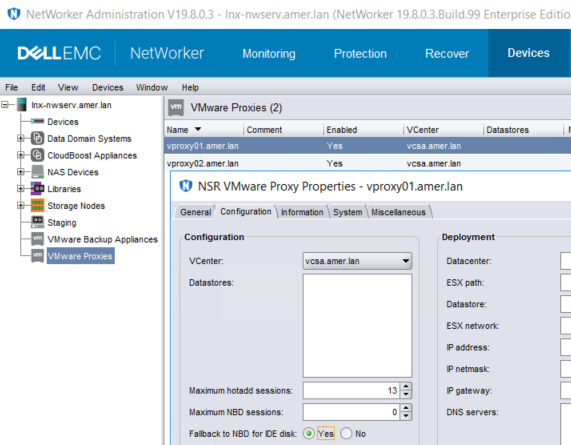
注意:此方法可確保 NBD 僅用於 IDE 磁碟。NBD 不會用於備份其他可存取 HotAdd 的 SCSI 磁碟。如果用於備份 IDE VM 的備份原則使用「vProxy 自動選擇」,則您必須將此設定套用至任何可能由工作流程選擇的 vProxy;否則,如果未啟用此設定的 vProxy 被拾起,可能會發生間歇性故障。另一種方法是將含 IDE 磁碟的 VM 縮小為個別群組和備份原則。在此新原則中,使用「manual vProxy selection」選取已啟用此設定的 vProxy。
Additional Information
HotAdd 要求與限制會記錄在《NetWorker VMware 整合指南》中;可透過:https://www.dell.com/support/home/product-support/product/networker/docs
Affected Products
NetWorker SeriesProducts
NetWorker SeriesArticle Properties
Article Number: 000056629
Article Type: Solution
Last Modified: 29 Sep 2023
Version: 3
Find answers to your questions from other Dell users
Support Services
Check if your device is covered by Support Services.