NVP-vProxy 백업이 hotadd 모드를 사용하지 않고 오류가 발생합니다. 가상 디스크[디스크 이름]이 HotAdd 모드를 지원하지 않음
Summary: 디스크가 IDE 가상 디스크이므로 NetWorker VMware Proxy(NVP) VM 백업이 실패하고 Virtual Disk [disk name]이 HotAdd 모드를 지원하지 않습니다. HotAdd 모드는 IDE 가상 디스크에서 작동하지 않으므로 NBD 전송 모드가 예비 전송 모드로 나열되지 않은 경우 백업이 실패합니다.
This article applies to
This article does not apply to
This article is not tied to any specific product.
Not all product versions are identified in this article.
Symptoms
- vProxy 어플라이언스는 Hotadd만 사용하여 NetWorker에 등록됩니다. NBD 세션은 0(비활성화)으로 설정됩니다.
- 가상 디스크[디스크 이름]가 HotAdd 모드를 지원하지 않는다는 내용의 VM 백업이 실패합니다.
- 백업에 실패한 VM 디스크는 VMware에서 IDE 디스크로 구성됩니다.
- vProxy /opt/emc/vproxy/runtime/logs/vbackupd/vbackupd-vddk.log 보고서:
VDDK: INFO: error Mounting VM using transport hotadd failed : Cannot use hotadd transport to mount Virtual Machines with disks that are not SCSI or SATA (adapter type: ide).
VDDK: INFO error Cannot use mode hotadd to access vCenter_Cannot mount using this method. (Mounting VM [name] using transport hotadd failed : Cannot use hotadd transport to mount Virtual Machines with disks that are not SCSI or SATA (adapter type: ide).)
Cause
HotAdd 전송 모드는 IDE 디스크를 지원하지 않습니다.
Resolution
사용할 수 있는 두 가지 옵션이 있습니다.
옵션 1:
기본 전송 방법은 HotAdd입니다. 핫 애드를 지원하려면 VMware의 디스크 및 디스크 컨트롤러 유형을 IDE에서 SCSI 디스크로 변경합니다. 핫 카드가 지원됩니다. VMware 관리자에게 문의하여 변경합니다.
VMware KB: https://kb.vmware.com/s/article/1016192 참조
VMware KB: https://kb.vmware.com/s/article/1016192 참조
옵션 2:
vProxy 어플라이언스 속성에서 "Fallback to NBD for IDE disk"를 활성화합니다.
1. 관리자 권한으로 NetWorker Management Console에 로그인합니다.
2. Devices-VMware> Proxies로 이동합니다.
1. 관리자 권한으로 NetWorker Management Console에 로그인합니다.
2. Devices-VMware> Proxies로 이동합니다.
참고: NETWorker NWUI(Web User Interface)의 경우 Protection-VMware> Proxies로 이동합니다.
3. vProxy 어플라이언스 속성을 엽니다.
4. Configuration 탭에서 IDE 디스크에 대한 NBD로의 Fallback에 대해Yes를 선택합니다.
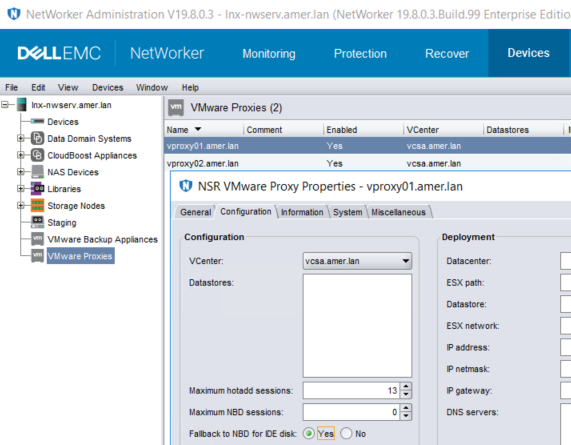
참고: 이 방법을 사용하면 NBD가 IDE 디스크에만 사용됩니다. NBD는 HotAdd 액세스가 가능한 다른 SCSI 디스크를 백업하는 데 사용되지 않습니다. IDE VM을 백업하는 데 사용되는 백업 정책이 "vProxy 자동 선택"을 사용하는 경우 워크플로에서 선택할 수 있는 모든 vProxy에 이 설정을 적용해야 합니다. 그렇지 않으면 이 설정이 활성화되지 않은 vProxy가 선택되어 있으면 간헐적인 오류가 발생할 수 있습니다. 또 다른 방법은 IDE 디스크가 있는 VM을 별도의 그룹 및 백업 정책으로 격리하는 것입니다. 이 새 정책에서는 "수동 vProxy 선택"을 사용하여 이 설정이 활성화된 vProxy를 선택합니다.
Additional Information
HotAdd 요구 사항 및 제한 사항은 NetWorker VMware 통합 가이드에 문서화되어 있습니다. 사용 가능: https://www.dell.com/support/home/product-support/product/networker/docs
Affected Products
NetWorker SeriesProducts
NetWorker SeriesArticle Properties
Article Number: 000056629
Article Type: Solution
Last Modified: 29 Sep 2023
Version: 3
Find answers to your questions from other Dell users
Support Services
Check if your device is covered by Support Services.