NVP-vProxy 备份未使用 hotadd 模式,并显示错误:虚拟磁盘 [磁盘名称] 不支持 HotAdd 模式
Summary: NetWorker VMware Proxy (NVP) 虚拟机备份失败,虚拟磁盘 [磁盘名称] 不支持 HotAdd 模式,因为磁盘是 IDE 虚拟磁盘。 HotAdd 模式无法与 IDE 虚拟磁盘配合使用,因此如果 NBD 传输模式未列为回退传输模式,则备份失败。
This article applies to
This article does not apply to
This article is not tied to any specific product.
Not all product versions are identified in this article.
Symptoms
- vProxy 应用装置仅使用 hotadd 向 NetWorker 注册。NBD 会话设置为 0(已禁用)。
- 虚拟机备份失败,表明虚拟磁盘 [磁盘名称] 不支持 HotAdd 模式。
- 无法备份的虚拟机磁盘在 VMware 中配置为 IDE 磁盘。
- vProxy /opt/emc/vproxy/runtime/logs/vbackupd/vbackupd-vddk.log 报告:
VDDK: INFO: error Mounting VM using transport hotadd failed : Cannot use hotadd transport to mount Virtual Machines with disks that are not SCSI or SATA (adapter type: ide).
VDDK: INFO error Cannot use mode hotadd to access vCenter_Cannot mount using this method. (Mounting VM [name] using transport hotadd failed : Cannot use hotadd transport to mount Virtual Machines with disks that are not SCSI or SATA (adapter type: ide).)
Cause
HotAdd 传输模式不支持 IDE 磁盘。
Resolution
有两个选项可用。
选项 1:
首选传输方法是 HotAdd。要支持热添加,请将 VMware 中的磁盘和磁盘控制器类型从 IDE 更改为 SCSI 磁盘;这支持 hotadd。请与您的 VMware 管理员联系以进行这些更改。
请参阅 VMware 知识库文章:https://kb.vmware.com/s/article/1016192
请参阅 VMware 知识库文章:https://kb.vmware.com/s/article/1016192
选项 2:
在 vProxy 应用装置属性中启用“回退到 IDE 磁盘的 NBD”。
1.以管理员用户身份登录 NetWorker 管理控制台。
2.转至 Devices-VMware>Proxies 。
1.以管理员用户身份登录 NetWorker 管理控制台。
2.转至 Devices-VMware>Proxies 。
提醒:对于 NetWorker Web 用户界面 (NWUI),请转至 Protection-VMware> 代理 。
3.打开 vProxy 应用装置属性。
4.在 配置 选项卡中,为 IDE 磁盘选择 是 以回退到 NBD 。
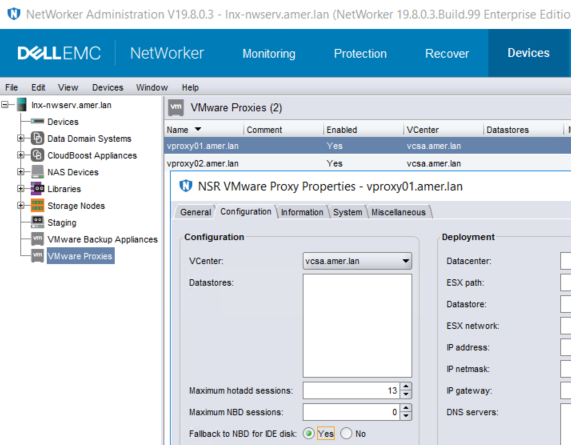
提醒:此方法可确保 NBD 仅用于 IDE 磁盘。NBD 将不用于备份可访问 HotAdd 的其他 SCSI 磁盘。如果用于备份 IDE 虚拟机的备份策略使用“vProxy 自动选择”,则必须将此设置应用于工作流可能选择的任何 vProxy;否则,如果选择了未启用此设置的 vProxy,则可能会出现间歇性故障。另一种方法是将具有 IDE 磁盘的虚拟机隔离到单独的组和备份策略中。在此新策略中,使用“手动 vProxy 选择”选择已启用此设置的 vProxy。
Additional Information
《NetWorker VMware 集成指南》中记录了 HotAdd 要求和限制;可通过以下网址获得: https://www.dell.com/support/home/product-support/product/networker/docs
Affected Products
NetWorker SeriesProducts
NetWorker SeriesArticle Properties
Article Number: 000056629
Article Type: Solution
Last Modified: 29 Sep 2023
Version: 3
Find answers to your questions from other Dell users
Support Services
Check if your device is covered by Support Services.