G3223Q Losses Video When Connected To Intel Chipset Computers When Playing DVDs or Blu-Rays
Summary: This article discusses the issue of the G3223Q monitor losing video when connected to computers with an Intel chipset during DVD or Blu-ray playback.
This article applies to
This article does not apply to
This article is not tied to any specific product.
Not all product versions are identified in this article.
Symptoms
The G3223Q monitor, when connected to computers with an Intel chipset, loses video during the playback of DVDs or Blu-Rays.
Cause
The issue is caused by a compatibility problem between the G3223Q monitor and certain Intel chipsets.
Resolution
Video Loss on Dell G3223Q Monitor
When a Dell G3223Q monitor is connected to computer using the Intel chipset with a DVD or Blu-ray playing. Turning the monitor off then on will cause a loss of video signal from the DVD or Blu-Ray movie.
Impacted Computers and Device:
- Inspiron 7510
- Precision 3561
- Precision 5560
- XPS 7390
- Dell DA300 USB-C Mobile Adapter
Solution
This is NOT a monitor issue. This is an issue with the drivers on the computers that are listed above or the DA300 USB-C Mobile Adapter.
As a workaround, switch the monitor to the Legacy HDMI2.x EDID setting using these steps:
- Press and hold the joystick button at the back of the monitor for at least 8 seconds.
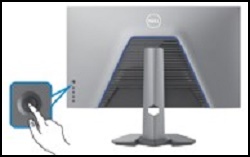
- A popup message appears to ask for selection of the Legacy HDMI2.x EDID setting.
- Select Yes.
Note: The Legacy HDMI2.x EDID setting remains until a factory reset of the monitor is performed.
Affected Products
Dell Adapter - Dell USB-C Mobile Adapter - DA300, Dell 32 4K UHD Gaming Monitor G3223Q, Inspiron 15 7510, Precision 3561, Precision 5560, XPS 13 7390Article Properties
Article Number: 000197173
Article Type: Solution
Last Modified: 13 Nov 2025
Version: 5
Find answers to your questions from other Dell users
Support Services
Check if your device is covered by Support Services.