Connectrix MDS series: Saving RUM report from a newly implemented SAN switch reports "failure: save status: the requested item was not found"
Resumen: Saving a Report Usage Metrics (RUM) report from a new SAN switch reports a "failure: save status: the requested item was not found" message.
Este artículo se aplica a
Este artículo no se aplica a
Este artículo no está vinculado a ningún producto específico.
No se identifican todas las versiones del producto en este artículo.
Síntomas
- Cisco model: Multilayer Director Switch (MDS) 9396T
- NX-OS version: 9.4.2a
- New switch implementation
- No license on MDS
- Switch is configured for SLP topology 5 (no connectivity to CSSM and no CSLU)
- Customer must create a smart account, register the smart license and associate it with the SAN switches.
The following error message appears when saving a RUM report with the license smart save usage all bootflash:all_rum.txt command: failure: save status: the requested item was not found
Causa
Per Cisco TAC, enable a feature that makes switches consume any licenses to save RUM reports successfully when no license is used for the first time. You can again disable it. After enabling and disabling (such as the ivr feature, which consumes Enterprise license), you can then save the RUM report using the same command.
Resolución
- SSH to switch, enable, and disable
ivrfeature, commands:
#config t
#feature ivr
#no feature ivr
#show run license
#show license status
- Run
#license smart save usage bootflash:$(SWITCHNAME)-rum.txt - Go to Chrome (Cisco TAC recommends Chrome over Edge), open https://software.cisco.com/software/smart-licensing/alerts >tab "reports" > tab "usage data files" > upload usage data > choose the rum report from the bootflash and click upload data.
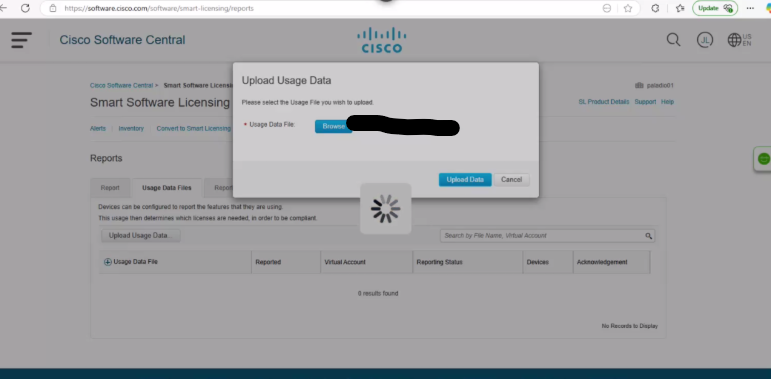
Figure 1. Upload Usage Data
- Choose the virtual account that you need:
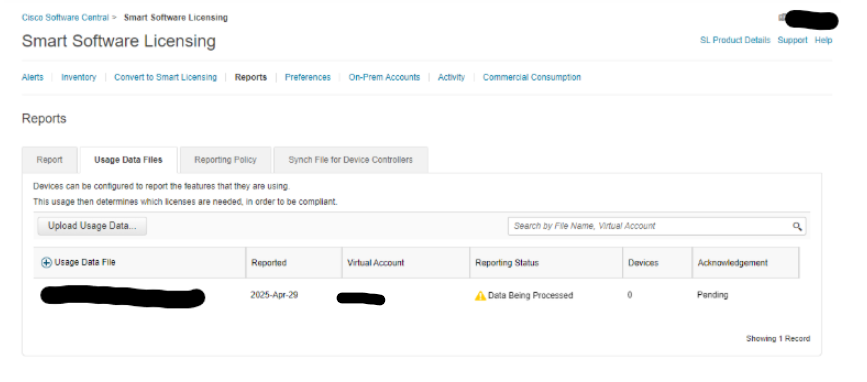
Figure 2. Smart Software Licensing
- Wait until the report status shows
no errors. If it does not update automatically, fresh the page, then click Download.
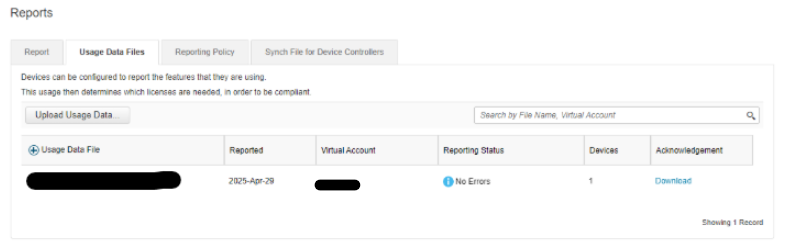
Figure 3. Download Reports
- SSH to the switch, copy this RUM report from TFTP to bootflash and run
#dir bootflash:to confirm it is in bootflash:
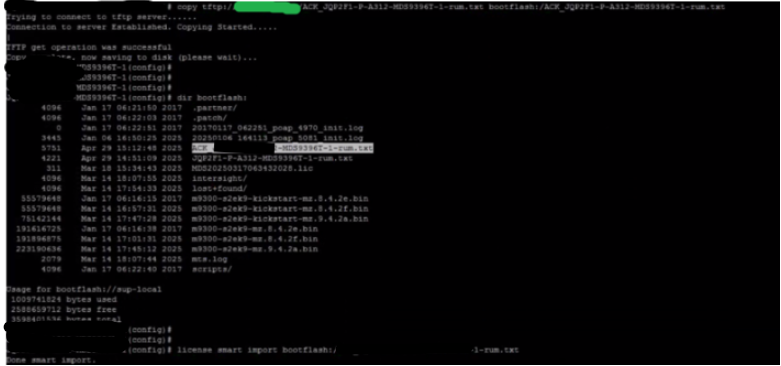
Figure 4. Copy RUM report to bootflash
Información adicional
- EMC SR#208916105
- Cisco TAC case#699031372
Videos
- Perform these steps to upload a RUM report to CSSM and download an ACK when the switch is not connected to CSSM or CSLU: Cisco MDS 9000 Series Licensing Guide, Release 9.x - Smart Licensing Using Policy [Cisco MDS 9000 NX-OS and SAN-OS Software] - Cisco
- Generating Authorization Code in Offline Mode: https://www.cisco.com/c/en/us/td/docs/dcn/mds9000/sw/9x/configuration/licensing/cisco-mds-9000-nx-os-licensing-guide-9x/smart-licensing-using-policy.html#task_iqp_s2p_gsb [cisco.com]
Productos afectados
Connectrix, Connectrix MDS-Series Firmware 9.XPropiedades del artículo
Número del artículo: 000319844
Tipo de artículo: Solution
Última modificación: 15 abr 2026
Versión: 1
Encuentre respuestas a sus preguntas de otros usuarios de Dell
Servicios de soporte
Compruebe si el dispositivo está cubierto por los servicios de soporte.