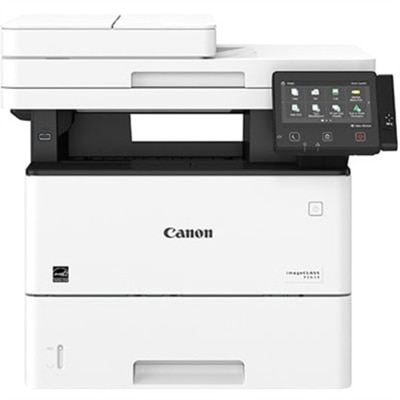
$449.99
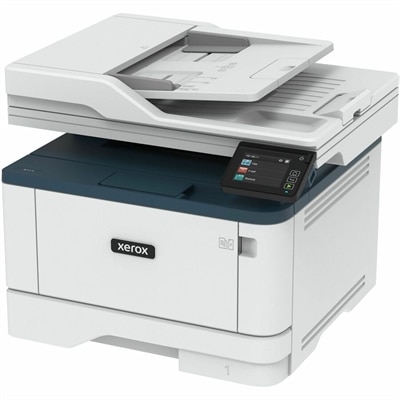
A monochrome multifunction printer delivering 45 ppm, automatic duplex printing, wireless connectivity, scanning, copying, and faxing.
Apple AirPrint printers make wireless printing from your Apple devices fast and convenient, whether you're at home, in the office, or on the go. Designed for seamless compatibility with iPhones, iPads, and Macs, these printers help you turn digital files into professional-quality documents and vibrant photos in just a few taps. Explore our selection of Apple AirPrint printers to find reliable options that fit your workspace and printing needs.
A monochrome multifunction printer delivering 45 ppm, automatic duplex printing, wireless connectivity, scanning, copying, and faxing.
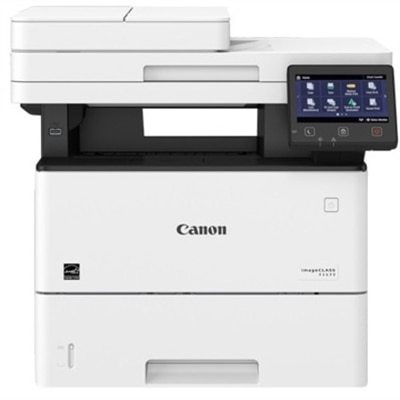
A wireless multifunction printer with 42-ppm printing, automatic two-sided printing, copying, scanning, faxing, and mobile support.
Apple AirPrint printers make it simple to turn digital documents, school forms, travel confirmations, recipes, photos, and everyday notes into paper copies from a compatible iPhone, iPad, or Mac. Because AirPrint technology is built into supported devices, printing typically does not require a separate driver, plug-in, or third-party mobile application. The printer and the Apple device need to be connected to the exact same Wi-Fi network, after which the printer should appear when you open a document or photo, select the share or print icon, choose the printer, set the number of copies or page range, and send the job. This driverless setup is especially useful in households where several people print from different devices. A student can send a worksheet from a tablet at the kitchen table, a remote worker can print a signed form from a laptop, and a family member can produce a favorite photograph from a phone without transferring files to a desktop computer first. Before choosing a printer, consider where it will live and how it will connect. A compact model may fit neatly on a bookshelf or a small desk, while a larger all-in-one printer may be better suited to a home office with room for a scanner lid and a dedicated paper supply. Wireless connectivity is convenient, but a stable home network remains important for dependable printing. If the printer disappears from the device list, checking that both devices are using the same network, restarting the Wi-Fi connection, and confirming that the printer is awake will often resolve the issue. A printer with a clear display, straightforward controls, and easy access to paper and ink or toner can make routine tasks feel far less disruptive.
The right printer depends on the type of work it will handle. For correspondence, forms, invoices, reading material, and other text-heavy documents, a black-and-white printer can provide crisp output while keeping the design and operation relatively simple. Color printing is useful for charts, classroom projects, presentations, invitations, labels, and photographs, particularly when visual detail helps information stand out. Inkjet printers are often a flexible choice for mixed home use and image printing, while laser printers are well suited to frequent text documents and steady workloads. An all-in-one model adds scanning and copying, which can be valuable when a household needs to digitize receipts, duplicate paperwork, scan artwork, or send a signed page by email. Duplex printing, also called automatic two-sided printing, can reduce paper use and create more compact reports, but it is worth confirming whether duplexing is automatic or requires manually turning pages. Look at paper handling as well: a printer that accepts different paper sizes and includes a separate photo or specialty-paper feed may be more convenient for creative projects. Print speed matters when producing multi-page documents, although the first-page time, warm-up behavior, and print quality can affect the experience just as much as the advertised pages-per-minute rating. For color output, review the printer’s available color controls and the cost of replacement supplies. Cartridge-based models may be familiar and compact, while refillable-tank designs can be appealing to people who print often and prefer fewer supply changes. Whichever format you choose, check the ongoing supply cost, recommended monthly volume, paper capacity, and warranty before placing the printer in a busy workspace. These details help match the equipment to real habits instead of relying only on its appearance or headline specifications.
AirPrint-compatible printers can serve a wide range of users, from a first apartment with limited desk space to a home office that manages several pages of paperwork each day. They can also make thoughtful gifts for someone moving into a new home, beginning remote work, returning to school, or organizing family records. A compact wireless printer may be particularly helpful for a relative who relies on a phone or tablet rather than a traditional computer, since printing can begin from familiar apps with only a few taps. Families may use one for permission forms, packing lists, coloring pages, and last-minute event documents; hobbyists may print reference images, patterns, recipes, or project labels; and small business owners may use an all-in-one model for estimates, receipts, shipping paperwork, and scanned documents. During the cooler months, a dependable printer can be useful for preparing indoor projects, organizing household files, and keeping important copies close at hand without making a separate trip to a print service. For photographs and graphics, choose a model that supports the paper sizes and media types you expect to use, and pair it with suitable paper for sharper detail and more consistent color. For documents, features such as automatic document feeding, quiet operation, sleep settings, and a generous paper tray can make a noticeable difference over time. Users who print from several rooms should also consider wireless range and the location of the printer in relation to the home router. Those comparing options for mobile printing can explore iPhone Printers for additional compatible choices. A well-matched printer should feel approachable every time it is used: select the file, choose the connected printer, confirm the settings, and collect a clean page without unnecessary software or complicated steps.
Add the products you would like to compare, and quickly determine which is best for your needs.