$159.99
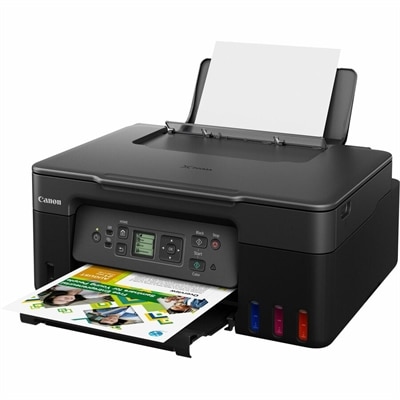
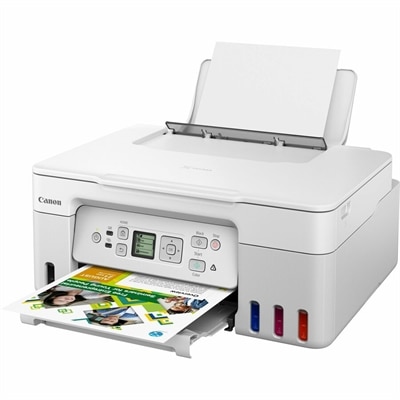
A white wireless multifunction printer with high-capacity ink tanks, 4800 x 1200 dpi resolution, and print, scan, copy.
Discover a wide selection of wireless printers for Mac computers designed to help streamline your home or office setup. Enjoy the convenience of untethered printing and seamless connectivity with devices in your Apple ecosystem. Whether you’re looking to handle everyday documents or high-quality photo prints, finding the right wireless printer for Mac computers ensures easy integration and reliable performance. Explore options that fit your workflow and enhance productivity with effortless compatibility.
A white wireless multifunction printer with high-capacity ink tanks, 4800 x 1200 dpi resolution, and print, scan, copy.
Wireless printers for Mac computers make it easier to turn digital work into useful, tangible pages without adding another cable to a desk. Whether the printer sits beside a home office monitor, on a shelf in a student’s room, or in a shared family workspace, Wi-Fi connectivity allows a Mac computer to send documents, photos, forms and schoolwork from across the room. When comparing models, look for support for Apple AirPrint, a widely used feature that lets compatible Mac computers and other Apple devices print through the local wireless network without requiring complicated driver installation. A straightforward setup can make a noticeable difference: connect the printer to the same Wi-Fi network as the Mac, select the printer from the print menu and choose the paper size, orientation, color settings and number of copies. Many newer models also support automatic software updates and companion applications that help with setup, ink or toner monitoring and routine maintenance. Checking macOS compatibility is still worthwhile, especially when using an older Mac computer or a home network with separate guest and main connections. A printer with a clear display, simple controls and dependable wireless reconnection can save time when the device has been idle for several days. That convenience is especially helpful during the cooler months, when a home office may become the center of more daily activity, from organizing household records to printing travel confirmations, recipes, classroom materials and forms.
The right wireless printer depends on the kind of pages you create and how often you print. Compact inkjet models can be a practical choice for occasional color documents, craft projects, school assignments and snapshots, particularly when space is limited. Color inkjet printers generally offer flexibility across different paper types and can produce detailed images, while models with separate color cartridges may help replace only the color that has run low. Monochrome laser printers are well suited to frequent black-and-white pages, such as invoices, shipping labels, reports and multi-page reading materials. Because toner is a dry powder, it does not dry out between occasional print jobs in the same way liquid ink can, which may appeal to people who print in bursts rather than every day. An all-in-one wireless printer adds scanning and copying for a broader range of home and small-office tasks. Scanning can help preserve signed documents, receipts, artwork and old photographs, while copying is convenient for permission forms, reference pages and household paperwork. Consider the printer’s print speed, paper capacity, automatic duplex printing and maximum paper size if you routinely handle longer documents. Automatic two-sided printing can reduce paper use and keep reports slimmer, while a larger input tray means fewer interruptions during a busy afternoon. For image-heavy work, pay attention to color handling and photo paper support; for text-heavy work, crisp characters, fast first-page output and economical consumables may matter more. A quiet operating profile and compact footprint can also be important when the printer shares space with a Mac desktop, monitor, keyboard and other everyday accessories.
Wireless printers for Mac computers can serve many different users, from remote professionals and university students to families managing schedules, creative hobbyists and small businesses. Someone working from a kitchen table may appreciate printing from a Mac without moving the computer near the printer, while a student can send an assignment from a desk and collect the pages when ready. A family can use an all-in-one model to scan identification documents, copy permission slips or print activity sheets, and a creative user may value color output for labels, invitations and personal projects. These printers can also make thoughtful practical gifts for someone setting up a first apartment, refreshing a home office or preparing a more organized workspace during the cooler months. Before choosing, measure the available surface and leave room for the paper tray, scanner lid and access to cartridges or toner. Review the estimated monthly duty cycle, recommended paper types and ongoing supply requirements rather than focusing only on the initial size or feature list. Security settings matter as well: use a protected home Wi-Fi network, keep printer software updated and choose a device that allows access controls when several people share it. For shoppers who prefer vivid color output with the crisp edges associated with toner, exploring Color Laser Printers For Mac can help narrow the selection. With AirPrint compatibility, reliable wireless performance and features matched to everyday printing habits, a Mac-compatible wireless printer can keep important pages, personal projects and routine paperwork moving smoothly without cluttering the workspace.
Add the products you would like to compare, and quickly determine which is best for your needs.