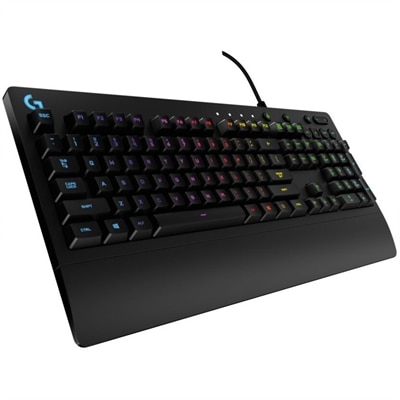
Backlit Keyboards For Laptops
Backlit keyboards for laptops offer enhanced visibility and a modern touch, making them a popular choice for users who value both style and functionality. Ideal for working in low-light environments or late-night study sessions, these keyboards provide an elevated typing experience. Explore a wide selection of backlit keyboards for laptops to find the perfect fit for your needs, whether you’re upgrading your current device or searching for a new laptop with added convenience and flair.
This product is not available
Check out the following recommendations.




Backlit Keyboards For Laptops
Backlit keyboards for laptops use lighting beneath or around the keys to make letters, numbers, and symbols easier to locate in dim surroundings. That illumination can be useful during an early morning study session, on an evening flight, or at a desk where the room lights are low and the laptop screen supplies most of the light. The category includes external illuminated keyboards that connect to a laptop, while some laptops have backlighting built into their own keyboards. An external keyboard can also make a desk setup more comfortable by allowing the laptop screen to sit on a riser while the keys remain closer to elbow height. The lighting itself varies: some keyboards provide a consistent white glow, others offer a single colored backlight, and some support multicolor effects or individually illuminated keys. For everyday writing and office work, clear key legends and adjustable brightness often matter more than elaborate lighting patterns. Light that shines through the characters can make them easier to identify than illumination that appears mainly between the keys, although the result depends on the design. A softly lit keyboard can help someone find a punctuation mark without switching on a bright overhead light, but it does not replace appropriate room lighting or change the brightness of the laptop display. Students taking notes, professionals revising documents, programmers working through code, and people answering messages after the household has settled down may all appreciate that extra visibility. Shared spaces bring their own considerations: a restrained glow and quiet key action can be less distracting to someone nearby than animated lighting and pronounced clicking. Backlighting is therefore one part of the typing experience, alongside layout, key feel, size, and connection type. A keyboard that feels comfortable through several pages of writing needs more than illuminated characters; it needs a shape and response that suit the person using it.
Size and layout determine how naturally an external backlit keyboard fits into a laptop workspace. A full-size layout usually includes a dedicated number pad, which can be useful for spreadsheets, bookkeeping, and repeated numeric entry. A layout without that number pad leaves more room for a mouse, while compact designs can fit more easily into a backpack or on a narrow desk. Smaller dimensions sometimes mean that navigation keys, function controls, or other commands share keys, so familiar shortcuts may work differently. Key spacing, the shape of the keycaps, and the position of the arrow keys can affect comfort as much as overall width. Low-profile keys may feel familiar to someone accustomed to typing directly on a laptop, while taller designs can provide a different sense of travel and feedback. Mechanical switches vary in resistance and sound, and membrane or scissor-style mechanisms have their own feel; none of these constructions guarantees a particular noise level without considering the individual design. Connection type matters, too. A wired keyboard avoids the need to recharge the keyboard itself, though the connector must match an accessible laptop port or a suitable adapter. Wireless options may connect through Bluetooth or a separate USB receiver, depending on the model. Lighting draws power, so brightness settings, lighting effects, and automatic shutoff behavior can influence battery life on wireless keyboards. Operating system compatibility deserves attention beyond basic letter entry because media keys, shortcut labels, lighting controls, and customization software may not behave the same way across systems. For laptops with integrated backlighting, brightness controls and timeout settings depend on the device; a keyboard shortcut or software setting may control them. An unlit built-in keyboard generally cannot gain backlighting through a software change alone. For a desk shared between work and personal laptops, supported device switching can be convenient, but that capability is separate from the presence of illuminated keys.
Materials and construction shape how a backlit keyboard handles everyday use, from being carried between classrooms to staying on a desk through long workdays. Plastic housings can help keep weight manageable, while metal top plates or frames may add rigidity and weight; overall durability still depends on assembly quality, switches, and other components. Keycaps also vary in texture and construction. Some use translucent characters designed to let light pass through, while others rely on surface markings that may wear differently over time. A textured surface can feel more secure under the fingertips, and a stable base with nonslip feet helps keep the keyboard from shifting during fast typing. For travel, a protective sleeve or a separate bag compartment can reduce contact with loose objects that might scratch the surface or press against the keys. At home, keeping drinks away from the keyboard and clearing crumbs before they collect around the switches can help preserve its condition. Routine care generally means disconnecting the keyboard or turning it off, then wiping exposed surfaces with a soft, lightly dampened cloth according to the manufacturer's instructions. Liquid should not be sprayed directly into the keys, and keycap removal is appropriate only when the design and care instructions support it. Spill resistance, when specified, should not be mistaken for waterproof construction. Intended use can further narrow the fit. A writer may prefer understated lighting and a comfortable space bar, while someone who plays games may value responsive switches, clear movement keys, and support for simultaneous key presses. For setups centered on play, Backlit Gaming Keyboards offer a related category where lighting styles and gaming-oriented layouts are central considerations. Backlighting alone does not establish gaming performance, just as a compact shape does not guarantee travel comfort. As a gift for a college student, a remote worker, or a frequent traveler, an illuminated keyboard is most useful when its connection, layout, and size match the recipient's laptop and routine. Those practical details turn a visible glow into a useful part of everyday typing.
FAQs:
A backlit keyboard enhances visibility in low-light environments, making it easier to type accurately at night or in dimly lit spaces. It also adds a modern aesthetic to your laptop and can be particularly helpful for students, professionals, and gamers who often work or play into the evening.
Yes, many laptops with backlit keyboards allow users to adjust the brightness levels to suit different lighting conditions. This is typically done through keyboard shortcuts or system settings, giving you flexibility to find the most comfortable illumination for your workspace.
There are several types of backlighting available, including single-color illumination for a clean and simple look, as well as RGB lighting that lets you customize the colors and effects. Some models even offer programmable lighting patterns for a more personalized experience.
Using the backlight feature on your laptop keyboard does consume additional power, which can slightly reduce battery life. However, many modern laptops are designed with energy-efficient backlighting, and you can often adjust or turn off the illumination when it’s not needed to conserve power.
In many cases, you can replace or upgrade your existing Dell keyboard with a backlit version, provided your laptop model supports this feature. Dell laptop replacement parts, including backlit keyboards, are available to help you upgrade your device for enhanced comfort and usability.