1. Color Accuracy
2. Resolution
3. Panel Type
4. Connectivity Options
Choosing the right monitor is crucial for film students who need accurate visuals for editing and color grading.
1. Color Accuracy
2. Resolution
3. Panel Type
4. Connectivity Options

A 42.5'' 4K monitor with multi-PC connectivity and four unique FHD partitions for enhanced productivity.
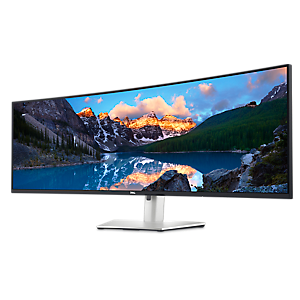
An immersive 49-inch dual QHD monitor with IPS Black panel and eco-friendly, arsenic-free glass.

A 27" QHD monitor with USB-C connectivity, 99% sRGB color gamut, and ComfortView Plus technology.

A 37.5-inch WQHD+ curved monitor with IPS Black panel and 21:9 aspect ratio for immersive viewing.

A 27-inch 4K monitor with 120Hz refresh rate, dual speakers, and eye comfort technology.

A 34-inch curved monitor with 3440 x 1440 resolution and 120Hz refresh rate for enhanced comfort.

A 40-inch curved monitor with a 5K display, 120Hz refresh rate, and Thunderbolt hub connectivity.

A 31.5-inch 4K monitor with 120Hz refresh rate, dual 5W speakers, and eye comfort technology.

A 27-inch 4K USB-C monitor with 120Hz refresh rate, dual speakers, and eye comfort technology.

A 27" monitor with enhanced IPS Black, 3000:1 contrast, and eye comfort technology for vivid visuals.
Film students should prioritize monitors with high color accuracy, wide color gamut coverage (such as sRGB or Adobe RGB), good contrast ratios, and IPS panels for consistent viewing angles. Features like factory calibration and support for hardware calibration are also beneficial for precise editing work.
Color accuracy ensures that the colors displayed on the monitor closely match the original footage and industry standards. This is crucial for film students who need to edit and grade videos, as it helps maintain consistency across different devices and platforms.
IPS (In-Plane Switching) panels are preferred by film students because they offer superior color reproduction and wider viewing angles compared to TN or VA panels. This allows for more accurate editing, especially when working with multiple people or from different positions.
A high resolution monitor, such as QHD or 4K, provides greater detail and clarity, allowing film students to see their work more accurately. It also offers more screen real estate, making it easier to manage timelines, toolbars, and multiple windows during video editing.
Yes, having a variety of connectivity options like HDMI, DisplayPort, USB-C, and built-in USB hubs can make it easier to connect cameras, laptops, and other peripherals. This flexibility streamlines workflow and supports various devices commonly used in film production.


Add the products you would like to compare, and quickly determine which is best for your needs.


