Desktop SSDs
Upgrade your computing experience with desktop SSDs designed to deliver fast and reliable performance for everyday tasks and demanding workloads. Whether you're building a new system or enhancing your current setup, desktop SSDs offer an efficient solution for improved data access and storage management. Explore a wide selection of options to find the perfect fit for your desktop, ensuring seamless multitasking and streamlined file transfers. Discover how desktop SSDs can help you get the most out of your PC.
This product is not available
Check out the following recommendations.




Desktop SSDs
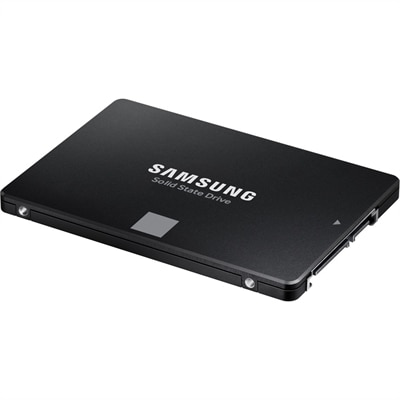
Desktop SSDs provide a practical way to improve a computer’s responsiveness, storage capacity and everyday usability. Unlike traditional hard disk drives, solid-state drives have no spinning platters or moving read/write heads, so they can access files more quickly, start applications with less delay and operate quietly. A desktop SSD can help a computer boot into its operating system faster, open a large photo library with fewer pauses and make file transfers feel more fluid during busy work sessions. It can also be a meaningful upgrade for an older desktop that still has a mechanical hard drive, especially when the computer is used for schoolwork, office applications, creative projects, programming, gaming or general home use. When comparing options, begin with compatibility rather than speed alone. Desktop SSDs are commonly available as M.2 drives or 2.5-inch SATA drives. An NVMe M.2 SSD installs directly into a compatible slot on the motherboard and communicates over the PCIe interface, making it the fastest and best overall choice for many modern desktop PCs. Current PCIe-based M.2 SSDs can deliver sequential speeds of up to 7,000 MB/s or more, depending on the drive, PCIe generation and computer configuration. A 2.5-inch SATA SSD connects through a SATA data cable and a power cable, with performance typically topping out around 550 MB/s. It may not match NVMe performance, but it remains an excellent budget-friendly upgrade for older desktops that do not have an available M.2 slot. Before purchasing, check the desktop’s motherboard manual or manufacturer specifications for supported form factors, interface standards and available installation space. An M.2 slot may support only certain drive lengths or may share bandwidth with another expansion slot, while a 2.5-inch drive may require a mounting bracket in a larger desktop case. Also confirm whether the computer has the required SATA cable, power connector or mounting hardware.
Capacity is another important consideration because the right amount of storage affects both convenience and long-term value. A 500GB SSD can suit a basic desktop used for web browsing, documents, communication and a modest application collection, but it may fill quickly after installing a modern operating system, creative software and several large games. For many people, 1TB is a comfortable capacity sweet spot, providing room for the operating system, everyday applications, personal files and a selection of games without paying for space that may go unused. A 2TB SSD offers more breathing room for large media libraries, design files, recorded video, virtual machines or an extensive game collection, and it can reduce the need to constantly move files to another drive. Users working with high-resolution photographs, video editing projects, music libraries or 3D content may appreciate even greater capacity or a second SSD dedicated to active projects. Capacity does not determine speed, however, and a larger drive is not automatically faster. Pay attention to the drive’s interface, rated sequential and random performance, endurance rating and warranty terms, while remembering that real-world results depend on the desktop’s motherboard, processor, operating system and workload. Cooling can matter as well: sustained transfers and demanding applications may generate heat, so a compatible heatsink or a motherboard’s built-in M.2 cover can help an NVMe drive maintain consistent performance. If a desktop supports more than one drive, a common arrangement is to use a fast SSD for the operating system and frequently used applications, then place larger files or archived content on an additional drive. For a broader look at compatible storage options, explore Internal SSDs.
Desktop SSDs suit a wide range of people and can make a thoughtful technology gift for someone preparing a computer for a new semester, a home office, a creative hobby or a growing game library. A family member who has grown tired of a slow startup may notice the improvement every time the desktop is turned on, while a photographer or video editor may value faster access to project folders and a quieter workspace. Gamers can use an SSD to shorten game loading screens and keep frequently played titles readily available, although an SSD does not replace the need for a capable graphics card or processor. Professionals handling spreadsheets, code repositories, design applications or large batches of documents may benefit from quicker application launches and smoother multitasking. Installation is usually straightforward for someone comfortable working inside a desktop, but it requires care: shut down and unplug the computer, discharge static electricity, follow the motherboard instructions and avoid forcing a connector or drive into place. After installation, the SSD may need to be initialized, formatted and assigned a drive letter before it appears in the operating system. Cloning an existing system drive can preserve files and settings, while a clean installation can provide a fresh start; either approach should begin with a verified backup of important documents, photos and other irreplaceable data. An SSD improves access speed, but it is not a complete backup plan, and important files should also be copied to a separate storage location. As cooler months bring more time indoors for work, entertainment and personal projects, choosing the correct desktop SSD can make a familiar computer feel more responsive while providing dependable space for the files and applications that matter most.
FAQs:
Upgrading your desktop with an SSD significantly improves system responsiveness, reduces boot and load times, and enhances overall reliability compared to traditional hard drives. SSDs have no moving parts, making them more durable and energy efficient, and they are ideal for faster file transfers, smoother multitasking, and a more enjoyable computing experience whether you’re gaming, working, or creating content.
To determine SSD compatibility, check your desktop’s motherboard for available M.2 slots for NVMe drives or SATA ports for 2.5-inch SSDs. Review your system manual or manufacturer’s website for supported storage types and maximum supported capacities. Many modern desktops support both types, while older systems may only have SATA connections.
Yes, you can use an SSD alongside your existing hard drive in most desktops. Many users install the operating system and frequently used programs on the SSD for speed, while keeping larger files or less frequently accessed data on the traditional hard drive. This setup combines the performance of an SSD with the storage capacity of an HDD.
Installing an SSD in a desktop PC typically involves mounting the drive in an available bay or M.2 slot, connecting it to the motherboard and power supply, and then initializing the drive in your operating system. For those migrating from an existing drive, you may choose to clone your current system or perform a fresh installation of the operating system. Step-by-step guides and video tutorials can help make this process straightforward, even for first-time upgraders.
A wide range of users benefit from upgrading to a desktop SSD, including gamers seeking faster load times, students and professionals looking for increased productivity, creative workers handling large files, and anyone wanting a more responsive and reliable computer. SSDs also make great gifts for tech enthusiasts or anyone looking to extend the life and performance of their desktop.