$199.99
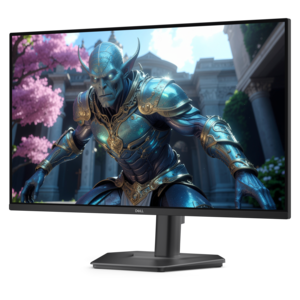
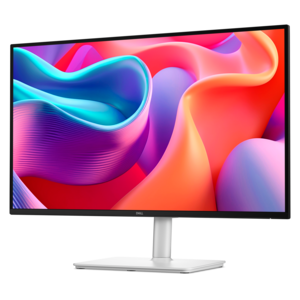
A QHD monitor with 144Hz refresh rate, USB-C connectivity, built-in speakers, and TÜV-certified eye comfort.
Game development monitors help designers, artists and developers review game worlds, interfaces and visual assets with greater clarity. Browse a selection of computer monitors and compare options such as screen size, resolution, refresh rate, color performance and connectivity to find a display that fits your development workflow.
A QHD monitor with 144Hz refresh rate, USB-C connectivity, built-in speakers, and TÜV-certified eye comfort.
Game development monitors serve as the visual workspace where ideas become playable worlds. A developer may spend hours moving between code, a game engine interface, animation timelines, level layouts, texture tools, bug reports and play-testing sessions, often with several windows open at once. A display with a generous screen size and sharp resolution can make that work feel less cramped, especially when a project includes detailed environments, layered lighting controls or long lines of code. For many workflows, a 27-inch to 32-inch monitor with QHD or 4K resolution offers a practical balance of desktop space and image detail. QHD can provide comfortable room for development tools while supporting smooth performance on a broad range of computers, while 4K can make fine interface elements, text and high-resolution artwork appear especially crisp. An ultrawide display can place a code editor, asset browser and preview window side by side, reducing the need to constantly minimize panels. A dual-monitor arrangement offers a similarly flexible setup, with one screen dedicated to the engine or game build and another reserved for documentation, communication or code. The best layout depends on the way each person works, the available desk space and the graphics capabilities of the connected computer. A display with an adjustable stand can also make a meaningful difference during long sessions, allowing the screen to be raised, tilted or turned for a more comfortable viewing position.
Color performance is a central consideration for anyone creating characters, environments, user interfaces or visual effects. An IPS panel is often a dependable choice for broad viewing angles and consistent color across the screen, which is helpful when examining gradients, shadows and subtle material changes. OLED displays can provide exceptionally deep blacks and strong contrast, making dark scenes, nighttime environments and dramatic lighting easier to evaluate. Whichever panel technology is selected, look for a wide color gamut and useful factory calibration when visual accuracy is important. Consistent color helps a development team see artwork as intended and can make it easier to compare assets across different stages of production. Resolution should be considered alongside computer performance: a high-resolution display can show more detail, but the graphics processor must be able to render a project at the desired resolution and frame rate. Refresh rate matters most during real-time preview and play-testing. A 60Hz monitor can be perfectly suitable for writing code, planning levels and reviewing static artwork, while a 120Hz, 144Hz or higher refresh rate can make camera movement, animation and fast action appear more fluid. For a team building a racing game, fighting game or competitive action experience, a very high refresh rate can help with performance testing and make it easier to notice stutter, frame pacing issues or motion blur. Response time is another useful specification; lower response times can help reduce visible ghosting during quick movement. Adaptive synchronization may also help align the display refresh with the computer’s frame output, creating a smoother preview when performance varies. Brightness, contrast, matte or glossy screen treatment and connectivity deserve attention as well. A monitor with HDMI and DisplayPort connections can fit more easily into changing workstations, while USB ports can simplify access to peripherals. Eye-comfort features such as flicker reduction, a low-blue-light mode and comfortable brightness control are valuable when a developer is refining a project late into the evening.
These monitors can suit independent creators, students learning interactive design, artists building digital worlds, programmers working on tools and small studio teams that need a flexible screen for both production and testing. They can also make a thoughtful gift for someone setting up a first development workspace, provided the recipient’s computer can support the selected resolution and refresh rate. Before choosing, measure the desk, consider the viewing distance and decide whether the screen will be used alone or alongside another display. A compact desk may benefit from a single high-resolution monitor with a carefully arranged window layout, while a larger workspace may accommodate two screens or an ultrawide format. Think about the project’s visual demands, too. A creator focused on illustrated environments and cinematic scenes may prioritize color coverage, contrast and resolution, while someone developing fast-moving gameplay may place greater emphasis on refresh rate, response time and smooth motion. A monitor used for both development and everyday entertainment should offer a comfortable balance rather than focusing on one specification in isolation. It is also worth checking the computer’s available outputs, graphics performance and operating system compatibility before making a choice. For developers who want to explore a performance-focused range built around creative and interactive work, Alienware Monitors For Developers provides a dedicated place to browse. The right display does more than enlarge a desktop. It can reveal a barely visible texture seam, make a dense timeline easier to navigate, show whether a shadow falls naturally across a virtual street and make a first playable build feel closer to its finished form. With suitable resolution, color, motion performance and ergonomic flexibility, a game development monitor can support the full rhythm of creation, from the first rough sketch to the final hands-on test.
Add the products you would like to compare, and quickly determine which is best for your needs.