$2299.00
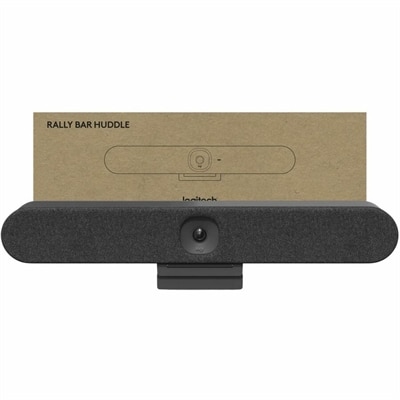
An all-in-one 4K conferencing bar featuring AI-powered audio, noise suppression, automatic shutter, and flexible mounting.
In today's dynamic work environment, hybrid work solutions are essential for seamlessly blending remote and in-office tasks. At Dell, we understand the importance of flexibility and productivity, which is why we've curated a range of innovative tools and technologies to empower your hybrid work experience. Whether you're setting up a home office or enhancing your workspace at the office, our selection is designed to support diverse working styles and help you stay connected, efficient, and inspired. Explore our offerings to find the perfect balance between collaboration and independent work, ensuring you have everything you need to thrive in any setting.
An all-in-one 4K conferencing bar featuring AI-powered audio, noise suppression, automatic shutter, and flexible mounting.
Hybrid work solutions help people move smoothly between home, office, and the spaces in between without losing focus or connection. A thoughtful setup usually begins with dependable computing equipment that supports the way work actually happens: a portable computer for commuting and changing rooms, a larger display for detailed projects, and comfortable accessories that make long periods of typing, viewing, and speaking easier. For someone who spends part of the week at a kitchen table and part of the week at a shared office, portability can be just as important as performance. A lightweight computer with a long-lasting battery is easier to carry through a morning train ride, while a desktop-style setup with a spacious screen can make spreadsheets, creative work, research, and video meetings feel less cramped once the workday begins. An adjustable monitor, a full-size keyboard, and a responsive pointing device can also help create a more natural posture and reduce the small frustrations that build up when equipment is chosen only for convenience. These solutions can support employees, independent professionals, students, and small teams, as well as anyone setting up a dedicated workspace for the first time. They can also make thoughtful gifts for a recent graduate, a family member beginning a flexible job, or a friend who has been working from a corner of the dining room and is ready for a more comfortable routine. The best choices balance capability with the person’s habits, including how often they travel, whether they work with detailed visuals, how many applications they keep open, and whether they need a quiet setup for shared living spaces. A simple, well-matched collection of devices often feels more useful than a crowded desk filled with equipment that rarely earns its place.
When comparing hybrid work solutions, consider the complete daily journey rather than focusing on a single specification. A person who travels between locations may value a compact form, durable construction, quick charging, and a clear camera and microphone for spontaneous conversations. Someone who works primarily from home may benefit more from a larger display, a comfortable input setup, and accessories that keep the desk organized. A second screen can place a document, calendar, or reference material beside an active project, much like spreading papers across a conference table without giving up valuable desk space. For shared work areas, look for equipment that is simple to connect, easy to adjust, and straightforward to store at the end of the day. Compatibility matters as well: accessories should work smoothly with the computer and operating system already in use, while display connections, charging options, and available ports should fit the way files, peripherals, and presentations are handled. Privacy deserves attention in any flexible environment, especially when work moves from a private room to a coffee shop or an open office. Screen positioning, device locks, protective covers, and sensible account practices can help keep information out of view and reduce interruptions. Clear team expectations also make a difference. Agreeing on where conversations happen, how quickly messages should receive a response, and when a person is available for meetings can make hybrid schedules feel less fragmented. Shared calendars, collaboration applications, video calls, and cloud-based files help people stay aligned, while a consistent workspace routine gives the day a dependable rhythm. Even small habits matter: keeping a charger in the same pocket of a work bag, using headphones in a shared room, and placing the camera at eye level can make transitions feel calmer and more professional.
A strong hybrid workspace should adapt as responsibilities change. New employees may need a flexible setup for onboarding, training, and regular check-ins, while experienced team members may prioritize comfort during focused work or the ability to move quickly between office and home. Managers can use a combination of portable computers, displays, accessories, and collaboration tools to create a consistent experience across locations without requiring every workspace to look identical. For households, the right arrangement may need to serve more than one person: a shared monitor, a compact keyboard, or an easy-to-store accessory can help a dining table become a work surface in the morning and return to everyday use at night. For creative professionals, clear color and ample screen space may be central; for writers and analysts, a comfortable keyboard and room for multiple windows may matter most; for frequent presenters, reliable audio and a clear camera can help them communicate with confidence. Think about the room itself, too. Glare from a nearby window can make a display difficult to read, while a poorly placed computer can turn every meeting into a search for the right angle. A stable surface, an appropriate viewing height, and enough space to move a notebook or drink away from electronics can make the entire area feel more intentional. Explore Hybrid Office Solutions to find options that support productive transitions between locations, clearer collaboration, and a more comfortable everyday routine. With the right balance of mobility, performance, comfort, and organization, hybrid work equipment becomes more than a collection of devices; it becomes the quiet foundation behind focused mornings, productive conversations, and the satisfying moment when the last task is complete and the workspace can be put away.
Add the products you would like to compare, and quickly determine which is best for your needs.