Laptop Hinges
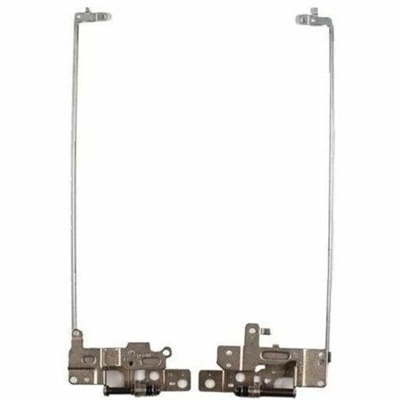
Laptop hinges are crucial components that ensure the smooth operation and longevity of your device. Designed to provide stability and flexibility, these hinges allow you to open and close your laptop with ease while maintaining the integrity of the screen and keyboard alignment. Whether you're looking to replace worn-out hinges or upgrade for enhanced durability, our selection offers reliable solutions tailored to meet your needs. Explore our range of high-quality laptop hinges to keep your device functioning flawlessly and extend its lifespan.
This product is not available
Check out the following recommendations.




Laptop Hinges
Laptop hinges are the small mechanical supports that connect a laptop display to its base, allowing the lid to open, close and hold a comfortable viewing angle. Although they are easy to overlook during everyday use, hinges handle repeated movement every time a laptop is opened for work, study, travel or entertainment. A replacement hinge or hinge assembly can be a practical choice when a screen no longer stays in position, feels unusually tight or begins to move unevenly. Common signs of hinge trouble include a display that wobbles or slowly drifts backward, popping or creaking sounds near the lower corners of the screen, resistance when lifting the lid, and visible separation in the plastic bezel or outer casing. A gap around the hinge area may expose internal wires or create a sharp edge, while a lid that sits crooked when closed can indicate that one side is bent, loose or damaged. Because the hinge is attached to both the display assembly and the laptop base, continuing to force a stiff or misaligned lid may place additional stress on the screen, bezel, mounting points or display cable. Selecting a compatible part from the available Laptop Hinges recommendations can help support a more secure, natural opening motion and extend the useful life of a familiar computer. For shoppers comparing laptop accessories and related computer equipment, Laptop Hubs offers another convenient place to explore options for workspaces, travel and everyday computing.
Compatibility should be the first consideration when choosing a laptop hinge. A hinge may look similar to another part while differing in its mounting holes, shape, tension, orientation or connection points, so shoppers should match the exact laptop model and, when available, the service or part number. Screen size alone is not enough to confirm fit. Check whether the listing includes a left hinge, right hinge or a matched pair, and compare the number and placement of screw holes with the existing assembly. It is also useful to confirm whether the part is intended for the display lid, base, or both sides, and whether mounting screws or other hardware are included. Some hinge assemblies are designed for a particular chassis configuration and may not align with a different revision of the same laptop family. The right replacement should move with steady, controlled resistance rather than feeling loose or rigid. Look for durable metal construction, cleanly finished pivot points and a design that leaves room for the display cable to pass without pinching. If the plastic around the original hinge has cracked, the problem may extend beyond the metal hinge itself. A new hinge can restore movement, but it may not hold securely if the brass inserts, screw posts or surrounding housing are broken. In that situation, the laptop may need a compatible housing repair, replacement case section or professional assessment in addition to the hinge. Reviewing product dimensions, included components, return information and compatibility notes before purchase can prevent the frustration of receiving a part that cannot be installed. Keeping the laptop’s model information nearby, along with a clear photograph of the existing hinge area, can make it easier to compare the available options accurately.
Laptop hinges are useful for people who rely on a computer throughout the day and want to repair a dependable device rather than replace the entire system because of a mechanical issue. A home office user may notice that the screen shifts whenever they adjust the viewing angle, while a student or frequent traveler may find that repeated opening and closing has loosened the hinge over time. They can also be a sensible maintenance purchase for a household laptop shared by several people, since frequent handling from different angles can place uneven pressure on the lid. Installation is a detail-oriented repair that generally involves shutting down the laptop, disconnecting power, protecting the display and carefully removing portions of the base and bezel. Internal batteries, display cables and delicate plastic clips may be nearby, and incorrect tool use can cause additional damage. Anyone who is not comfortable with small screws, cable connectors or opening a laptop should consider having the work completed by a qualified technician. During everyday use, opening the lid from the center with both hands or one hand placed near the middle distributes force more evenly than pulling from a single corner. Carrying the laptop in a properly fitted sleeve, avoiding pressure on the closed lid and keeping the hinge area clear of debris can also help reduce unnecessary strain. A hinge should never be forced past its natural range, and a popping sound, exposed cable or rapidly widening gap is a reason to stop using the lid until the issue is assessed. With careful compatibility checks and sensible handling, a replacement hinge can help a laptop open smoothly, hold its display securely and remain comfortable to use through changing routines and the cooler months.
FAQs:
Common signs that a laptop hinge may need repair include unusual noises like squeaking or cracking when opening or closing the lid, increased resistance or stiffness, a screen that feels loose or won't stay in place, visible gaps between the screen and keyboard, or exposed internal components around the hinge area.
To prevent damage, always open and close your laptop from the center of the lid rather than one corner, which helps distribute pressure evenly across both hinges. Avoid forcing the lid past its designed angle, and regularly check for loose screws or debris around the hinge area.
Some minor issues, such as tightening loose screws or lubricating a stiff hinge, can be addressed at home with basic tools. However, if the plastic casing is cracked or the hinge mechanism is severely damaged, professional repair or replacement may be necessary to ensure long-term functionality.
Laptop hinges are commonly made from metals such as steel or zinc alloy for strength, while the surrounding housing is often constructed from plastic. This combination provides durability and flexibility, but the plastic components can sometimes wear out or crack after prolonged use.
If a hinge is broken, the laptop can sometimes still function as a desktop setup by keeping the lid open and using external peripherals like a monitor, keyboard, and mouse. However, continued use without repair may lead to further structural damage or impact the display’s performance.