$699.99
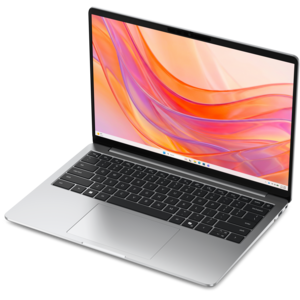
A thin, lightweight laptop crafted from eco-friendly materials with Series 3 Intel Core processors for productivity.
Lightweight laptops for students are the perfect choice for balancing busy academic schedules with on-the-go convenience. Ideal for taking notes in class, collaborating on group projects, or studying at your favorite coffee shop, these laptops offer the portability students need without compromising on performance. Explore a range of options designed to fit seamlessly into your lifestyle and help you stay productive wherever your studies take you.
A thin, lightweight laptop crafted from eco-friendly materials with Series 3 Intel Core processors for productivity.
A remarkably thin, lightweight laptop designed for ultimate mobility and effortless everyday productivity.
A thin, lightweight laptop crafted with eco-friendly materials and powered by AMD Ryzen 200 Series processors.
A portable laptop with a sleek design, 16:10 display, and AI PC options for productivity anywhere.
A thin, lightweight laptop made with eco-friendly materials and Series 3 Intel Core processors for productivity.
A durable, serviceable Chromebook designed specifically for education environments.
A laptop featuring Intel® 13th Gen processors, a built-in FHD camera, and an enlarged ergonomic keyboard.
A modern laptop powered by AMD Ryzen™ processors for effortless productivity and captivating entertainment.
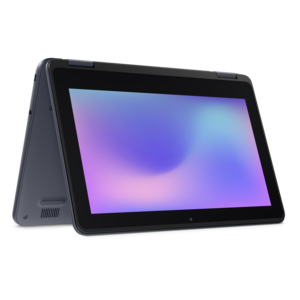
A durable, serviceable laptop or 2-in-1 designed specifically for K-12 learning environments.
A durable, serviceable Chromebook designed specifically for education environments.
A laptop featuring an FHD camera, enlarged ergonomic keyboard, and AMD Ryzen™ processing.
A durable, serviceable laptop or 2-in-1 designed specifically for demanding education environments.
A durable, serviceable Chromebook laptop or 2-in-1 designed specifically for K–12 environments.
A versatile 2-in-1 laptop with Intel Core processors, DDR5 memory, and multiple modes for creative work.
A durable, serviceable laptop designed specifically for demanding education environments.
Lightweight laptops for students are designed to make everyday computing easier to carry from one place to another, whether that means moving between lecture halls, studying in a library, working at a kitchen table or completing assignments during a commute. A compact laptop typically weighs about 2 to 3 pounds, with some especially portable configurations coming in below that range, while still providing a screen large enough for reading digital textbooks, drafting papers and reviewing class materials. A 13- or 14-inch display often offers a practical balance between portability and workspace: it can fit into a backpack without taking up much room, yet it provides more comfortable viewing than a phone or small tablet. Screen resolution, brightness and panel quality also matter, particularly for students who spend long stretches reading slides, spreadsheets or online course content. A bright display with clear text can reduce eye strain in rooms with changing light, while a touchscreen may be helpful for scrolling, annotating or navigating presentations. A sturdy chassis, comfortable keyboard and responsive touchpad are equally important because these are the parts used through every study session. For students who take handwritten notes, create diagrams or work through formulas, compatibility with a stylus or an external monitor can add flexibility without requiring a larger, heavier computer. Before choosing, consider how often the laptop will be carried, how much space is available in a backpack and whether a lightweight design is more valuable than a larger display or additional ports. A slim laptop can be especially useful for students who move frequently throughout the day, live in a small residence, travel between home and campus or want one computer that feels manageable during both short errands and longer trips. Browse the broader Laptop For Students selection to compare portable designs alongside other configurations suited to different academic routines.
Battery life is one of the most important specifications for a student laptop because access to a power outlet is not always predictable. A laptop that can last through several classes, a study group and an evening of light work can help students stay focused instead of searching for a charger. Battery estimates vary according to display brightness, video streaming, wireless activity and the applications being used, so it is helpful to look beyond the advertised maximum and consider the type of work involved. Web browsing, word processing and note-taking generally use less power than video editing, gaming, large design projects or software development tools. Efficient processors can support a thin, quiet design while providing enough performance for common schoolwork, including research, video calls, presentations, spreadsheets and multiple browser tabs. For more demanding majors, look for a modern processor with enough memory to keep specialized applications running smoothly. At least 8GB of memory may suit basic schoolwork, while 16GB can offer more breathing room for multitasking and demanding coursework over several years. Storage capacity deserves similar attention. Solid-state storage helps a laptop start quickly, open files promptly and operate quietly, while additional capacity is useful for downloaded lectures, photo collections, creative projects and offline course materials. Students who rely heavily on cloud-based tools may need less local storage, but keeping important files available offline can be valuable when traveling or working in locations with unreliable internet access. Port selection is another practical detail: USB-A and USB-C connections can support accessories, external drives and displays, while an audio jack may be convenient for headphones during shared study sessions. A built-in webcam and microphone are useful for remote classes and group projects, and a privacy shutter or other camera control can provide added peace of mind. Students should also confirm that the operating system supports required classroom software, testing platforms and major-specific applications before making a choice.
The right lightweight laptop depends on the student’s schedule, field of study and preferred way of working. A student focused on writing, reading and online research may value a comfortable keyboard, long battery life and a clear display more than high-end graphics performance. Someone studying computer science, architecture, media production or engineering may need a faster processor, more memory, stronger graphics capability or compatibility with specialized applications. Students who create presentations, edit images or work with video should pay close attention to screen color, storage capacity and sustained performance, while those who travel frequently may prioritize a durable build, compact charger and secure login features. A two-in-one design can be appealing for learners who want to switch between typing notes and viewing content in tablet mode, although a traditional clamshell laptop may provide a more familiar keyboard experience and a simpler profile. These computers can also make thoughtful gifts for a student beginning a new program, moving into a residence or preparing for a more independent academic routine. The most useful gift is one that matches the recipient’s real needs: a lightweight design for someone who walks across campus, a larger screen for someone who studies at home, or stronger performance for a student working with demanding applications. Accessories can complete the setup without adding much weight. A padded sleeve helps protect the laptop inside a backpack, a compact wireless mouse can make extended work more comfortable, and a USB-C hub can connect additional peripherals when desk space is available. A full-size monitor may be worthwhile for students who regularly work from a fixed location, allowing the laptop to remain portable while providing a larger view for research, coding or creative projects. During the warmer and cooler parts of the academic year, students often shift between outdoor spaces, classrooms and home work areas, making portability, dependable battery life and a durable design especially valuable. By weighing carrying comfort against screen size, matching performance to required applications and leaving room for future coursework, students can choose a laptop that supports both everyday assignments and the evolving demands of their education.
Add the products you would like to compare, and quickly determine which is best for your needs.