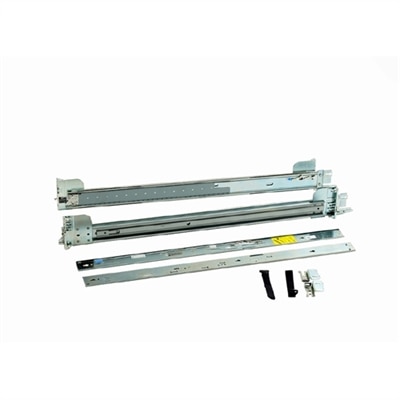
Rack Mount Sliding Rails
Rack mount sliding rails are essential components for any server or networking setup, providing the flexibility and accessibility needed to efficiently manage and maintain your equipment. Designed to support various types of hardware, these sliding rails allow for easy installation, adjustment, and removal of devices within a rack, ensuring optimal organization and functionality. Whether you’re setting up a new data center or upgrading an existing infrastructure, investing in high-quality rack mount sliding rails can significantly enhance your system’s performance and ease of use. Explore our selection to find the perfect solution tailored to your specific requirements.
This product is not available
Check out the following recommendations.




Rack Mount Sliding Rails
Rack mount sliding rails provide a supported way to move compatible rack-mounted desktop workstations forward for access, then return them to their installed position. For a workstation tucked into a production desk or a creative studio’s equipment rack, that movement can make a practical difference: a rear connection becomes easier to reach, a cable can be checked without working entirely by touch, and routine maintenance may require less repositioning of surrounding equipment. Unlike fixed supports, sliding rails use nested sections that travel along one another, although the amount of extension and the way the mounted chassis attaches vary by design. Some assemblies incorporate ball-bearing slides for controlled movement, while others use different mechanisms suited to their intended load and mounting arrangement. Steel is a common material because it offers rigidity in a relatively narrow profile, and protective finishes help limit corrosion under normal indoor conditions. The strength of the metal is only part of the picture, however. Brackets, attachment points, fasteners, and the slide mechanism all contribute to how securely an assembly supports its intended equipment. For designers, video editors, engineers, and other professionals using compatible rack-mounted desktop workstations, a well-matched rail assembly can help keep a concentrated workspace accessible without changing the workstation’s everyday role. The same considerations apply in a shared computer lab or an instructional media room, where different people may need access to connections over time. Sliding rails are functional accessories rather than universal supports: their usefulness depends on the exact chassis, mounting environment, and service requirements. A compact desktop computer does not become suitable for direct rail mounting simply because its dimensions appear to fit the available space. Manufacturer-supported attachment points and an expressly compatible mounting arrangement are essential distinctions, especially when the equipment will be moved forward while remaining supported by the rails.
Fit involves more than matching the width of the opening. Rack mount sliding rails must accommodate the distance between the front and rear mounting points, the mounting-hole style, and the attachment features on the compatible workstation chassis. An adjustable rail may cover a range of installation depths, but that range has limits, and the overall chassis depth can introduce additional clearance requirements. Square, round, and threaded mounting holes can require different brackets or hardware; a tool-less connection designed for one arrangement should not be assumed to work with another. Likewise, rails intended for a four-post installation are not automatically appropriate for a two-post frame or an under-desk support. Left and right components may be distinct, and chassis-mounted inner members must match their corresponding outer assemblies. These details matter when replacing a worn assembly as much as when fitting a new workstation. A rail that appears nearly identical can still have a different latch position, attachment spacing, or travel length. Weight capacity is another specification that needs close attention, including whether the stated capacity applies to a pair of rails and whether any conditions change when the assembly is extended. The installed workstation’s actual weight, including fitted components and supported accessories, is the relevant figure—not an estimate based on its external size. Extension length also shapes everyday access. Partial-extension rails may expose only part of a chassis, while full-extension designs can provide broader access when the installation permits it. Neither description alone guarantees that a cover can be removed or a particular connection reached. In a narrow editing room, for example, a workstation may slide out far enough for maintenance yet leave insufficient room for someone to stand comfortably in front of it. Clearance behind the equipment matters as well, particularly where cables need to bend without being pinched. Compatibility documentation brings these measurements together and helps distinguish a genuinely suitable assembly from one that merely looks close.
Durability shows up in how consistently the rails move, how securely they retain the workstation, and how well their attachment points hold alignment through repeated use. A workstation that is accessed several times a month places different demands on its mounting hardware than one that remains untouched for long stretches, but both benefit from correctly supported, level installation. Binding, scraping, unexpected resistance, or a latch that no longer engages cleanly are reasons to stop and inspect the assembly rather than force it through its travel. Dust and loose debris can accumulate around exposed slide sections, especially in studios where equipment shares space with fabric backdrops, paper, or other materials. Cleaning should follow the rail manufacturer’s directions; accessible surfaces can often be wiped with a soft, dry cloth, while factory-lubricated mechanisms may require specific treatment or no additional lubricant at all. Applying an arbitrary oil or cleaning spray can attract debris or affect materials, so maintenance products should not be chosen by guesswork. Cables deserve similar care. As a mounted desktop workstation moves forward, connected cables need an appropriate service loop or compatible cable-management arrangement that accommodates the full permitted travel without pulling on ports. Excess slack should not hang where it can catch in a slide or obstruct airflow. Retention features, travel stops, and release tabs also serve different purposes: a release intended for chassis removal should not be confused with a routine positioning control. Any locking or hold-open function needs to be confirmed in the assembly’s documentation rather than assumed. The supporting structure must be stable and installed according to its own requirements, since extending heavy equipment shifts weight forward. Rails should never be treated as a step, seat, or support for unrelated objects. For a busy creative workspace, the best fit is not necessarily the assembly with the longest travel or the most elaborate mechanism. It is the one that matches the workstation and mounting structure, provides the access the space actually allows, and remains straightforward to inspect and maintain throughout regular use.
FAQs:
Rack mount sliding rails provide easy access to mounted equipment, allowing users to slide devices in and out for maintenance, upgrades, or cleaning without removing them from the rack. This improves organization, saves time, and helps maintain tidy cable management in both professional and home environments.
Rack mount rails are widely used by IT professionals, creative studios, engineers, and tech enthusiasts who require efficient, organized setups. They are also suitable for home offices, especially for users who want to maximize space and keep their equipment easily accessible.
Rack slide rails allow users to quickly access, upgrade, or replace equipment without dismantling the entire rack. This flexibility is ideal for environments where technology changes frequently or where regular maintenance is required.
Many rack mount rails are designed to be versatile and can accommodate a range of devices, including desktops, workstations, and certain accessories. Compatibility should be checked with the specific device to ensure a secure fit.
When choosing rack mount rails, consider factors such as weight capacity, device compatibility, installation method, and the type of rack you have. Opting for quality rails, like those found in a dell precision rack mount kit, ensures long-term reliability and ease of use.