Rackmount 1U UPS
Rackmount 1U UPS solutions are designed to provide reliable power protection and efficient energy management for servers, networking equipment, and critical IT infrastructure. Ideal for data centers, server rooms, and network closets, these compact uninterruptible power supplies fit seamlessly into standard rack enclosures, helping to maximize valuable space while supporting continuous uptime. Explore a range of rackmount 1U UPS options to find the right fit for your organization’s needs and ensure consistent performance for your essential systems.
This product is not available
Check out the following recommendations.




Rackmount 1U UPS
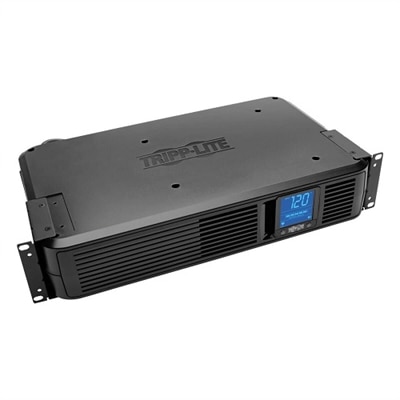
A rackmount 1U UPS is an uninterruptible power supply designed to provide battery backup while occupying one rack unit, or 1.75 inches, of vertical mounting space. Its low-profile shape suits organized workspaces where a desktop computer, monitors, and essential accessories need short-term protection from interruptions in utility power. Rather than sitting beside a chair or underneath a desk, the unit mounts horizontally in a compatible equipment rack, keeping its enclosure within a defined footprint. For a designer working on a detailed illustration, a brief outage can mean losing recent edits; for someone recording voice tracks, even a momentary interruption can break a session. A UPS can bridge a short interruption or provide time to save work and shut down connected equipment properly, depending on the electrical load and battery condition. That role is different from supplying power throughout an extended outage. The 1U designation describes height, not capacity, runtime, or depth, so two units with the same mounting height can have very different capabilities and installation requirements. Many rackmount designs fit a nominal 19-inch mounting format, but enclosure depth, bracket placement, and rear connector clearance still determine how comfortably a unit fits. A shallow under-desk rack may require a shorter enclosure, while a deeper installation needs enough room for supported mounting hardware and cables without tight bends. Metal housings are common, providing a rigid structure around the electronics and battery, although construction and finish vary. Because batteries add substantial weight, a slim profile does not necessarily mean a lightweight accessory. Compatible rails, shelves, or brackets must support the unit as specified by its manufacturer; front mounting ears alone are not always sufficient. In a home office, creative studio, or dedicated desktop workspace, this combination of compact mounting and temporary backup can keep power protection neatly integrated with everyday equipment.
Electrical capacity and battery runtime define what a rackmount 1U UPS can support in practice. Capacity is commonly expressed in both volt-amperes, abbreviated VA, and watts, and connected equipment must remain within both ratings. The watt rating is especially useful when comparing the UPS with the actual power consumption of a desktop, display, and any accessories that need backup. A computer power supply’s maximum rated output is not the same as the computer’s everyday consumption: a desktop handling email may draw much less power than that same system rendering video or running a demanding game. Displays also add to the total, particularly when several remain connected. Some capacity headroom accommodates changing workloads, but it does not establish a guaranteed runtime. Runtime depends on the particular battery system, connected load, battery age, temperature, and state of charge. Manufacturer runtime charts provide a more meaningful reference than a broad promise of a certain number of minutes. At heavier loads, backup time may be brief; a lighter load generally allows longer operation, though the relationship is not strictly proportional. Output waveform is another important distinction. Pure sine wave output can be an important compatibility consideration for desktop power supplies with active power factor correction, while acceptance of a simulated or stepped waveform depends on the connected equipment’s requirements. Neither the 1U shape nor the VA rating identifies that waveform. Some line-interactive designs include automatic voltage regulation, which can correct certain input-voltage fluctuations without switching to battery operation. Transfer time also matters, since connected electronics must tolerate the interval between loss of utility power and battery output. Outlet arrangements deserve equal attention: some receptacles may provide battery backup and surge protection, while others provide surge protection only. Keeping the computer and primary monitor on battery-backed outlets supports a practical shutdown sequence, while high-draw appliances and devices with large startup demands generally belong outside that backup plan unless explicitly supported. Input voltage, plug type, and receptacle compatibility also need to match the intended U.S. workspace.
Everyday usability often comes down to details that are easy to overlook in a compact enclosure. A front display or status lights can make battery charge, load level, and operating conditions easier to understand, while audible alerts signal that attention is needed during an interruption or battery fault. Display functions, alarm controls, and software support vary by design. Where compatible communication features are provided, a connected computer may be able to begin an orderly shutdown automatically before the battery is exhausted. That can be useful when a long export continues after someone steps away from the desk, although software compatibility and configuration determine how the feature behaves. Acoustic performance matters in occupied rooms, too: fans, relay clicks, and alarms can be more noticeable in a quiet editing space than in a busy shared office. Ventilation openings need the clearances specified for the enclosure, and cables should remain clear of airflow paths and accessible for inspection. A cool, dry location within the manufacturer’s operating limits helps protect the electronics and battery; heat can shorten battery service life even when outages are infrequent. Routine care generally involves keeping exterior vents free of dust, reviewing status indicators, and performing self-tests according to the documentation. Battery chemistry, replacement procedures, and expected service life differ, so a user-replaceable battery should never be assumed from the rackmount form factor alone. Where replacement is supported, the specified compatible battery and appropriate recycling process are important parts of long-term ownership. A durable metal chassis can remain useful beyond the service life of its original battery, but enclosure durability does not eliminate battery maintenance. Power distribution is a separate function: Rackmount PDUs distribute power to multiple connections rather than supplying battery backup themselves. Any distribution accessory used with a UPS must be permitted by the relevant manufacturers and remain within all electrical ratings. For desktop users who value an orderly workspace, the practical appeal of a rackmount 1U UPS is its combination of low-profile mounting, clearly defined backup capacity, and accessible power-status information—not its height alone.
FAQs:
A rackmount 1U UPS is ideal for protecting critical electronics such as network switches, desktop computers, monitors, routers, and small-scale servers. It is also well-suited for AV equipment, smart home hubs, and other sensitive devices that require consistent power and protection from surges or outages.
A rackmount 1U UPS automatically provides backup power from its internal battery when it detects a loss of utility power. This ensures that connected devices continue to operate without interruption, allowing users time to save work, safely shut down systems, or maintain network connectivity during brief outages.
A 10 inch rack mount UPS is designed for environments where space is at a premium, such as small server closets, AV racks, or home labs. Its compact form factor allows for efficient use of limited rack space while still providing reliable power backup and protection for essential devices.
Many rack mount UPS models offer remote monitoring and management capabilities, often through network management cards or dedicated software. These features allow IT professionals and users to track power status, battery health, and event logs from anywhere, making it easier to maintain uptime and respond proactively to power issues.
Automatic voltage regulation (AVR) stabilizes incoming voltage to prevent minor fluctuations from affecting connected equipment. This feature helps extend the life of both the UPS battery and the devices it protects by reducing the frequency of battery usage and providing consistent, clean power.