$798.00
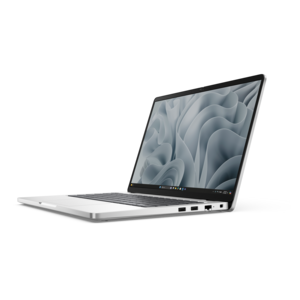
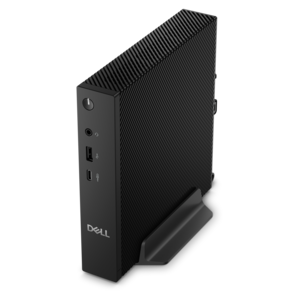
A compact thin client supporting cloud software, ThinOS, Windows 11 IoT Enterprise, or no operating system.
In today's fast-paced digital landscape, staying connected to your work and personal data from anywhere in the world is more critical than ever. Remote access solutions empower individuals and businesses to securely manage their devices and networks with ease, ensuring seamless connectivity and productivity no matter where you are. Whether you're a remote worker needing secure access to company resources or a tech-savvy individual looking for flexible control over your home devices, these solutions offer the versatility and reliability required to meet your needs. Explore a range of options designed to enhance your connectivity experience while maintaining top-notch security standards.
A compact thin client supporting cloud software, ThinOS, Windows 11 IoT Enterprise, or no operating system.
Remote access solutions help people use computers, applications and files from outside a traditional office while maintaining a thoughtful balance between convenience and control. For a work-from-home employee, that may mean signing in to business applications from a laptop at the kitchen table, reviewing a project from a quiet corner of the house or assisting a colleague without sitting beside the same screen. For an IT professional, remote access can provide a way to troubleshoot a desktop, install approved updates, check device performance or guide a user through an unfamiliar task from another location. These solutions may include virtual private networks (VPNs), zero trust network access (ZTNA), secure access service edge (SASE) capabilities, remote desktop and support software, and identity tools such as multi-factor authentication (MFA). Each approach serves a different purpose. A VPN creates an encrypted connection between an approved device and a protected business environment, while ZTNA is more selective, granting access to particular applications according to the user’s identity, device condition and permissions. SASE combines cloud-delivered connectivity and security functions for organizations with users working in several locations. Remote desktop tools allow an authorized person to view or control a computer as though they were sitting in front of it, which can be especially helpful when a specialized application or important file remains on another device. MFA adds another checkpoint beyond a password, often using an authentication app, security key or temporary code. Together, these capabilities support flexible work without treating every connection, device or user as automatically trustworthy.
Choosing among remote access solutions starts with understanding who will use them, what they need to reach and how much oversight the organization requires. A small business with a few employees may value a straightforward, cloud-managed service that is easy to deploy and administer, while a larger organization may need detailed policies for departments, contractors and external support providers. Look for controls that follow least-privilege access, allowing each person to use only the applications, files or computers necessary for their role. This limits unnecessary exposure if an account is compromised or a device is misplaced. Device-health checks can help confirm that an operating system is updated, security software is active and the connection comes from an approved device before access is granted. Session recording and auditing may be important for regulated work, technical support or vendor activity because they create a record of sign-ins, actions and connection times. Also compare client-based access, which requires an application on the user’s computer, with clientless access, which can operate through a web browser. Client-based tools may offer deeper functionality, while browser access can simplify use on a temporary or shared computer. Review compatibility with Windows and other operating systems, available mobile support, screen resolution, file transfer, printing, clipboard controls and the number of simultaneous sessions. Clear administrative dashboards, role-based permissions and easy account removal matter just as much as connection speed. For organizations coordinating access to remote equipment, a dedicated resource such as Remote Server Management may fit into a broader plan for monitoring and administration. A reliable laptop, comfortable monitor, responsive keyboard and dependable webcam can also make remote sessions feel less tiring, especially when a workday stretches through the cooler months and the home office becomes a regular workspace rather than an occasional stop.
Remote access products can serve a wide range of people, from employees and freelancers to instructors, support specialists, consultants and families managing computers in different locations. A student attending classes from home may use secure access to reach campus applications, while a designer or analyst may need a larger monitor and a powerful desktop connection to work comfortably with demanding software. A traveling professional can use a lightweight laptop and MFA to review documents from a hotel or shared workspace without relying on an unfamiliar computer. For technical teams, remote desktop and support capabilities can reduce interruptions by allowing an authorized specialist to diagnose a problem while the user describes what they see on screen. Families may also appreciate remote assistance when helping relatives with device settings, updates or everyday troubleshooting, provided that permission and account security remain clear. If considered as a gift, a remote access setup is most suitable for someone who already has a specific need, such as a student building a study station, a relative who wants occasional computer help or a home-based professional improving an established workspace. The most useful additions may be practical rather than flashy: a comfortable display for viewing multiple windows, a full-size keyboard for long sessions, a precise mouse, a headset for clear conversations or a privacy accessory for shared rooms. Before purchasing, confirm that the chosen solution supports the intended devices, operating systems and applications, and check whether licensing is based on users, devices, active connections or features. Strong encryption protects data while it travels, but secure habits still matter: use unique passwords, turn on MFA, keep software updated, lock the screen when stepping away and remove access when a role or project ends. With the right combination of hardware, software and permission controls, remote access solutions can make work and support feel close at hand even when people and computers are far apart.
Add the products you would like to compare, and quickly determine which is best for your needs.