$799.99
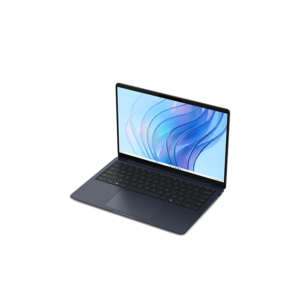
A remarkably thin, lightweight laptop designed for ultimate mobility and effortless everyday productivity.
Finding the right laptop is essential for anyone passionate about programming and coding, especially when working within a budget. If you’re looking for a laptop under $1000 for programming and coding, there are plenty of powerful and reliable options available to help you tackle projects efficiently. Whether you’re a student, a professional developer, or someone just starting your coding journey, choosing a laptop that fits both your technical needs and your budget can make all the difference in your workflow. Explore top-rated choices designed to support your creativity, productivity, and growth without exceeding the $1000 mark.
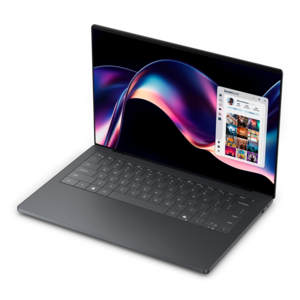
A remarkably thin, lightweight laptop designed for ultimate mobility and effortless everyday productivity.
A versatile 2-in-1 laptop with Intel Core processors, DDR5 memory, and multiple modes for creative work.
A durable, serviceable Chromebook designed specifically for education environments.
A durable, serviceable Chromebook designed specifically for education environments.
A durable, serviceable Chromebook designed for K–12 learning environments.
A durable, serviceable Chromebook laptop or 2-in-1 designed specifically for K-12 learning environments.
A laptop featuring an FHD camera, enlarged ergonomic keyboard, and AMD Ryzen™ processing.
A thin, lightweight laptop crafted from eco-friendly materials with Series 3 Intel Core processors for productivity.
A modern laptop powered by AMD Ryzen™ processors for effortless productivity and captivating entertainment.
A laptop featuring an FHD camera, enlarged ergonomic keyboard, and Intel 13th Gen processors.
A durable, serviceable laptop designed specifically for demanding education environments.
A portable laptop with a sleek design, 16:10 display, and AI PC options for productivity anywhere.
Choosing among the best laptops under $1000 for programming and coding starts with matching the computer to the way you plan to work. A student learning Python, Java, JavaScript, or HTML and CSS may need a different setup from a professional building mobile applications, compiling large projects, or running several development tools at once, but a few fundamentals apply across nearly every situation. Look for at least 16GB of RAM, which gives coding tools, web browsers, documentation, local databases, and testing environments enough working space to run together without constant slowdowns. A modern multi-core processor is equally important because it helps with compiling code, building applications, running scripts, and using virtual machines. Processor names and performance levels vary, so pay attention to the generation and class of the processor rather than relying on clock speed alone. An SSD should be considered essential in this price range. Solid-state storage allows the operating system to start quickly, applications to open with less waiting, and source-code folders, project libraries, and test environments to load smoothly. Storage capacity also deserves practical thought: a smaller drive may be suitable for lightweight web development, while a 512GB or 1TB SSD gives more breathing room for software development kits, virtual environments, design assets, local repositories, and personal files. A laptop with a bright 14-inch display is often easy to carry between classrooms, offices, libraries, and home workspaces, while a 15- or 16-inch display can make a noticeable difference when several code windows, a terminal, and a browser need to remain visible at the same time. For more guidance across different programming needs, visit Best Laptops for Software Engineers and Coders.
The keyboard is one of the most important features for anyone who spends hours writing code, even though it is easy to overlook while comparing technical specifications. Comfortable key travel, clear legends, a firm deck, and a layout that places frequently used keys within easy reach can reduce fatigue during long assignments or late-night debugging sessions. A precise touchpad is helpful when moving between files or reviewing documentation, while a built-in numeric keypad may appeal to users who work with data, spreadsheets, or database entries. Screen quality matters beyond size. A sharp resolution helps small text remain readable, and a matte or low-glare finish can be more comfortable beneath office lighting or beside a window. Battery life is useful for coding away from an outlet, but real-world runtime depends on display brightness, connected accessories, browser tabs, and the intensity of the applications being used. A lightweight chassis can make a daily commute easier, while a sturdier design may be worthwhile for a laptop that travels in a backpack every day. Check the available ports before purchasing as well. USB connections are useful for external drives, mice, keyboards, and development hardware; an HDMI connection can simplify presentations or a second display; and a modern USB-C port can support charging, accessories, or compatible monitors. Wireless connectivity should be dependable for downloading packages, accessing repositories, attending virtual classes, and collaborating with a team. Windows and Linux are widely used for general programming, web development, scripting, and many software tools, while developers creating applications for a particular mobile ecosystem should confirm that the laptop supports the operating system and development environment required for that platform. Compatibility is especially important when a course, employer, or project specifies a particular compiler, IDE, container tool, or virtualization feature.
Laptops in this price range can serve a broad group of users. They are practical for a student taking an introductory computer science course, a career changer building a portfolio, a freelancer creating websites for small businesses, or an experienced developer who wants a portable secondary computer. They can also make thoughtful gifts for a learner who has outgrown a basic school laptop and is ready to explore programming, robotics, game creation, or app development. For a beginner, a responsive keyboard and fast SSD can make the first lessons feel less frustrating: instead of watching a progress bar crawl across the screen, the learner can move from writing a few lines of code to testing the result almost immediately. For a more advanced user, 16GB of RAM and a capable processor provide room for an IDE, multiple browser tabs, a terminal, communication tools, and local testing services without forcing every application to close. Consider the laptop’s upgrade options, warranty coverage, webcam quality, speakers, and hinge construction as part of the complete ownership experience. A good development computer should fit comfortably into everyday routines, whether it sits on a desk beside a monitor, travels to a study group during the cooler months, or supports focused work from a quiet corner at home. The strongest choice is the one that balances processing performance, memory, SSD capacity, keyboard comfort, screen workspace, portability, and operating-system compatibility while staying within the $1000 budget.
Add the products you would like to compare, and quickly determine which is best for your needs.