Wide Format All In One Printers
Wide format all in one printers offer a versatile solution for businesses and creative professionals who need to handle larger documents, posters, or high-impact visuals with ease. Designed to streamline printing, scanning, copying, and faxing tasks, these printers are ideal for offices and workspaces that demand flexibility and efficiency. Explore a range of wide format all in one printers to find the perfect fit for your workspace and enjoy professional-quality results on every project.
This product is not available
Check out the following recommendations.




Wide Format All In One Printers
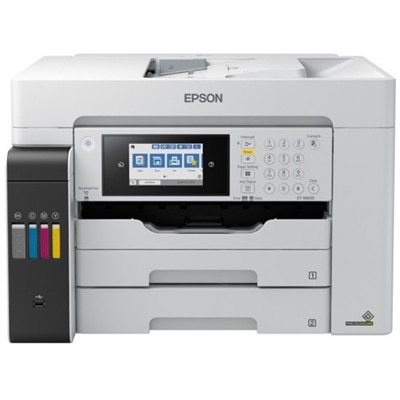
Wide-format all-in-one printers combine larger-format printing with scanning and copying in a single machine, with fax capability included on some models. They suit work that needs more room than a standard letter-size sheet, from a spreadsheet with dozens of columns to a presentation board with photographs, captions, and diagrams. Common print sizes include 11 x 17 inches, often called tabloid, and 13 x 19 inches, sometimes called super tabloid, although supported dimensions vary by printer. A3 measures approximately 11.7 x 16.5 inches and is not interchangeable with 11 x 17 inches, making exact paper specifications more useful than a broad format label. The extra page area can keep a floor plan readable, give a classroom chart larger lettering, or let a designer review a layout closer to its intended finished size. An all-in-one design also brings everyday document tasks into the same workspace: copying a signed form, scanning a sketch, and printing a multipage report can happen without separate dedicated machines. Importantly, maximum print size does not establish maximum scan or copy size. A printer that produces 13 x 19-inch output may have a smaller scanner bed or accept only certain original sizes through its document feeder. Large-original scanning, automatic two-sided printing, and borderless output are separate capabilities, each with its own size and media limits. Those distinctions matter in a home office handling oversized paperwork just as much as in a creative studio preparing visual presentations. For shoppers comparing the broader category, Wide Format Desktop Printers provides a related view of desktop printing options for larger pages. Within the all-in-one category, the most useful combination of functions depends on whether the daily workload centers on documents, images, or a mixture of both. Occasional posters and frequent office reports place different demands on paper handling, ink systems, and scanning features, even when both workflows require the same maximum sheet size.
Print quality depends on the relationship between the printer, its ink, the source file, and the paper rather than on resolution alone. Small type and fine architectural lines need clean edges, while photography and illustrations benefit from smooth gradients and consistent color across broad areas. Many desktop wide-format all-in-one printers use inkjet technology, with cartridge-based or refillable-tank ink systems depending on the design. Pigment and dye inks have different characteristics, but resistance to moisture, fading, and smudging depends on the complete ink-and-paper combination and the conditions in which a print is displayed. Plain office paper works well for many drafts and internal documents; compatible matte presentation paper gives diagrams and text a different finish, while suitable glossy or luster photo paper supports image-focused output. Paper weight, thickness, coating, and stiffness all affect feeding, so cardstock or specialty media requires explicit support rather than an assumption based on sheet dimensions. A rear feed or a relatively straight paper path can accommodate certain heavier materials when specified by the manufacturer. Borderless printing can create an edge-to-edge photograph, but it may slightly enlarge and crop the image, which matters when important details sit near the edge. For layouts requiring precise finished dimensions, margins and trimming allowances remain part of the workflow. Paper capacity also shapes day-to-day use. Separate trays can keep letter-size sheets ready for correspondence while larger paper stays loaded for charts, reducing repeated tray adjustments. Automatic duplex printing is convenient for reports, although supported sizes and paper types may be narrower than those accepted for single-sided output. An automatic document feeder helps process stacks of originals, but two-sided scanning may require a particular feeder design or manual intervention. For a teacher preparing illustrated handouts, an accountant reviewing a dense worksheet, or a photographer checking a large composition, these practical details often matter more than a single headline specification. Rated print speeds also need context: draft text, detailed color graphics, and high-quality photographs can take substantially different amounts of time.
Physical fit deserves as much attention as paper size because a wide-format all-in-one printer occupies more than its closed footprint during use. Extended input trays, an open scanner lid, rear-feed clearance, and the output tray can all add to the space required on a desk or cabinet. A sturdy, level surface with room to retrieve large pages helps prevent sheets from bending against a wall or spilling into a busy work area. Access to ink compartments and paper-path covers matters, too, particularly when the printer sits beneath shelving. In a shared household workspace, operating noise and the route between the computer, printer, and paper supplies can influence how comfortably the equipment fits into the room. Connection options may include USB, Wi-Fi, and supported mobile printing, but compatibility with the intended computers, phones, applications, and operating systems varies. Scanning destinations and software features deserve similar attention when documents need to become searchable files or move into an established filing routine. Long-term care is generally straightforward: suitable paper stored flat and dry feeds more consistently, a clean scanner glass helps keep streaks out of copies, and manufacturer-recommended maintenance supports reliable inkjet operation. Long periods without use can affect ink flow, while unnecessary cleaning cycles consume ink, so care routines should follow the printer’s own guidance. Recommended monthly print volume is a more useful workload reference than treating a maximum duty-cycle figure as an everyday target. For prints intended for display or frequent handling, compatible protective sleeves or framing can help limit wear after the ink has dried as directed. These printers can serve small businesses, educators, design students, hobby photographers, and households that regularly produce larger visual projects. As a gift for a creative workspace, the practical fit depends on the recipient’s available room, preferred materials, and actual need for oversized output. A well-matched wide-format all-in-one printer supports both ordinary paperwork and larger projects, keeping crisp documents, detailed scans, and expansive page layouts within a familiar desktop workflow.
FAQs:
When selecting a wide format all in one printer, key features to consider include print resolution for high-quality images, wireless connectivity for flexible device usage, automatic document feeders for efficient scanning and copying, and support for mobile printing such as compatibility with Android phones. Additionally, look for options like duplex printing, high-capacity ink systems, and intuitive touchscreen controls to streamline your workflow.
Wide format all in one printers are especially beneficial for creative professionals, architects, educators, small business owners, and anyone who regularly works with large documents or graphics. They are also ideal for hobbyists who enjoy printing posters, photo enlargements, or craft projects at home.
Yes, many wide format all in one printers support wireless and mobile printing. Features such as Wi-Fi Direct, AirPrint, and dedicated apps allow you to print directly from smartphones and tablets, including Android and iOS devices, making it easy to produce large-format prints from anywhere in your workspace.
These printers are perfect for producing architectural plans, engineering drawings, marketing posters, classroom materials, and high-quality photo enlargements. They are also great for creating professional presentations, banners, and custom signage for events or business use.
Yes, several models offer eco-friendly features such as refillable ink tanks, high-yield cartridges, and energy-saving modes. Some newer printers even provide inkless portable printer technology for specific uses, helping to reduce waste and lower your overall environmental impact.