$99.99
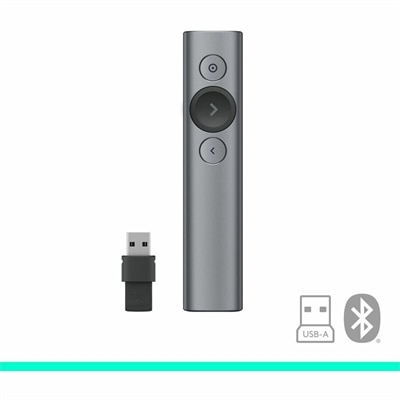
A slate wireless presentation remote with laser pointer, Bluetooth connectivity, digital highlighting, 30-meter range, and quick charging.
Wireless presentation remotes offer a seamless way to control your slides and enhance your presentations in classrooms, boardrooms, or conference halls. With the freedom to move around the room, these devices help you engage your audience and deliver information effectively. Explore a wide selection of wireless presentation remotes designed to support both professional and educational environments, making it easy to find the perfect tool for your presentation needs.
A slate wireless presentation remote with laser pointer, Bluetooth connectivity, digital highlighting, 30-meter range, and quick charging.
Wireless presentation remotes give presenters the freedom to move naturally through a room instead of staying beside a laptop or reaching back toward a keyboard after every slide. With a click, you can advance a presentation, return to an earlier point, or draw attention to a detail while continuing to speak and make eye contact. That extra mobility can make a noticeable difference in a classroom, conference room, training session, professional meeting, worship space, or community event. A presenter can step toward a screen to explain a chart, walk among attendees during a discussion, or pause near a demonstration without losing control of the presentation. Many wireless presentation remotes also include a pointer function, which can help direct attention to a specific figure, line of text, image, or section of a diagram. Before choosing one, consider the size and layout of the room. A range of about 50 to 65 feet is generally suitable for smaller meeting rooms, classrooms, and home offices, while larger auditoriums or long training spaces may call for a connection that reaches 90 feet or more. The stated range is only part of the picture; walls, furniture, display equipment, and nearby wireless devices can affect performance, so a little extra range may provide useful flexibility. A compact shape, clearly marked buttons, and a comfortable grip are equally important. During a long presentation, a remote should feel secure in your hand and allow you to advance slides by touch without looking down. Raised controls or distinct button shapes can help you operate it in dim lighting, while a storage slot for the receiver can reduce the chance of leaving a small accessory behind. Battery life, charging method, automatic sleep features, and battery indicators are practical details that matter when a presentation begins early in the morning or runs through several sessions. Consider how often the remote will travel between rooms, too. A lightweight design can slip into a laptop bag, while a sturdy exterior may be preferable for shared equipment used by teachers, trainers, or staff members. If you present from a lectern one day and walk around a classroom the next, a device with responsive buttons and a dependable connection can help you keep your attention on the audience rather than on the equipment. A carrying pouch, receiver storage, or simple power switch may seem minor, but these touches can make setup and cleanup smoother over time.
Connection type is another important consideration for wireless presentation remotes. A USB receiver can offer straightforward plug-and-play use, especially when presenting from a computer with a compatible USB port. USB-A receivers remain common and can be convenient in offices, schools, and shared meeting spaces where equipment varies from room to room. Bluetooth connectivity can be a better fit for newer laptops and lightweight computers that have limited physical ports, particularly when you prefer not to carry an adapter. Some remotes support both Bluetooth and a USB receiver, giving you more flexibility when moving between personal and shared devices. Check operating-system compatibility and presentation-software support before purchasing, and consider whether the remote needs administrator approval or software installation. Basic controls such as next, previous, start, and blank screen may be all that is needed for a straightforward slide deck. More advanced controls can include volume adjustment, scrolling, media playback, custom button mapping, and haptic feedback that confirms an action without requiring you to look at the remote. Pointer technology deserves special attention as well. A traditional red laser can stand out clearly on many projection screens, while a green laser may appear brighter in some environments. Physical lasers may be less effective on certain LED, LCD, or television displays, where a digital spotlight, magnifier, or on-screen highlighter can provide more precise emphasis. If several people will use the same device, look for simple pairing, clear instructions, and a connection designed to resist interference. Security can also matter in professional settings, so features such as encrypted wireless communication may be worth considering when presentations include confidential information. Wireless presentation remotes can make thoughtful gifts for teachers, students, trainers, public speakers, nonprofit organizers, and anyone who regularly shares ideas with a group. They can also be useful for a student preparing a class presentation, a manager leading a hybrid meeting, or a family member organizing a slideshow for a celebration. For everyday navigation away from the desk, explore Wireless Laptop Mice. The best choice is one that matches the presenter’s typical room, display technology, computer ports, presentation habits, and comfort preferences, helping every transition feel quiet, steady, and almost effortless. When the right remote is in hand, the presenter can move with confidence, give the audience a clear visual path through the material, and maintain a natural rhythm from the opening slide to the final point.
Add the products you would like to compare, and quickly determine which is best for your needs.