How to Uninstall Advanced Authentication Post 8.18 Upgrade
Summary: The Advanced authentication plug-in that is part of the Dell Data Protection software is no longer installed after the v8.18 build. The advanced authentication plug-in is not be uninstalled, when upgrading an older build of the software to a build later than v8.18. ...
This article applies to
This article does not apply to
This article is not tied to any specific product.
Not all product versions are identified in this article.
Symptoms
Affected Products:
- Dell Encryption
- Dell Data Protection | Encryption
- Dell Endpoint Security Suite Enterprise
Affected Versions:
- v8.0 to 10.0
Affected Operating Systems:
- Windows
Cause
Not Applicable
Resolution
In order to remove the Advanced Authentication Plugin, the respective setup file must be run to perform an uninstall.
- The Advanced Authentication plug-in setup file must be extracted from the Master Installer of the older build of Dell Encryption (formerly Dell Data Protection | Encryption) that was installed. For information, reference: How to Extract Child Installers from the Dell Data Security Master Installer.
- Once the child installers have been extracted, the Advanced Authentication installer can be found in \DDP\Advanced Authentication\XX.

Figure 1: (English Only) Advanced Authentication installer
- Run the setup.exe and follow the prompts to uninstall.
Warning: The next step is a Windows Registry edit:
- Back up the Registry before proceeding, reference How to Back Up and Restore the Registry in Windows
.
- Editing the Registry can cause the computer to become unresponsive on the next reboot.
- Contact Dell Data Security International Support Phone Numbers for assistance if you have concerns about performing this step.
- If there are any errors during uninstall regarding the encryption status, a registry value modification must be performed.
- Opening an administrative regedit, go to the key HKLM\Software\Dell\Dell Data Protection and locate PbaActivated and change the value from 1 to 0 and select OK.
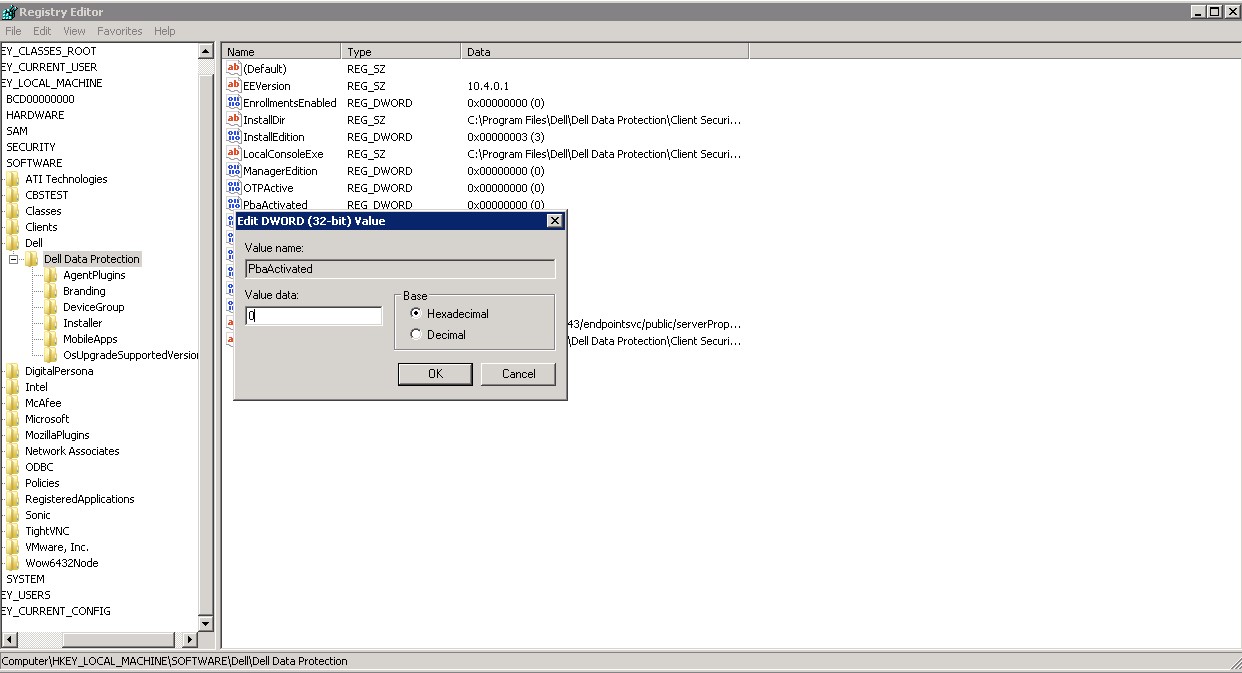
Figure 2: (Enlgish Only) Update PbaActivated
- Retry the Advanced Authentication uninstall, it should complete the uninstall this time.
- Before reboot, it is recommended to change the registry value of PbaActivated back to the original value.
To contact support, reference Dell Data Security International Support Phone Numbers.
Go to TechDirect to generate a technical support request online.
For additional insights and resources, join the Dell Security Community Forum.
Affected Products
Dell Encryption, Dell Endpoint Security Suite EnterpriseArticle Properties
Article Number: 000185272
Article Type: Solution
Last Modified: 11 Apr 2024
Version: 4
Find answers to your questions from other Dell users
Support Services
Check if your device is covered by Support Services.