VMware Carbon Black Cloud Sensor Status Description
Summary: This article describes the different status of an endpoint, their meaning, and the settings that can affect the status.
Instructions
Affected Products:
- VMware Carbon Black Cloud
On the VMware Carbon Black Cloud Console, going to the Inventory pane, it is possible to see the endpoints and their status.
Below is a list of the possible status and its meaning:

The sensor is periodically performing a check-In to the VMware Carbon Black Cloud console. If the sensor could do it within the last 30 days, then the sensor is showing as Active. This does not mean that the Device is turned on or reachable.

If the sensor did not do any check-in within the last 30 days, then it is shown as Inactive in the console. A device that is powered off or has a network issue could be the cause.
It is not possible to delete from the VMware Carbon Black Cloud console an Inactive sensor. Only Deregistered sensors can be deleted. To deregister an Inactive sensor, uninstall it from the cloud console (this changes its status to Deregistered).

A sensor can show as Deregistered for three main reasons:
- The sensor has been uninstalled locally or from the cloud console.
- The sensor has been reinstalled and a new active endpoint has been created for the same device, while the previous endpoint is showing as Deregistered.
- The sensor is installed on a VDI, and the tenant has globally active the setting Deregister VDI sensors that have been inactive for:

- The deregistered sensors are removed from the console if the tenant has a globally active the policy Delete sensors that have been deregistered for:
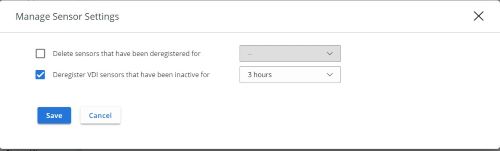

- The deregistered sensors are removed from the console if the tenant has a globally active the policy Delete sensors that have been deregistered for:
A sensor is showing in Bypass mode if it was placed in bypass by an administrator or if there is a problem with the sensor itself (that is failed sensor upgrade).

If a sensor has been placed in Quarantine status, then the device network filter driver connects to the VMware Carbon Black Cloud Console only, to remotely access the endpoint and manage it.

When an install email is sent to a user, but the sensor has not been installed yet, the device is listed as Pending and the user’s email address is showing in the console.

This icon shows when the sensor is reporting errors.
To contact support, reference Dell Data Security International Support Phone Numbers.
Go to TechDirect to generate a technical support request online.
For additional insights and resources, join the Dell Security Community Forum.