Networker: License installation is failing with error "invalid host"
Summary: Dell EMC NetWorker: Unable to check out 'NETWORKER_UPDATE': status - -9 'Invalid host. (-9,57)
This article applies to
This article does not apply to
This article is not tied to any specific product.
Not all product versions are identified in this article.
Symptoms
While validating the license on NMC (NetWorker management Console), the following error is observed:
Checking CLP connection using "D:\Program Files\EMC NetWorker\nsr/lic/licspec.properties".
Checking license properties file "D:\Program Files\EMC NetWorker\nsr/lic/licspec.properties"
Found 'license path=D:\Program Files\EMC NetWorker\nsr\lic\dpa.lic'
Checking license file 'D:\Program Files\EMC NetWorker\nsr\lic\dpa.lic'
License file 'D:\Program Files\EMC NetWorker\nsr\lic\dpa.lic' is unserved
172537:nsrlic: Unable to check out 'NETWORKER_UPDATE': status - -9 'Invalid host. (-9,57)'
172537:nsrlic: Unable to check out 'NETWORKER_CAPACITY': status - -9 'Invalid host. (-9,57)'
172527:nsrlic: License file 'D:\Program Files\EMC NetWorker\nsr\lic\dpa.lic' issues found: 0
FAILED
Cause
The backup server is configured with 2 NICs so while applying the license it was trying to connect to different NIC. .
Resolution
Disable the other IP from the network sharing centre:
Go to network sharing centre.
Change adaptor option.
Then disable the different secondary IP [Which is not the backup IP]
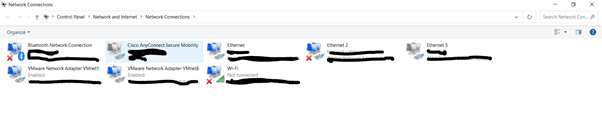
Once other IP is disabled then try to apply the license again with below steps:
1. On the NetWorker server, launch the NMC Administration window, right-click the server, and then select Properties from
the list. The Server Properties window appears.
click OK.
entry for CLP Capacity License that indicates the Authorized -No expiration date.
Once the license will applied successfully the enable the IP which you have disabled.
Go to network sharing centre.
Change adaptor option.
Then disable the different secondary IP [Which is not the backup IP]
Once other IP is disabled then try to apply the license again with below steps:
1. On the NetWorker server, launch the NMC Administration window, right-click the server, and then select Properties from
the list. The Server Properties window appears.
a. Select the Licensing tab.
b. In the CLP license text field, click Browse.
c. Navigate to the location of the license file, and select the license file.
d. Click Validate license. The Validate license button will be disabled until the contents are validated. You can check the
status by using the nsrlic -C command.
2. In the Server Properties window, on the Licensing tab, ensure that the following fields have the correct values, and thenb. In the CLP license text field, click Browse.
c. Navigate to the location of the license file, and select the license file.
d. Click Validate license. The Validate license button will be disabled until the contents are validated. You can check the
status by using the nsrlic -C command.
click OK.
● Solution ID
● CLP SWID
3. In the NMC Administration window, click Server, and then select Registrations. Confirm that the right pane displays an● CLP SWID
entry for CLP Capacity License that indicates the Authorized -No expiration date.
Once the license will applied successfully the enable the IP which you have disabled.
Additional Information
https://dl.dell.com/content/docu104858_networker-19-5-licensing-guide.pdf?language=en-us
Affected Products
NetWorker FamilyArticle Properties
Article Number: 000199901
Article Type: Solution
Last Modified: 07 May 2025
Version: 2
Find answers to your questions from other Dell users
Support Services
Check if your device is covered by Support Services.