How to Get the Service Tag from Dell Switches
Summary: This is a general guide on how to get the Service Tag from dell switches (OS6, OS9, OS10, or SONiC).
This article applies to
This article does not apply to
This article is not tied to any specific product.
Not all product versions are identified in this article.
Instructions
When having issues on your system and want to open a case, you may need to provide the device service tag to Technical Support. There are two ways to get the service tag as shown below:
The following are examples for different platforms:

Figure 1: Front panel view of 3248TE-ON switch
The back of the luggage tag includes the swich number as well as a QRL that lists a How-To site where you can watch videos about racking the switch, replacing components, configuring port channels, and so on.
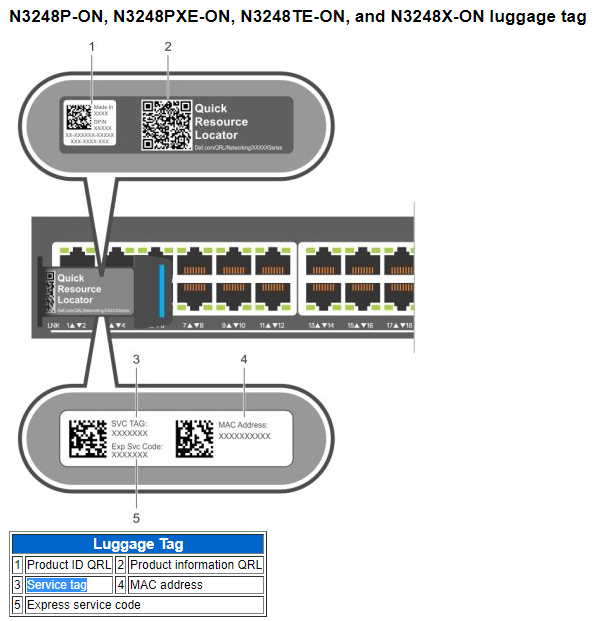
Figure 2: Back of luggage tag of an N3200-ON switch with QRL
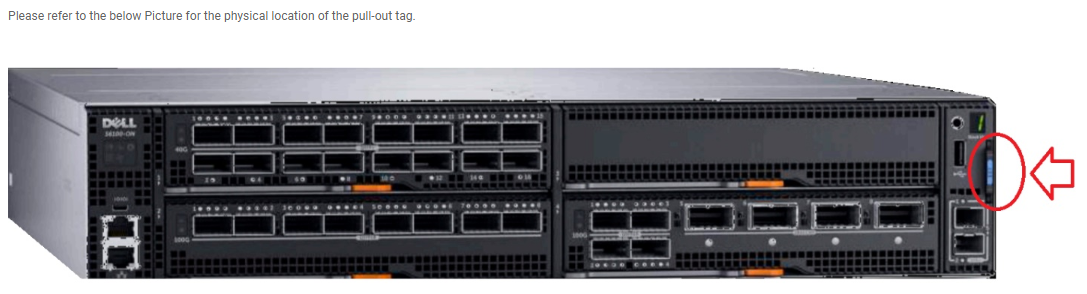
Figure 3: S6100-ON switch front view showing physical location of pull-out tag
Pull out the tag to find the service tag number.
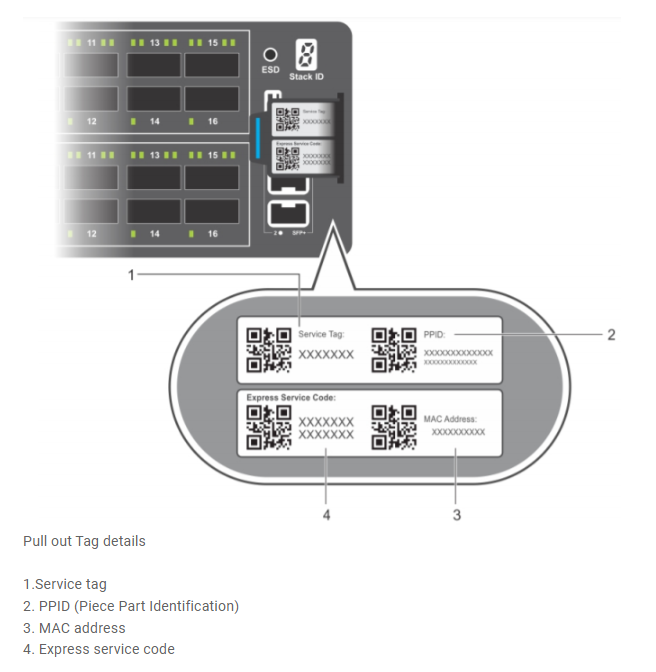
Figure 4: Pull-out tag showing switch information including service tag
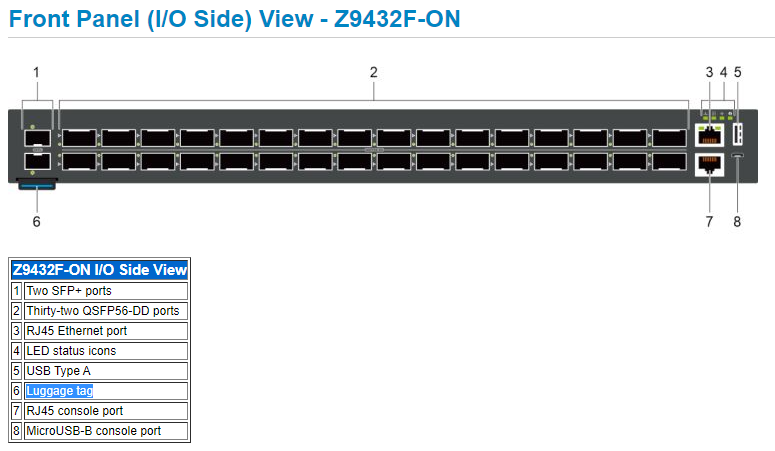
Figure 5: Z9432F-ON switch front panel view showing physical location of pull-out tag
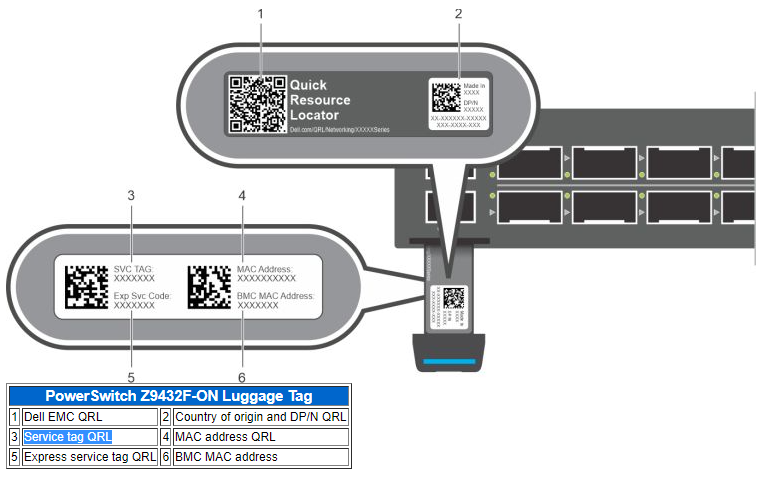
Figure 6: Back of luggage tag of Z9432F-ON switch with QRL

Figure 7: Front panel view of the X-Series indicating where the luggage tag is located

Figure 8:
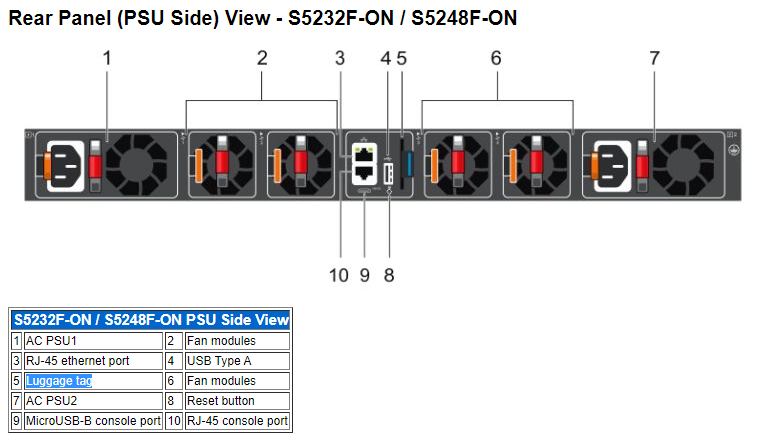
Figure 9:
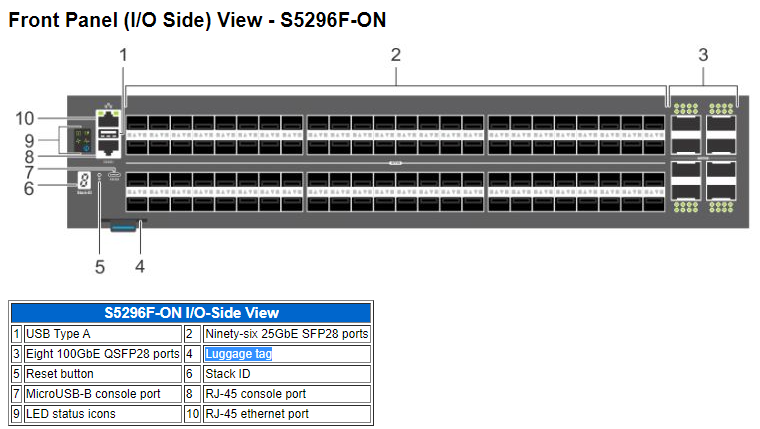
Figure 10:
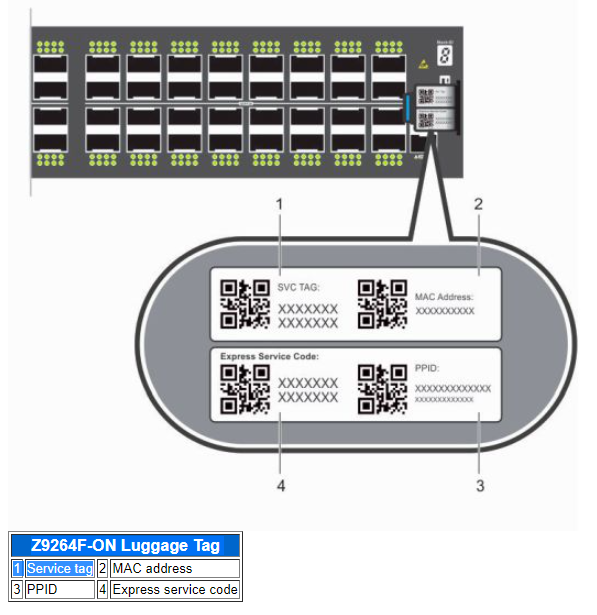
Figure 11:
The following are examples for different operating system (OS6, OS9, OS10, or SONiC).
Physical Review
If you are onsite and can physically touch the dell switch, you can get the Service Tag directly from the switch. There is one part called the Luggage Tag in dell switches (on the Front-I/O side or the Rear- PSU side Panel), it is marked with a blue color. Pull the luggage tag out of the swtich, and you see more details on the switch including the "Service Tag".The following are examples for different platforms:
-
N-Series
Dell PowerSwitch N3200-ON Series
This section covers the front panel (I/O panel) view of the PowerSwitch N3200-ON Series and also helps you identify the service tag.
The switch has a pull-out tag known as a luggage tag, on the Front (I/O-side) left side of the switch box.The front of the luggage tag includes switch ID information.
The switch has a pull-out tag known as a luggage tag, on the Front (I/O-side) left side of the switch box.The front of the luggage tag includes switch ID information.
Figure 1: Front panel view of 3248TE-ON switch
The back of the luggage tag includes the swich number as well as a QRL that lists a How-To site where you can watch videos about racking the switch, replacing components, configuring port channels, and so on.
Figure 2: Back of luggage tag of an N3200-ON switch with QRL
-
S-Series
S6100-ON Switch
The service tag is found from the pull-out tag on the Front (I/O-side) right side of the switch box. The pull-out tag is also known as the Luggage Tag. See to the view below for the physical location of the pull-out tag.
The service tag is found from the pull-out tag on the Front (I/O-side) right side of the switch box. The pull-out tag is also known as the Luggage Tag. See to the view below for the physical location of the pull-out tag.
Figure 3: S6100-ON switch front view showing physical location of pull-out tag
Pull out the tag to find the service tag number.
Figure 4: Pull-out tag showing switch information including service tag
-
Z-Series
Z9432F-ON Switch
This section covers the front panel view of the Z9432F-ON and helps you identify the service tag. The switch has a pull-out tag known as a luggage tag, on the Front (I/O-side) left bottom side of the switch box. The front of the luggage tag includes the switch ID information.
Figure 5: Z9432F-ON switch front panel view showing physical location of pull-out tag
The back of the luggage tag includes the swich number as well as a QRL that takes you to a How-To site where you can watch videos about racking the switch, replacing components, configuring port channels, and so on.
Figure 6: Back of luggage tag of Z9432F-ON switch with QRL
-
X-Series
This section covers X-Series switches.
This section covers the front panel view of the X-Series switches and helps you identify the luggage tag where the service tag number is found.
This section covers the front panel view of the X-Series switches and helps you identify the luggage tag where the service tag number is found.
Figure 7: Front panel view of the X-Series indicating where the luggage tag is located
-
More Examples for S5200F-ON and Z9264F-ON switches:
The S5200F-ON Series switches have a pull-out tag known as a luggage tag, on the I/O or PSU-side of the switch.
Figure 8:
Figure 9:
Figure 10:
The Z9264F-ON switch has a pull-out tag, known as a luggage tag, on the Front (I/O-side), Right side of the switch box.
Figure 11:
Command Line
If the service tag cannot be get physically, there is another way to find it by remote command. Log in to the switch by SSH or telnet remotely, then enter into priviledge mode (end with # prompt).The following are examples for different operating system (OS6, OS9, OS10, or SONiC).
-
OS6
N3248TE-ON Switch
N3248TE-ON# show version
Machine Description............... Dell Networking Switch
System Model ID................... N3248TE-ON     <-this is switch type
Machine Type...................... Dell Networking N3248TE-ON
Serial Number..................... TW0HXY4CDNT123456789     <-this is Serial Number
Manufacturer...................... 0xbc00
Burned In MAC Address............. 18XXX.5XXX.5XXX
System Object ID.................. 1.3.6.1.4.1.674.1XXX5.3XXX
CPU Version....................... C3338
SOC Version....................... BCM56371_A2
HW Version........................ 3
CPLD Versions..................... System 01.06  CPU 00.07
Image File........................ N3200v6.8.1
Software Capability............... Stack Limit = 12, VLAN Limit = 4093

unit active      backup      current-active next-active
---- ----------- ----------- -------------- --------------
1    6.8.1.0     6.6.3.17    6.8.1.0        6.8.1.0     <-this is current active version 6.8.1.0
N3248TE-ON#
N3248TE-ON# show system id
Service Tag: H3GXXXX      <-this is Service Tag
Serial Number: TW0HXY4CDNT123456789
Asset Tag: none
Unit Service tag       Serial number           Asset tag
---- ------------      --------------          ------------
1    H3GXXXX           TW0HXY4CDNT123456789    none
N3248TE-ON#
-
OS9
S6100-ON Switch
S6100-ON# show version
Dell EMC Real Time Operating System Software
Dell EMC Operating System Version:  2.0
Dell EMC Application Software Version:  9.14(2.11)      ------// this is current active version,
Copyright (c) 1999-2021 by Dell Inc. or its subsidiaries. All Rights Reserved.
Build Time: Mon Nov 29 11:55:50 2021
Build Path: /neteng/build/clones/coveritybuild-eqx-04/build/build04/SW/SRC
Dell EMC Networking OS uptime is 20 week(s), 2 day(s), 3 hour(s), 16 minute(s)
System image file is "system://A"
System Type: S6100-ON      ------// this is switch type,
Control Processor: Intel Rangeley with 3 Gbytes (3203227648 bytes) of memory, core(s) 4.
8G bytes of boot flash memory.
  1 4 Modules, 16x40G/8x100G ports TE/TF/FO/FI/HU G (S6100-ON)
  2 Ten GigabitEthernet/IEEE 802.3 interface(s)
  4 Twenty Five GigabitEthernet/IEEE 802.3 interface(s)
 16 Forty GigabitEthernet/IEEE 802.3 interface(s)
 15 Hundred GigabitEthernet/IEEE 802.3 interface(s)
S6100-ON#
S6100-ON# show inventory
System Type            : S6100-ON
System Mode            : 1.0
Software Version       : 9.14(2.11)
   ------// get Part Number and Svc Tag as below,
Unit Type                      Serial Number  Part Number  Rev  Piece Part ID            Rev  Svc Tag  Exprs Svc Code
---------------------------------------------------------------------------------------------------------------------
* 1  S6100-ON-01-FE-66/34      NA             0WKFYN       A00  CN-0WKFYN-77931-65F-0014 A00  328XXXX  666 595 XXX 2
  1  S6100-MOD-8xETH100-T      NA             0J7H53       A00  CN-0J7H53-77931-659-0014 A00  N/A      NA
  1  S6100-MOD-8xETH100-4CXP-T NA             015FMD       A00  CN-015FMD-77931-63F-0049 A00  N/A      NA
  1  S6100-MOD-16xETH40-F      NA             00NYND       A00  CN-00NYND-77931-63L-0247 A00  N/A      NA
  1  S6100-ON-PWR-AC           NA             0C3JK8       A00  CN-0C3JK8-17972-5BN-00TV A00  N/A      NA
  1  S6100-ON-PWR-AC           NA             0C3JK8       A00  CN-0C3JK8-17972-5BN-00T9 A00  N/A      NA
  1  S6100-ON-FAN              NA             0KXXNJ       A00  CN-0KXXNJ-77931-659-0006 A00  N/A      NA
  1  S6100-ON-FAN              NA             0KXXNJ       A00  CN-0KXXNJ-77931-659-0001 A00  N/A      NA
  1  S6100-ON-FAN              NA             0KXXNJ       A00  CN-0KXXNJ-77931-64I-0012 A00  N/A      NA
  1  S6100-ON-FAN              NA             0KXXNJ       A00  CN-0KXXNJ-77931-659-0118 A00  N/A      NA
 * - Management Unit
Software Protocol Configured
--------------------------------------------------------------
  LLDP
  RSTP
  SNMP
S6100-ON#
-
OS10
Z9432F-ON Switch
Z9432F-ON# show version
Dell EMC Networking OS10 Enterprise
Copyright (c) 1999-2022 by Dell Inc. All Rights Reserved.
OS Version: 10.5.4.4      ------// this is current active version,
Build Version: 10.5.4.4.193
Build Time: 2022-10-13T21:15:55+0000
System Type: Z9432F-ON      ------// this is switch type,
Architecture: x86_64
Up Time: 4 weeks 2 days 02:05:33
Z9432F-ON#
Z9432F-ON# show inventory
Product               : Z9432F-ON
Description           : Z9432F-ON 32x400GbE QSFP56-DD, 2x10GbE SFP+ Interface Module
Software version      : 10.5.4.4
Product Base          :
Product Serial Number :
Product Part Number   :
   ------// get Part Number and Svc Tag as below,
Unit Type                     Part Number  Rev  Piece Part ID             Svc Tag  Exprs Svc Code
-------------------------------------------------------------------------------------------------
* 1  Z9432F-ON                0GM6WJ       A00  TW-0GM6WJ-DNT00-0CH-0117  6QYXXXX  146 903 XXX X6
  1  Z9432F-ON-PWR-1-AC       0CPM5N       A00  CN-0CPM5N-DED00-0CE-0047
  1  Z9432F-ON-FANTRAY-1      0P6C79       A00  TW-0P6C79-DNT00-0CE-0106
  1  Z9432F-ON-FANTRAY-2      0P6C79       A00  TW-0P6C79-DNT00-0CE-0107
  1  Z9432F-ON-FANTRAY-3      0P6C79       A00  TW-0P6C79-DNT00-0CE-0108
  1  Z9432F-ON-FANTRAY-4      0P6C79       A00  TW-0P6C79-DNT00-0CE-0109
  1  Z9432F-ON-FANTRAY-5      0P6C79       A00  TW-0P6C79-DNT00-0CE-0110
  1  Z9432F-ON-FANTRAY-6      0P6C79       A00  TW-0P6C79-DNT00-0CE-0111
  1  Z9432F-ON-FANTRAY-7      0P6C79       A00  TW-0P6C79-DNT00-0CE-0112
Z9432F-ON#
S5248F-ON Switch
S5248F-ON# show version
Dell EMC Networking OS10 Enterprise
Copyright (c) 1999-2021 by Dell Inc. All Rights Reserved.
OS Version: 10.5.2.6      ------// this is current active version,
Build Version: 10.5.2.6.354
Build Time: 2021-06-15T08:30:09+0000
System Type: S5248F-ON      ------// this is switch type,
Architecture: x86_64
Up Time: 1 day 11:27:58
S5248F-ON#
S5248F-ON# show inventory
Product               : S5248F-ON
Description           : S5248F-ON 48x25GbE SFP28, 4x100GbE QSFP28, 2x200GbE QSFP-DD Interface Module
Software version      : 10.5.2.6
Product Base          :
Product Serial Number :
Product Part Number   :
   ------// get Part Number and Svc Tag as below,
Unit Type                     Part Number  Rev  Piece Part ID             Svc Tag  Exprs Svc Code
-------------------------------------------------------------------------------------------------
* 1  S5248F-ON                02TN4C       A00  CN-02TN4C-CES00-8AM-0017  76SXXXX  156 489 XXX X8
  1  S5248F-ON-PWR-2-AC       02RPHX       A00  CN-02RPHX-DED00-87G-04RI
  1  S5248F-ON-FANTRAY-1      0CNY0X       A00  CN-0CNY0X-CES00-89Q-0025
  1  S5248F-ON-FANTRAY-2      0CNY0X       A00  CN-0CNY0X-CES00-89Q-0026
  1  S5248F-ON-FANTRAY-3      0CNY0X       A00  CN-0CNY0X-CES00-89Q-0027
  1  S5248F-ON-FANTRAY-4      0CNY0X       A00  CN-0CNY0X-CES00-89Q-0028
S5248F-ON#
-
SONiC
Z9264F-ON Switch
Z9264F-ON# show version
Software Version  : 4.0.3-Enterprise_Advanced      ------// this is current active version,
Product           : Enterprise SONiC Distribution by Dell Technologies
Distribution      : Debian 10.13
Kernel            : 4.19.0-9-2-amd64
Config DB Version : version_4_0_2
Build Commit      : 3100fce2f
Build Date        : Thu Dec  1 18:40:24 UTC 2022
Built By          : sonicbld@sonic-lvn-csg-005
Platform          : x86_64-dellemc_z9264f_c3538-r0
HwSKU             : DellEMC-Z9264f-C64      ------// this is switch type,
ASIC              : broadcom
Hardware Version  : A01
Serial Number     : CN0DYJR5DND0093E0023      ------// this is Serial Number,
Uptime            : 16:42:57 up 17:59, 1 user, load average: 2.41, 2.29, 2.20
Mfg               : Dell EMC
...<output omitted>...
Z9264F-ON#
Z9264F-ON# show platform syseeprom
--------------------------------------------------------
Attribute                Value/State
--------------------------------------------------------
Crc 32                   :0x8D9BC2EF
Platform                 :x86_64-dellemc_z9264f_c3538-r0
Device Version           :1
Diag Version             :3.00.3.41-1
Hardware Version         :A01
Product Name             :Z9264F-ON      ------// this is switch type,
Location                 :Slot 1
Manufacture Country      :CN
Mfg Date                 :2019-03-14
Mfg Name                 :DND00
Base Mac Address         :20:04:XX:XX:BB:C9
Mac Addresses            :640
Onie Version             :3.42.1.9-6
Part Number              :0DYJR5      ------// this is Part Number,
Serial Number            :CN0DYJR5DND0093E0023      ------// this is Serial Number,
Service Tag              :HBSXXXX      ------// this is Service Tag,
Vendor Ext               :0x00 0x00 0x02 0xA2
Vendor Name              :Dell EMC
Z9264F-ON#
Affected Products
N Series, PowerSwitch, S Series, X Series, OS9, Enterprise SONiC Distribution, SmartFabric OS10 SoftwareArticle Properties
Article Number: 000211667
Article Type: How To
Last Modified: 10 Nov 2023
Version: 3
Find answers to your questions from other Dell users
Support Services
Check if your device is covered by Support Services.