Dellスイッチからサービス タグを取得する方法
Summary: これは、Dellスイッチ(OS6、OS9、OS10、SONiC)からサービス タグを取得する方法に関する一般的なガイドです。
This article applies to
This article does not apply to
This article is not tied to any specific product.
Not all product versions are identified in this article.
Instructions
システムに問題があり、ケースを開きたい場合は、デバイスサービスタグをテクニカルサポートに提供する必要がある場合があります。サービス タグを取得するには、次の2つの方法があります。
さまざまなプラットフォームの例を次に示します。

図1: 3248TE-ONスイッチ
の前面パネル図 荷物タグの背面には、スイッチのラック取り付け、コンポーネントの交換、ポート チャネルの設定などに関するビデオを視聴できるハウツー サイトのリストを示すQRLと、スウィチ番号が含まれています。

図2:QRL付きN3200-ONスイッチの荷物タグの背面

図3:引き出しタグの物理的な位置を示すS6100-ONスイッチの前面図 サービス タグ
番号を見つけるためにタグを引き出します。

図4:サービス タグを含むスイッチ情報を示すプルアウト タグ

図5:引き出しタグの物理的な位置を示すZ9432F-ONスイッチの前面パネル図

図6:QRL搭載Z9432F-ONスイッチの荷物タグの背面

図7:荷物タグの位置を示すXシリーズの前面パネル図
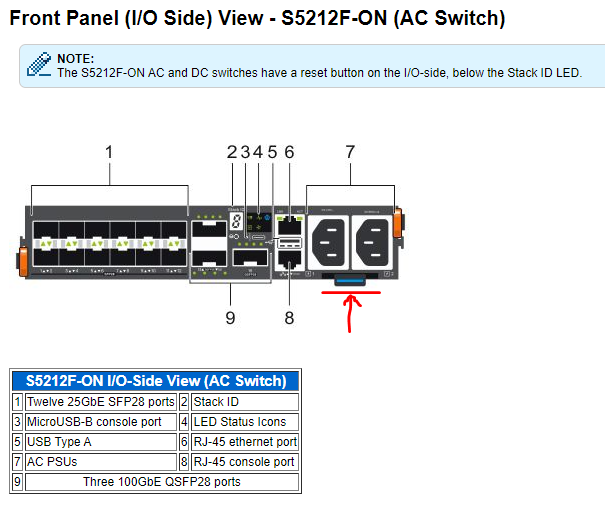
図8:

図9:

図10:

図11:
さまざまなオペレーティング システム(OS6、OS9、OS10、SONiC)の例を次に示します。
物理レビュー
オンサイトでデル製スイッチに物理的にタッチできる場合は、スイッチから直接サービス タグを取得できます。デル製スイッチには、荷物タグと呼ばれるパーツが1つあります(前面I/O側または背面PSUサイド パネル)。青色でマークされています。スイッチから荷物タグを引き出すと、「サービスタグ」を含むスイッチの詳細が表示されます。さまざまなプラットフォームの例を次に示します。
-
N-Series
Dell PowerSwitch N3200-ONシリーズ
このセクションでは、PowerSwitch N3200-ONシリーズの前面パネル(I/Oパネル)ビューについて説明し、サービス タグの識別にも役立ちます。
スイッチには、スイッチ ボックスの前面(I/O側)左側に、荷物タグと呼ばれるプルアウト タグがあります。荷物タグの前面には、スイッチID情報が含まれています。
スイッチには、スイッチ ボックスの前面(I/O側)左側に、荷物タグと呼ばれるプルアウト タグがあります。荷物タグの前面には、スイッチID情報が含まれています。
図1: 3248TE-ONスイッチ
の前面パネル図 荷物タグの背面には、スイッチのラック取り付け、コンポーネントの交換、ポート チャネルの設定などに関するビデオを視聴できるハウツー サイトのリストを示すQRLと、スウィチ番号が含まれています。
図2:QRL付きN3200-ONスイッチの荷物タグの背面
-
Sシリーズ
S6100-ONスイッチ
サービス タグは、スイッチ ボックスの前面(I/O側)右側にあるプルアウト タグから見つかります。引き出しタグは、荷物タグとも呼ばれます。引き出しタグの物理的な位置については、以下の図を参照してください。
サービス タグは、スイッチ ボックスの前面(I/O側)右側にあるプルアウト タグから見つかります。引き出しタグは、荷物タグとも呼ばれます。引き出しタグの物理的な位置については、以下の図を参照してください。
図3:引き出しタグの物理的な位置を示すS6100-ONスイッチの前面図 サービス タグ
番号を見つけるためにタグを引き出します。
図4:サービス タグを含むスイッチ情報を示すプルアウト タグ
-
Zシリーズ
Z9432F-ONスイッチ
このセクションでは、Z9432F-ONの前面パネル図について説明し、サービス タグの識別に役立ちます。スイッチには、スイッチ ボックスの前面(I/O側)左下に、荷物タグと呼ばれるプルアウト タグがあります。荷物タグの前面には、スイッチID情報が含まれています。
図5:引き出しタグの物理的な位置を示すZ9432F-ONスイッチの前面パネル図
荷物タグの背面には、スイッチのラック取り付け、コンポーネントの交換、ポート チャネルの設定などに関するビデオを視聴できるハウツー サイトに移動するQRLと同じ番号が記載されています。
図6:QRL搭載Z9432F-ONスイッチの荷物タグの背面
-
Xシリーズ
このセクションでは、Xシリーズ スイッチについて説明します。
このセクションでは、Xシリーズ スイッチの前面パネルビューについて説明し、サービスタグ番号が見つかった荷物タグを識別するのに役立ちます。
このセクションでは、Xシリーズ スイッチの前面パネルビューについて説明し、サービスタグ番号が見つかった荷物タグを識別するのに役立ちます。
図7:荷物タグの位置を示すXシリーズの前面パネル図
-
S5200F-ONおよびZ9264F-ONスイッチのその他の例:
S5200F-ONシリーズ スイッチには、スイッチのI/OまたはPSU側に、荷物タグと呼ばれるプルアウト タグがあります。
図8:
図9:
図10:
Z9264F-ONスイッチには、スイッチ ボックスの前面(I/O側)の右側に、荷物タグと呼ばれるプルアウト タグがあります。
図11:
コマンド ライン
サービス タグを物理的に取得できない場合は、リモート コマンドでサービス タグを検索する別の方法があります。SSHまたはtelnetを使用してリモートでスイッチにログインし、priviledgeモードに入ります(#プロンプトで終了)。さまざまなオペレーティング システム(OS6、OS9、OS10、SONiC)の例を次に示します。
-
OS6
N3248TE-ONスイッチ
N3248TE-ON# show version
Machine Description............... Dell Networking Switch
System Model ID................... N3248TE-ON     <-this is switch type
Machine Type...................... Dell Networking N3248TE-ON
Serial Number..................... TW0HXY4CDNT123456789     <-this is Serial Number
Manufacturer...................... 0xbc00
Burned In MAC Address............. 18XXX.5XXX.5XXX
System Object ID.................. 1.3.6.1.4.1.674.1XXX5.3XXX
CPU Version....................... C3338
SOC Version....................... BCM56371_A2
HW Version........................ 3
CPLD Versions..................... System 01.06  CPU 00.07
Image File........................ N3200v6.8.1
Software Capability............... Stack Limit = 12, VLAN Limit = 4093

unit active      backup      current-active next-active
---- ----------- ----------- -------------- --------------
1    6.8.1.0     6.6.3.17    6.8.1.0        6.8.1.0     <-this is current active version 6.8.1.0
N3248TE-ON#
N3248TE-ON# show system id
Service Tag: H3GXXXX      <-this is Service Tag
Serial Number: TW0HXY4CDNT123456789
Asset Tag: none
Unit Service tag       Serial number           Asset tag
---- ------------      --------------          ------------
1    H3GXXXX           TW0HXY4CDNT123456789    none
N3248TE-ON#
-
OS9
S6100-ONスイッチ
S6100-ON# show version
Dell EMC Real Time Operating System Software
Dell EMC Operating System Version:  2.0
Dell EMC Application Software Version:  9.14(2.11)      ------// this is current active version,
Copyright (c) 1999-2021 by Dell Inc. or its subsidiaries. All Rights Reserved.
Build Time: Mon Nov 29 11:55:50 2021
Build Path: /neteng/build/clones/coveritybuild-eqx-04/build/build04/SW/SRC
Dell EMC Networking OS uptime is 20 week(s), 2 day(s), 3 hour(s), 16 minute(s)
System image file is "system://A"
System Type: S6100-ON      ------// this is switch type,
Control Processor: Intel Rangeley with 3 Gbytes (3203227648 bytes) of memory, core(s) 4.
8G bytes of boot flash memory.
  1 4 Modules, 16x40G/8x100G ports TE/TF/FO/FI/HU G (S6100-ON)
  2 Ten GigabitEthernet/IEEE 802.3 interface(s)
  4 Twenty Five GigabitEthernet/IEEE 802.3 interface(s)
 16 Forty GigabitEthernet/IEEE 802.3 interface(s)
 15 Hundred GigabitEthernet/IEEE 802.3 interface(s)
S6100-ON#
S6100-ON# show inventory
System Type            : S6100-ON
System Mode            : 1.0
Software Version       : 9.14(2.11)
   ------// get Part Number and Svc Tag as below,
Unit Type                      Serial Number  Part Number  Rev  Piece Part ID            Rev  Svc Tag  Exprs Svc Code
---------------------------------------------------------------------------------------------------------------------
* 1  S6100-ON-01-FE-66/34      NA             0WKFYN       A00  CN-0WKFYN-77931-65F-0014 A00  328XXXX  666 595 XXX 2
  1  S6100-MOD-8xETH100-T      NA             0J7H53       A00  CN-0J7H53-77931-659-0014 A00  N/A      NA
  1  S6100-MOD-8xETH100-4CXP-T NA             015FMD       A00  CN-015FMD-77931-63F-0049 A00  N/A      NA
  1  S6100-MOD-16xETH40-F      NA             00NYND       A00  CN-00NYND-77931-63L-0247 A00  N/A      NA
  1  S6100-ON-PWR-AC           NA             0C3JK8       A00  CN-0C3JK8-17972-5BN-00TV A00  N/A      NA
  1  S6100-ON-PWR-AC           NA             0C3JK8       A00  CN-0C3JK8-17972-5BN-00T9 A00  N/A      NA
  1  S6100-ON-FAN              NA             0KXXNJ       A00  CN-0KXXNJ-77931-659-0006 A00  N/A      NA
  1  S6100-ON-FAN              NA             0KXXNJ       A00  CN-0KXXNJ-77931-659-0001 A00  N/A      NA
  1  S6100-ON-FAN              NA             0KXXNJ       A00  CN-0KXXNJ-77931-64I-0012 A00  N/A      NA
  1  S6100-ON-FAN              NA             0KXXNJ       A00  CN-0KXXNJ-77931-659-0118 A00  N/A      NA
 * - Management Unit
Software Protocol Configured
--------------------------------------------------------------
  LLDP
  RSTP
  SNMP
S6100-ON#
-
OS10
Z9432F-ONスイッチ
Z9432F-ON# show version
Dell EMC Networking OS10 Enterprise
Copyright (c) 1999-2022 by Dell Inc. All Rights Reserved.
OS Version: 10.5.4.4      ------// this is current active version,
Build Version: 10.5.4.4.193
Build Time: 2022-10-13T21:15:55+0000
System Type: Z9432F-ON      ------// this is switch type,
Architecture: x86_64
Up Time: 4 weeks 2 days 02:05:33
Z9432F-ON#
Z9432F-ON# show inventory
Product               : Z9432F-ON
Description           : Z9432F-ON 32x400GbE QSFP56-DD, 2x10GbE SFP+ Interface Module
Software version      : 10.5.4.4
Product Base          :
Product Serial Number :
Product Part Number   :
   ------// get Part Number and Svc Tag as below,
Unit Type                     Part Number  Rev  Piece Part ID             Svc Tag  Exprs Svc Code
-------------------------------------------------------------------------------------------------
* 1  Z9432F-ON                0GM6WJ       A00  TW-0GM6WJ-DNT00-0CH-0117  6QYXXXX  146 903 XXX X6
  1  Z9432F-ON-PWR-1-AC       0CPM5N       A00  CN-0CPM5N-DED00-0CE-0047
  1  Z9432F-ON-FANTRAY-1      0P6C79       A00  TW-0P6C79-DNT00-0CE-0106
  1  Z9432F-ON-FANTRAY-2      0P6C79       A00  TW-0P6C79-DNT00-0CE-0107
  1  Z9432F-ON-FANTRAY-3      0P6C79       A00  TW-0P6C79-DNT00-0CE-0108
  1  Z9432F-ON-FANTRAY-4      0P6C79       A00  TW-0P6C79-DNT00-0CE-0109
  1  Z9432F-ON-FANTRAY-5      0P6C79       A00  TW-0P6C79-DNT00-0CE-0110
  1  Z9432F-ON-FANTRAY-6      0P6C79       A00  TW-0P6C79-DNT00-0CE-0111
  1  Z9432F-ON-FANTRAY-7      0P6C79       A00  TW-0P6C79-DNT00-0CE-0112
Z9432F-ON#
S5248F-ONスイッチ
S5248F-ON# show version
Dell EMC Networking OS10 Enterprise
Copyright (c) 1999-2021 by Dell Inc. All Rights Reserved.
OS Version: 10.5.2.6      ------// this is current active version,
Build Version: 10.5.2.6.354
Build Time: 2021-06-15T08:30:09+0000
System Type: S5248F-ON      ------// this is switch type,
Architecture: x86_64
Up Time: 1 day 11:27:58
S5248F-ON#
S5248F-ON# show inventory
Product               : S5248F-ON
Description           : S5248F-ON 48x25GbE SFP28, 4x100GbE QSFP28, 2x200GbE QSFP-DD Interface Module
Software version      : 10.5.2.6
Product Base          :
Product Serial Number :
Product Part Number   :
   ------// get Part Number and Svc Tag as below,
Unit Type                     Part Number  Rev  Piece Part ID             Svc Tag  Exprs Svc Code
-------------------------------------------------------------------------------------------------
* 1  S5248F-ON                02TN4C       A00  CN-02TN4C-CES00-8AM-0017  76SXXXX  156 489 XXX X8
  1  S5248F-ON-PWR-2-AC       02RPHX       A00  CN-02RPHX-DED00-87G-04RI
  1  S5248F-ON-FANTRAY-1      0CNY0X       A00  CN-0CNY0X-CES00-89Q-0025
  1  S5248F-ON-FANTRAY-2      0CNY0X       A00  CN-0CNY0X-CES00-89Q-0026
  1  S5248F-ON-FANTRAY-3      0CNY0X       A00  CN-0CNY0X-CES00-89Q-0027
  1  S5248F-ON-FANTRAY-4      0CNY0X       A00  CN-0CNY0X-CES00-89Q-0028
S5248F-ON#
-
SONiC
Z9264F-ONスイッチ
Z9264F-ON# show version
Software Version  : 4.0.3-Enterprise_Advanced      ------// this is current active version,
Product           : Enterprise SONiC Distribution by Dell Technologies
Distribution      : Debian 10.13
Kernel            : 4.19.0-9-2-amd64
Config DB Version : version_4_0_2
Build Commit      : 3100fce2f
Build Date        : Thu Dec  1 18:40:24 UTC 2022
Built By          : sonicbld@sonic-lvn-csg-005
Platform          : x86_64-dellemc_z9264f_c3538-r0
HwSKU             : DellEMC-Z9264f-C64      ------// this is switch type,
ASIC              : broadcom
Hardware Version  : A01
Serial Number     : CN0DYJR5DND0093E0023      ------// this is Serial Number,
Uptime            : 16:42:57 up 17:59, 1 user, load average: 2.41, 2.29, 2.20
Mfg               : Dell EMC
...<output omitted>...
Z9264F-ON#
Z9264F-ON# show platform syseeprom
--------------------------------------------------------
Attribute                Value/State
--------------------------------------------------------
Crc 32                   :0x8D9BC2EF
Platform                 :x86_64-dellemc_z9264f_c3538-r0
Device Version           :1
Diag Version             :3.00.3.41-1
Hardware Version         :A01
Product Name             :Z9264F-ON      ------// this is switch type,
Location                 :Slot 1
Manufacture Country      :CN
Mfg Date                 :2019-03-14
Mfg Name                 :DND00
Base Mac Address         :20:04:XX:XX:BB:C9
Mac Addresses            :640
Onie Version             :3.42.1.9-6
Part Number              :0DYJR5      ------// this is Part Number,
Serial Number            :CN0DYJR5DND0093E0023      ------// this is Serial Number,
Service Tag              :HBSXXXX      ------// this is Service Tag,
Vendor Ext               :0x00 0x00 0x02 0xA2
Vendor Name              :Dell EMC
Z9264F-ON#
Affected Products
N Series, PowerSwitch, S Series, X Series, OS9, Enterprise SONiC Distribution, SmartFabric OS10 SoftwareArticle Properties
Article Number: 000211667
Article Type: How To
Last Modified: 10 Nov 2023
Version: 3
Find answers to your questions from other Dell users
Support Services
Check if your device is covered by Support Services.