Bluetooth Device Shows Yellow Bang in Device Manager If Turning the Bluetooth off and on While Playing Audio
Summary: This article provides information about a Bluetooth device that shows a Yellow Bang in Device Manager.
This article applies to
This article does not apply to
This article is not tied to any specific product.
Not all product versions are identified in this article.
Symptoms
After connecting the Bluetooth Audio device, turn on or turn off the Bluetooth button Bluetooth, and device settings function is normal.
The issue occurs when clicking the turn on and turn off buttons while playing audio or during a Teams call or Zoom call.
The Bluetooth device shows a yellow exclamation in Device Manager when playing music turning off Bluetooth then turning on, once the issue happens, the Bluetooth on and off switch will gray out.
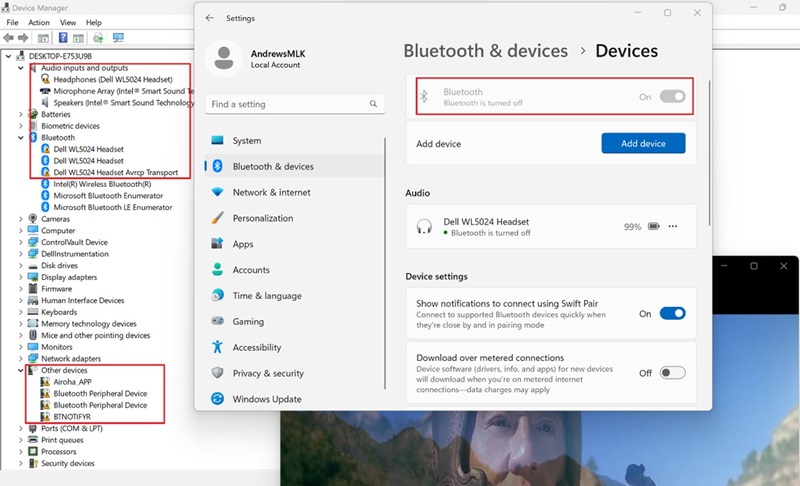
(Figure 1 - Bluetooth and Devices Settings)
Rebooting the system cannot recover from the issues.
Cause
Audio Bluetooth offload in the Intel Smart Sound Technology (ISST) driver problem
Resolution
Updating the Audio Driver to version 6.0.9597.1 or later on the computer resolves the issue. To download and install the driver, reference How to Download and Install Dell Drivers.
Once the audio driver is updated, the ISST driver is updated to version 10.29.00.9947 or later.
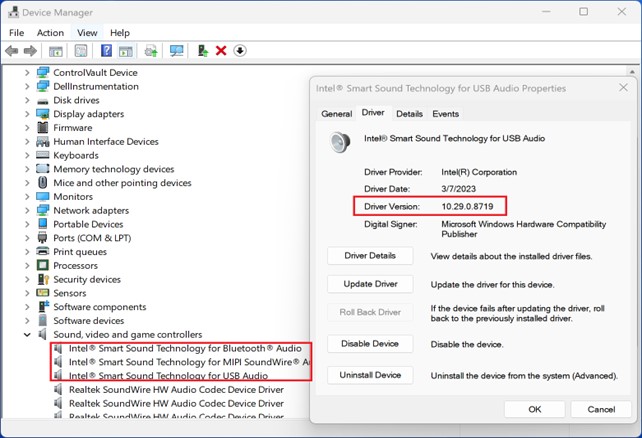
(Figure 2 - Device Manager)
Affected Products
Dell Pro 13 Premium PA13250, Latitude 3140, Latitude 7330, Latitude 9330, Latitude 5431, Latitude 5440, Latitude 7430, Latitude 7440, Latitude 9430, Latitude 7530, Latitude 7640, Latitude 5430, Precision 3470, Precision 3480, Precision 5480
, Precision 7670, Precision 7680, Precision 7770, Precision 7780
...
Article Properties
Article Number: 000220747
Article Type: Solution
Last Modified: 24 Apr 2025
Version: 7
Find answers to your questions from other Dell users
Support Services
Check if your device is covered by Support Services.