PowerProtect: PowerProtect Data Manager File System Agent-installatie mislukt op AIX met korte naam
Summary: Er is een specifieke vereiste voor het gebruik van korte naam op AIX-hosts met behulp van /etc/hosts-bestand dat is geconfigureerd om voorrang te krijgen op Domain Name System (DNS).
This article applies to
This article does not apply to
This article is not tied to any specific product.
Not all product versions are identified in this article.
Symptoms
Vanuit /opt/dpsapps/fsagent/logs/OpAgentSvc-XXXX.log:
YYYY-MM-DDTHH:MM:SS.232Z ERROR [] [pool-2-thread-8] [][][][TRACE_ID:b49b########06c0][] [c.e.d.e.a.s.s.i.AgentServiceImpl.sendRequestToAgentWithProtocol(282)] - Failed to connect to agent on host AIX_Client_Shortname:
org.springframework.web.client.ResourceAccessException: I/O error on GET request for "http://10.##.##.AIX_Client_IP:7000/greetings": 10.##.##.AIX_Client_IP:7000 failed to respond; nested exception is org.apache.http.NoHttpResponseException: 10.##.##.AIX_Client_IP:7000 failed to respond

YYYY-MM-DDTHH:MM:SS.903Z ERROR [] [pool-2-thread-2] [][ALERT:AGRA0004][][TRACE_ID:a10f046e33e7f0f4][] [c.e.d.e.c.s.m.DefaultMessageResourceModifier.printAlertLog(143)] - Date: Dec DD, YYYY HH:MM:SS PM; Summary: Unable to register the agent host AIX_Client_Shortname because short name is not allowed for agent registration.; Details: The agent registration cannot be completed because short name(s) for host are not allowed for the agent registration.; Recommended Action: To resolve the issue:
Cause
De gebruiker moet FSAgent short name gebruiken in het bestand /etc/hosts, maar PowerProtect Data Manager vereist om veiligheidsredenen fully qualified domain name (FQDN).
Resolution
- Controleer de DNS voor FSAgent Client om het probleem op te lossen naar FQDN
- Voer register.sh uit en installeer de Agent met behulp van het 'IP-adres' waar om FQDN of IP wordt gevraagd.
- Bewerkt /opt/dpsapps/agentsvc/register.sh-bestand om NSORDER = binding te hebben
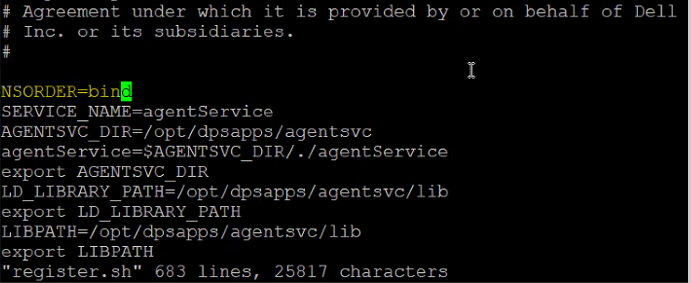
- Open het meest recente bestand onder /opt/dpsapps/agentservice/logs/Op*.log en zoek naar het trefwoord fqdns.
Voorbeeld:
YYYY-MM-DDTHH:MM:SS.104Z INFO [] [https-jsse-nio-9001-exec-1] [][][][663d021b-120d-4ac4-a83c-85e8ac6c90d9][] [c.e.d.e.a.s.c.StateChangeUtils.processAgentRequest(89)] - Process Agent Request
YYYY-MM-DDTHH:MM:SS.104Z INFO [] [https-jsse-nio-9001-exec-1] [][][][TRACE_ID:90f736f0f3001fb9][] [c.e.d.e.a.s.c.AgentRegistrationController.postAgentRegistration(107)] - Processing Agent Registration request for new payload: {
"agentId" : "ede44140-5c1e-4e5a-b5cf-2739c630720c",
"fqdns" : [ "AIX_Client_FQDN" ],
"addresses" : {
"ipv4" : [ "10.##.##.AIX_Client_IP" ],
"ipv6" : [ ],
"wwpn" : [ ]
},
- Test de back-up nu.
Products
PowerProtect SoftwareArticle Properties
Article Number: 000220749
Article Type: Solution
Last Modified: 23 Oct 2024
Version: 3
Find answers to your questions from other Dell users
Support Services
Check if your device is covered by Support Services.