APEX Multi Cloud Platform for Azure |AzureEdgeRemoteSupport 在 Azure 门户中显示为“失败”
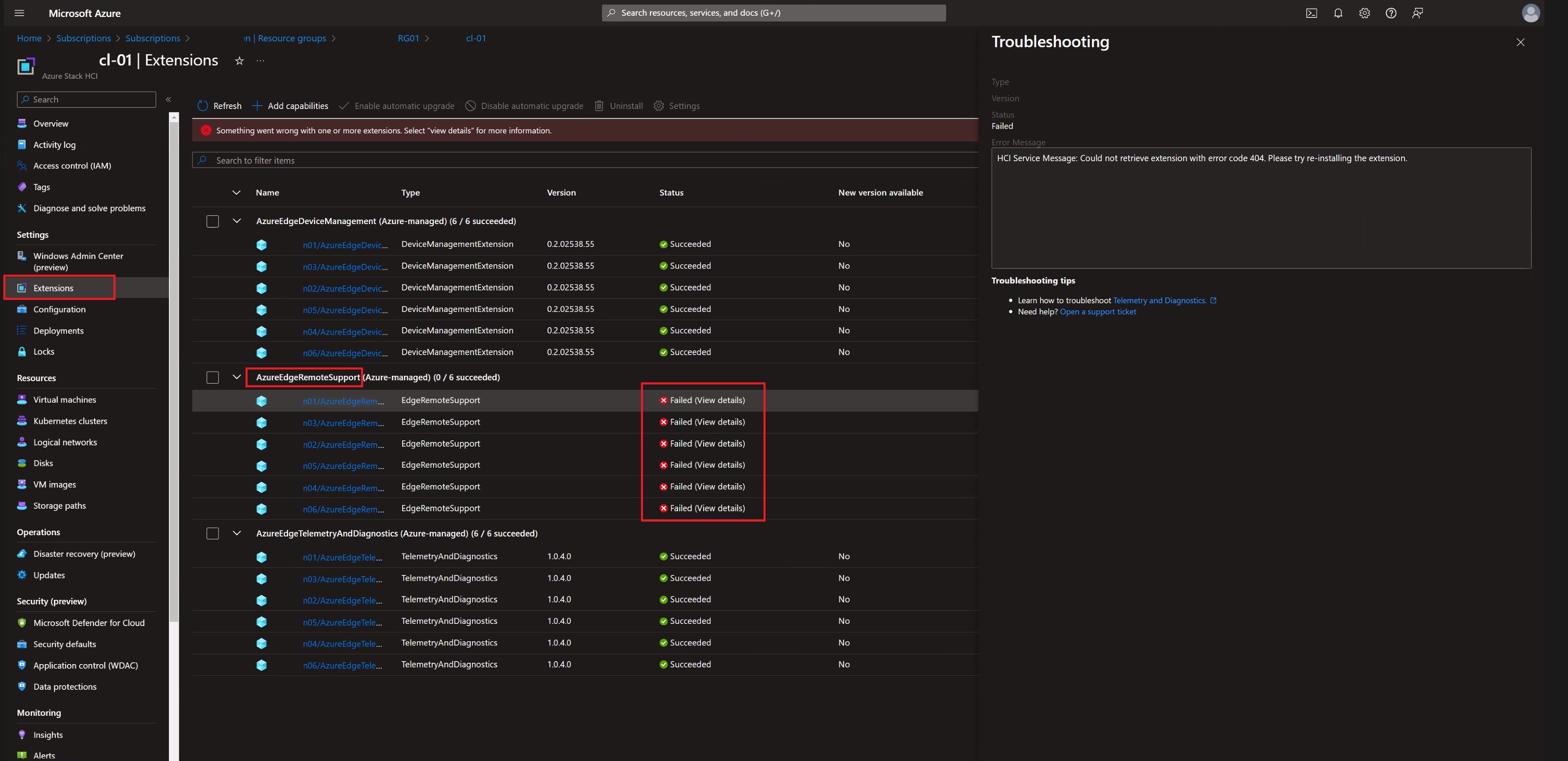
Summary: 在部署 APEX Multi-Cloud Platform for Azure(版本 1.01)后,AzureEdgeRemoteSupport 在 Azure 门户中显示为“Failed”。
This article applies to
This article does not apply to
This article is not tied to any specific product.
Not all product versions are identified in this article.
Symptoms
在部署 APEX Multi-Cloud Platform for Azure(版本 1.01)后,AzureEdgeRemoteSupport 在 Azure 门户中显示为“Failed”。此设置可在群集的资源组中找到。它位于 Settings-> Extensions下。
Cause
这是 Microsoft 已知的问题。群集完成部署后,AzureEdgeRemoteSupport(Azure-managed) 扩展在 Azure 门户中显示“失败”。
远程支持扩展正常工作,但由于扩展“EdgeRemoteSupport”与“AzureEdgeRemoteSupport”的名称不匹配,因此存在活动服务端问题。
远程支持扩展正常工作,但由于扩展“EdgeRemoteSupport”与“AzureEdgeRemoteSupport”的名称不匹配,因此存在活动服务端问题。
Resolution
微软正在开发来自Azure云的修复程序,但目前,他们表示可以忽略它。
或者,如果用户不想等待自动应用修复,则可以执行以下操作:
1.转到门户中 ARC 计算机边栏选项卡上的每个 ARC HCI 节点。
2.卸载具有错误名称的远程支持扩展。
3.通过运行以下命令,从群集中的任何节点触发强制同步:
或者,如果用户不想等待自动应用修复,则可以执行以下操作:
1.转到门户中 ARC 计算机边栏选项卡上的每个 ARC HCI 节点。
2.卸载具有错误名称的远程支持扩展。
3.通过运行以下命令,从群集中的任何节点触发强制同步:
sync-azurestackhci4.HCI RP 使用正确的名称重新安装扩展,HCI 刀片上的故障应会消失。
Affected Products
APEX Cloud Platform for Microsoft AzureArticle Properties
Article Number: 000223559
Article Type: Solution
Last Modified: 11 Apr 2024
Version: 2
Find answers to your questions from other Dell users
Support Services
Check if your device is covered by Support Services.