NetWorker: Save sets cloned to Cloud Tier are not marked as Transit after upgrade to NetWorker 19.11
Summary: This Article describes a defect detected in NetWorker which prevents newly-cloned save sets being marked correctly for migration to the cloud when using Data Domain Cloud Tier devices.
This article applies to
This article does not apply to
This article is not tied to any specific product.
Not all product versions are identified in this article.
Symptoms
- Save sets cloned to DD Cloud Tier devices successfully
- Upon investigation, newly-cloned save sets are not marked as In Transit in NetWorker's media database: NetWorker: Understanding Save Set Flags
- Active Tier usage may rise unexpectedly as DD Cloud Tier volume save sets are not being migrated to the cloud
- Cloning or recovery from save sets on the DD Cloud Tier results in errors
- Problem affects save sets cloned to Cloud Tier after upgrade to 19.11 from 19.10 which were cloned with RPS disabled
Cause
This problem is currently under review by NetWorker Engineering. Save sets cloned to DD Cloud Tier devices are affected if RPS cloning is disabled. This setting is represented in the NetWorker Management Console, NetWorker server properties: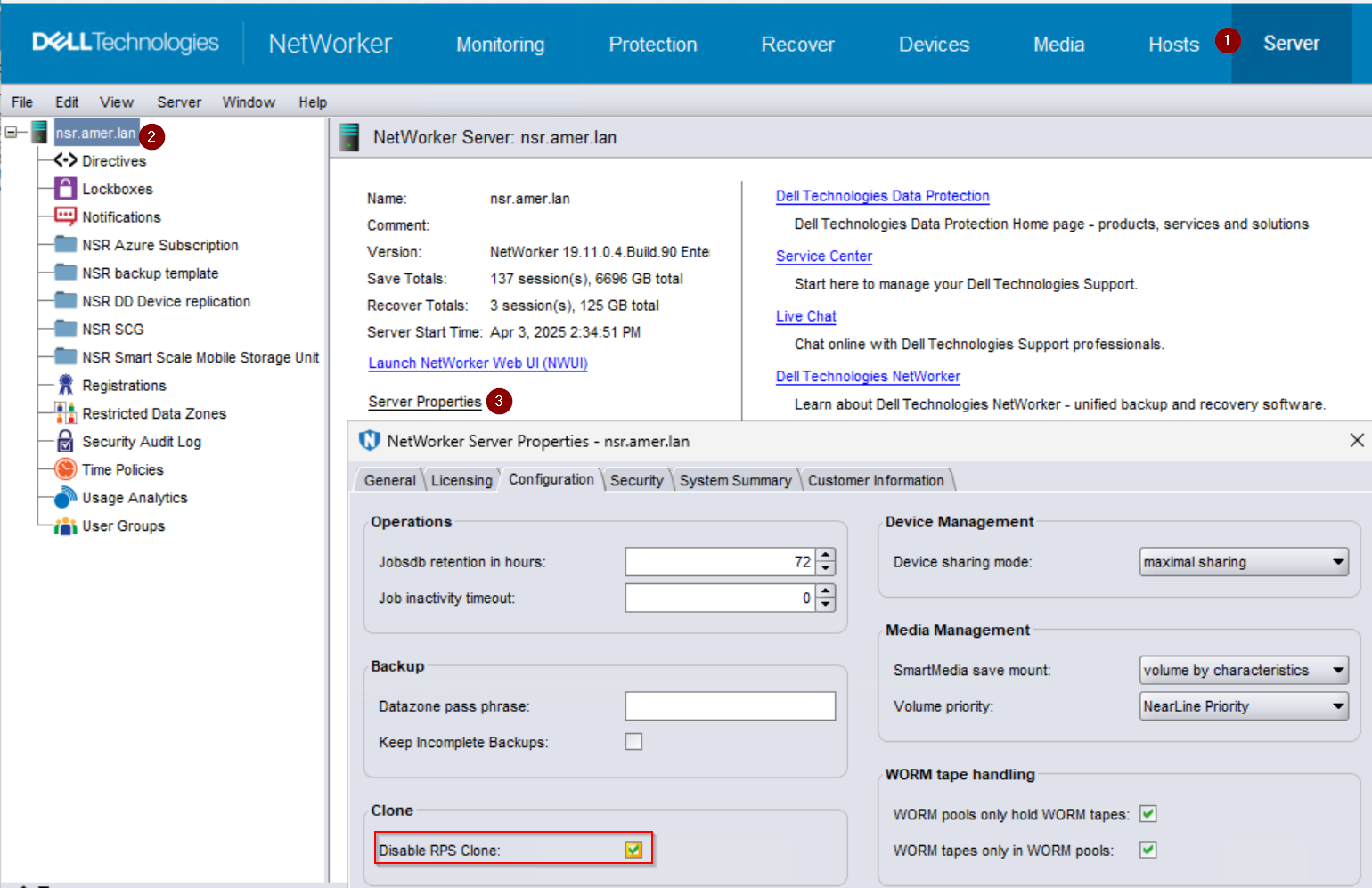
The save sets in question fail to read, recover, or clone due to NetWorker interpreting the lack of Transit flag in its media database normally: the save set has already been migrated, and must be recalled from the cloud for any read operation. However, due to the defect described, the data was never migrated, so despite the active tier copy being present and viable, the recall attempt fails.
Resolution
NOTE: The defect is under investigation, and this Article will be updated as remediation for the affected save sets is tested and verified.
Workaround:
Ensure that Disable RPS Clone is unticked on the NetWorker server; meaning RPS cloning is enabled. Save sets that are cloned with RPS enabled are not be affected, are properly marked, and migrated to the cloud. This change takes effect immediately for all clone jobs started after the change. Affected save sets will not be retroactively updated with the correct flags. Use either the NetWorker Management Console (NMC), or the NetWorker server nsradmin command to check and modify this setting.
NetWorker Management Console (NMC)
From the NMC perform the following:
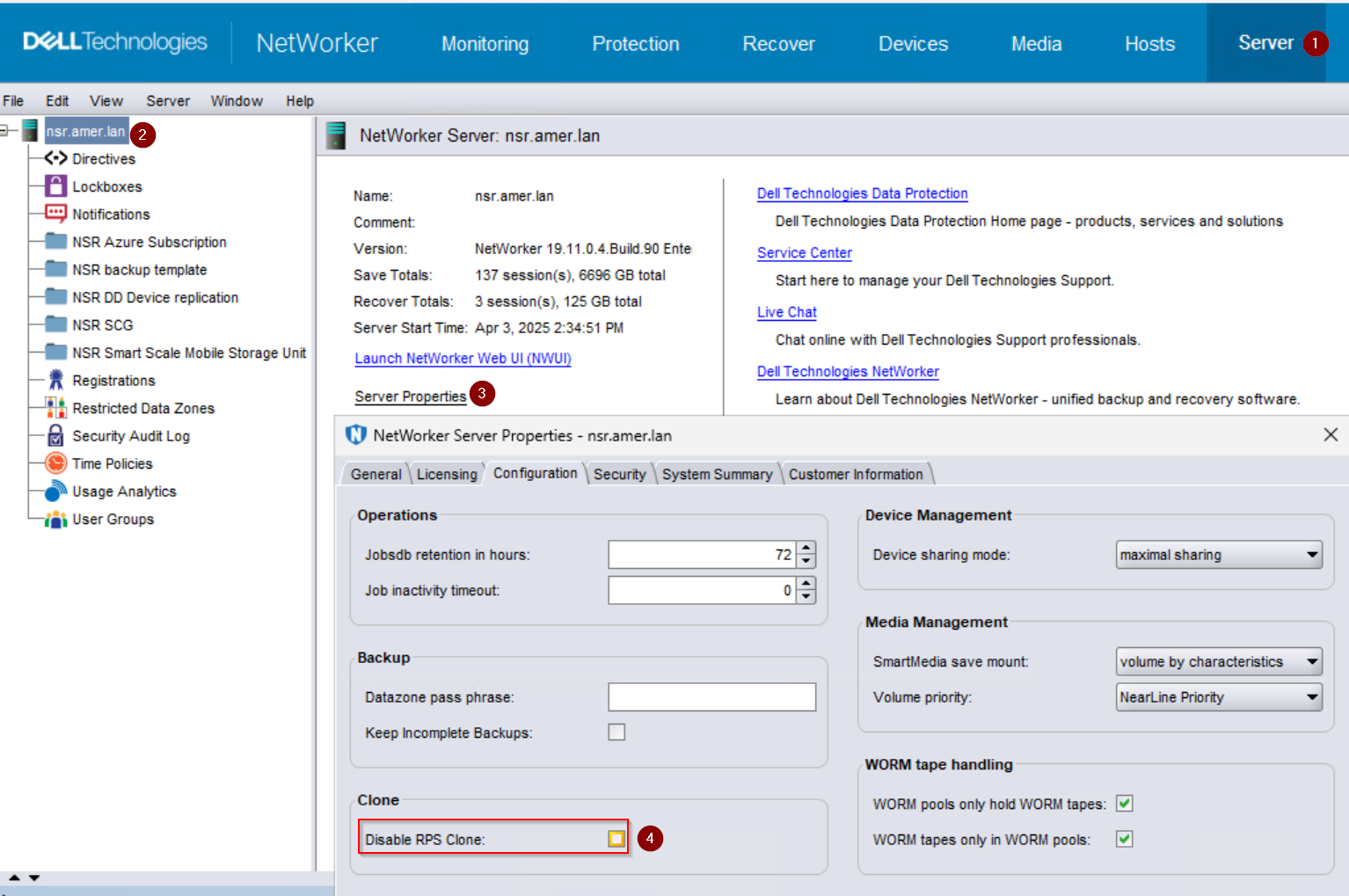
- Click the Server tab.
- Select the NetWorker server resource from the left menu.
- Click Server Properties.
- In the General tab, check the Disable RPS Cloning option. If the option is ticked, untick it.
nsradmin
To check if RPS cloning is disabled in your environment, enter the nsradmin interactive prompt on the NetWorker server:
nsradminFrom within the prompt, filter for the property and display the value:
nsradmin> show Disable RPS clonensradmin> print type: nsr
NOTE: A value of Yes indicates that the defect may be encountered in your data zone. A value of No is preferred and should be the configuration chosen, unless there are issues with cloning, and it has been disabled with the guidance of Dell Support.
To reenable RPS cloning, from within the interactive prompt, update the value to No:
nsradmin> update Disable RPS Clone: No
Products
NetWorkerArticle Properties
Article Number: 000308066
Article Type: Solution
Last Modified: 06 Apr 2026
Version: 2
Find answers to your questions from other Dell users
Support Services
Check if your device is covered by Support Services.