PowerStore: SupportAssist fails to re-enable with error: ServiceLevel Selection same as existing serviceLevel
Sammanfattning: SupportAssist may fail to re-enable with the error: Encountered an exception enabling SupportAssist Remote Access: Error Response: ServiceLevel Selection same as existing serviceLevel
Den här artikeln gäller för
Den här artikeln gäller inte för
Den här artikeln är inte kopplad till någon specifik produkt.
Alla produktversioner identifieras inte i den här artikeln.
Symptom
SupportAssist may fail to re-enable, normally after disabling temporarily for troubleshooting or other reasons, with errors:
Encountered an exception enabling SupportAssist Remote Access: Error Response: ServiceLevel Selection same as existing serviceLevel (Encountered an exception enabling SupportAssist Remote Access: Error Response: ServiceLevel Selection same as existing serviceLevel)
Example as seen from PowerStore Manager (UI):
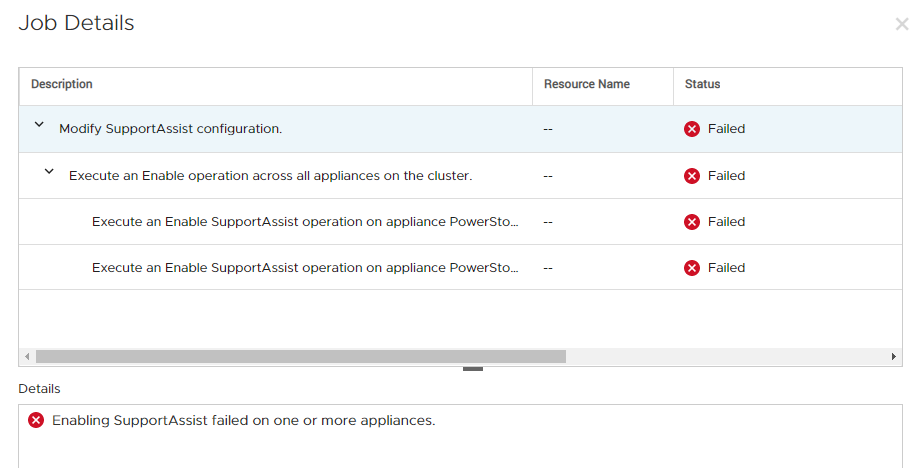
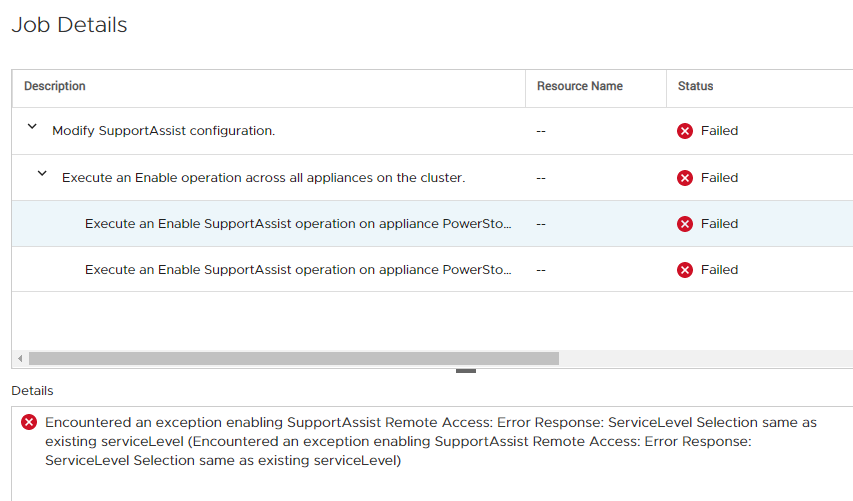
Enabling SupportAssist failed on one or more appliances.
Encountered an exception enabling SupportAssist Remote Access: Error Response: ServiceLevel Selection same as existing serviceLevel (Encountered an exception enabling SupportAssist Remote Access: Error Response: ServiceLevel Selection same as existing serviceLevel)
Example as seen from PowerStore Manager (UI):
Orsak
Under rare circumstances the SupportAssist status is not sync'd properly between the management layer and the SupportAssist services.
The SupportAssist engine may maintain a "memory" of being previously configured with a specific config, and when a new attempt to enable with the same config is received, it sends the error message 'ServiceLevel Selection same as existing serviceLevel'.
The SupportAssist engine may maintain a "memory" of being previously configured with a specific config, and when a new attempt to enable with the same config is received, it sends the error message 'ServiceLevel Selection same as existing serviceLevel'.
Upplösning
The easiest way around this is to temporarily enable SupportAssist with a different type or config than what was setup before.
For example, if before disabling SupportAssist was configured as Direct Connect with remote access / Remote Support, try to enable it without remote access / Remote Support. Once this is accepted by the system and SupportAssist is enabled with the new config, you can disable and switch to the intended SupportAssist type.
The permanent fix will be delivered in a future release of PowerStoreOS.
For example, if before disabling SupportAssist was configured as Direct Connect with remote access / Remote Support, try to enable it without remote access / Remote Support. Once this is accepted by the system and SupportAssist is enabled with the new config, you can disable and switch to the intended SupportAssist type.
The permanent fix will be delivered in a future release of PowerStoreOS.
Berörda produkter
PowerStore, PowerStore 1000X, PowerStore 1000T, PowerStore 3000X, PowerStore 3000T, PowerStore 5000X, PowerStore 5000T, PowerStore 7000X, PowerStore 7000T, PowerStore 9000TProdukter
PowerStore 9000XArtikelegenskaper
Artikelnummer: 000183691
Artikeltyp: Solution
Senast ändrad: 02 mars 2021
Version: 1
Få svar på dina frågor från andra Dell-användare
Supporttjänster
Kontrollera om din enhet omfattas av supporttjänster.