$2299.00
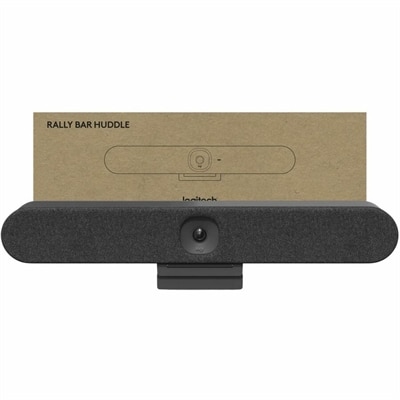
An all-in-one 4K conferencing bar featuring AI-powered audio, noise suppression, automatic shutter, and flexible mounting.
In today's fast-paced digital landscape, AI video conferencing is revolutionizing the way we connect, collaborate, and communicate. With cutting-edge artificial intelligence technology at its core, this innovative solution enhances virtual meetings by streamlining interactions and optimizing user experiences. Whether you're a business professional looking to boost productivity or a remote team striving for seamless communication, AI video conferencing offers an intuitive platform that adapts to your needs. Explore the future of virtual meetings and discover how this technology can transform your professional interactions into dynamic and efficient exchanges.
An all-in-one 4K conferencing bar featuring AI-powered audio, noise suppression, automatic shutter, and flexible mounting.
AI video conferencing brings intelligent assistance to everyday calls, helping conversations feel more natural whether participants are gathered around a table, working from home, or joining from different locations. Products in this category can combine high-quality cameras, clear microphones, vivid displays, and AI-enabled computing features to improve the entire meeting experience. Smart framing can automatically adjust the view as people move, keeping a speaker centered or widening the frame when another participant joins. Speaker tracking can help remote attendees follow the conversation without requiring someone to operate the camera, while background blur can reduce visual distractions in a busy room. AI-powered noise cancellation and voice isolation are especially useful in real homes and shared workspaces, where keyboard clicks, air conditioners, pets, traffic, and nearby conversations can otherwise compete with a presenter’s voice. Some conferencing software can also create real-time transcriptions, searchable meeting records, summaries, and action items, making it easier to revisit an important discussion after the call ends. Live captions and translation features may help multilingual teams communicate more comfortably, although availability and performance can vary by platform, language, and subscription. For a closer look at camera options, explore Video Conference Cameras designed to support clearer, more engaging virtual meetings.
When choosing products for AI video conferencing, start with the way the equipment will be used. A remote professional who spends several hours in meetings may value a comfortable laptop, a sharp built-in camera, clear microphone pickup, and a display that makes faces, shared documents, and captions easy to see. A student or instructor may benefit from automatic framing, bright image quality, and simple controls that make it easier to present from a bedroom, study area, or classroom. For a small business, a larger monitor can provide room for participants, presentation materials, chat, and notes at the same time, while a dedicated camera or microphone may improve the experience for everyone in the room. Consider resolution, field of view, low-light performance, autofocus, privacy controls, and whether the camera can be positioned at eye level. A wide field of view is helpful for group meetings, but a narrower view may feel more natural for one person. Microphone pickup should match the room: close-range voice isolation can work well at a desk, while a broader pickup pattern may be preferable for a compact meeting area. AI effects such as background replacement, portrait lighting, eye contact adjustments, and automatic framing can make calls look polished, but they should complement—not obscure—natural expressions and gestures. Check compatibility with the conferencing applications used by your household or organization, along with the operating system, available ports, display connections, and privacy settings. Many newer computers include neural processing units, or NPUs, that handle selected AI tasks locally. This dedicated hardware can help manage blur, framing, audio effects, and other enhancements while reducing the load on the main processor and helping preserve battery life. Hardware-accelerated features may vary, so reviewing supported functions is important when comparing options.
AI video conferencing products can support nearly anyone who needs to communicate face to face from a distance. Professionals can use them for interviews, project reviews, client presentations, training sessions, and recurring team check-ins, while independent workers can create a more polished presence without building a complicated studio. Families may use a camera and comfortable display to stay connected with relatives during the cooler months, share milestones, or make a familiar kitchen table feel closer across the miles. These products can also make thoughtful gifts for graduates, first-time remote workers, students moving into a new living space, or relatives who want easier video calls with friends and family. A useful setup does not need to be elaborate: a laptop or desktop with AI-capable features, a monitor placed at a comfortable height, a camera aligned near the center of the screen, and a quiet microphone can make a meaningful difference. Place the primary light in front of the speaker rather than behind them, keep the camera close to eye level, and leave enough open space around the frame for automatic tracking to work smoothly. For shared spaces, look for convenient privacy shutters, mute controls, and settings that make it obvious when the camera or microphone is active. Clear video also depends on a stable internet connection and the conferencing platform’s own capabilities, while advanced machine-learning codecs may help maintain high-definition images with less data in supported environments. Whether the goal is a more focused workday, a welcoming virtual classroom, or a warmer family conversation, the right combination of AI-enabled hardware and thoughtful placement can make remote communication feel clearer, calmer, and more personal.
Add the products you would like to compare, and quickly determine which is best for your needs.