DVI Adapters
Elevate your connectivity with our diverse range of DVI adapters, designed to seamlessly bridge the gap between various digital devices and displays. Whether you're looking to connect your computer to a monitor, projector, or television, DVI adapters offer a versatile solution for ensuring high-quality video transmission. Explore our collection to find the perfect adapter that meets your needs, ensuring compatibility and convenience in your digital setup. With options suited for different configurations, these adapters are essential tools for optimizing your multimedia experience.
This product is not available
Check out the following recommendations.




DVI Adapters
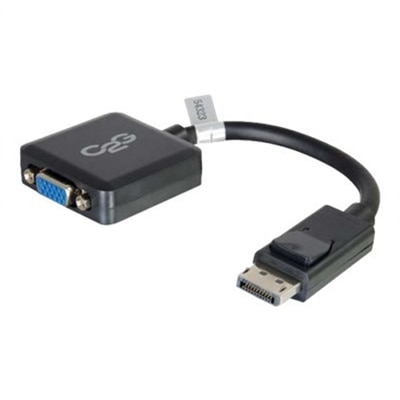
DVI adapters provide a practical way to connect a computer, laptop, docking accessory or other video source to a monitor or projector with a DVI input. They are especially useful when a newer device needs to work with an older display that still has a dependable DVI connection. Common configurations include HDMI to DVI, DisplayPort to DVI and USB-C to DVI, with the correct choice determined by the output port on the source device and the input port on the display. For example, an HDMI-to-DVI adapter can connect an HDMI-equipped computer to a DVI monitor, while a DisplayPort-to-DVI adapter can help link a desktop or laptop with a DisplayPort output to an older screen. A USB-C-to-DVI adapter may be suitable for a compatible laptop or tablet, but USB-C ports do not all support video output, so the source device’s specifications should be checked before choosing an adapter. If the display uses VGA instead of DVI, a separate category such as DisplayPort To VGA Adapters may be a better match. Paying close attention to both ends of the connection helps prevent a frustrating situation in which every cable appears secure but the screen remains blank.
Connector details matter because DVI is available in several formats. DVI-D carries digital video only, while DVI-I can support digital and analog signals through its additional contacts; DVI-A is designed for analog video and is less common. The adapter should match the DVI port’s pin layout as well as its gender, meaning whether the display or adapter requires a male or female connector. A digital HDMI-to-DVI connection is often straightforward, and many basic passive adapters support resolutions such as 1920 x 1080 or 1920 x 1200 at 60Hz, depending on the source, display and cable. Higher resolutions, refresh rates or more complicated signal paths may require an active converter rather than a simple passive adapter. DisplayPort connections can also vary by direction and signal type, so an adapter intended to connect a DisplayPort output to a DVI display should not automatically be assumed to work in reverse. USB-C introduces another consideration: the port may support charging and data but not video, or it may rely on a compatible display-output mode. Checking the laptop or tablet manual, reviewing the monitor’s supported resolution and confirming the adapter’s direction before purchase can make setup much smoother, particularly for a home office where a monitor may be positioned behind a desk or mounted against a wall.
DVI adapters are useful for remote workstations, study areas, shared family computers, conference rooms, classrooms and entertainment setups that combine newer electronics with an established display. They can extend the useful life of a clear, comfortable monitor instead of requiring an immediate replacement simply because a newer computer uses a different video port. Someone working with spreadsheets, documents, photo libraries or browser windows may appreciate the extra screen space from an older DVI monitor, while a presenter can use an adapter to connect a compatible computer to a projector with a DVI input. They can also be a thoughtful addition to a practical home-office gift, especially for someone building a workspace from equipment collected over several years. Keep in mind that DVI transmits video but not audio. If sound is needed, the computer must send it through separate speakers, headphones or an audio cable, and a monitor with built-in speakers will not necessarily receive sound through a DVI connection. Before completing a setup, compare the source port, display port, supported resolution, refresh rate, DVI type and required cable length. A compact adapter can be convenient for a laptop bag, while a longer cable or a firmly secured connection may be preferable for a desktop that stays in one place. With those details aligned, a DVI adapter can quietly solve a common compatibility problem and help a trusted display remain part of a productive setup through changing equipment and everyday routines.
FAQs:
DVI adapters are often used to connect computers, laptops, monitors, projectors, and some media players. They are especially useful when you need to bridge older devices with DVI ports to newer equipment that uses HDMI, DisplayPort, or USB-C outputs.
The choice depends on your source and display devices. Active adapters are recommended when converting signals from DisplayPort or USB-C to DVI, especially for dual monitors or high-resolution displays. Passive adapters work well when both devices can natively support the signal conversion.
Standard DVI adapters and cables only transmit video signals. If you need to transfer audio, you will need a separate audio connection or use an adapter that supports both video and audio, such as an active usb c to hdmi adapter.
Yes, many DVI adapters support high-definition resolutions, including 1080p and higher. When choosing an adapter, check the supported resolution to ensure it matches your monitor’s capabilities for the best image quality.
Absolutely. With the right dp cable or DisplayPort to DVI adapter, you can connect your DVI monitor to a device that features a DisplayPort output. For additional options, you can also explore adapters like DisplayPort To VGA Adapters for broader compatibility.