$79.99
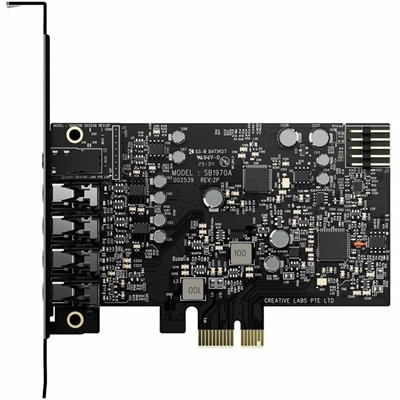
A PCIe sound card delivering 7.1 surround, 32-bit/384 kHz audio, 120 dB SNR, and headphone amplification.
Elevate your computing experience with our diverse range of PCI peripherals, designed to seamlessly enhance the functionality and performance of your system. Whether you're looking to expand connectivity, improve graphics, or boost data transfer speeds, these essential components offer versatile solutions tailored to meet your specific needs. Explore options that cater to both personal and professional environments, ensuring that your setup is equipped with the latest advancements in technology. Discover how PCI peripherals can transform your computer into a powerhouse of efficiency and capability.
A PCIe sound card delivering 7.1 surround, 32-bit/384 kHz audio, 120 dB SNR, and headphone amplification.
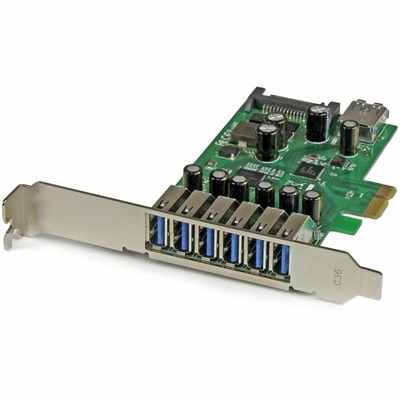
A seven-port PCIe USB 3.2 Gen 1 card delivering 5Gbps connectivity across desktop systems.
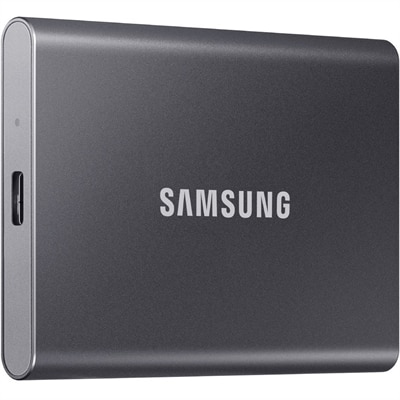
A titan gray portable SSD with PCIe NVMe, USB 3.2 Gen 2, 1TB capacity, metal construction, and AES 256-bit encryption.
PCI peripherals are expansion components that add capabilities to a desktop computer through an internal slot on the motherboard. The term PCI stands for Peripheral Component Interconnect, a standardized bus architecture created to let the processor communicate with add-in hardware. Traditional PCI used a parallel communication design, while PCI Express, commonly abbreviated PCIe, uses high-speed serial lanes to deliver greater bandwidth and more flexible performance. Because modern desktop computers have largely moved from traditional PCI to PCIe, shoppers should confirm the slot type, size, and available lane configuration before choosing an expansion card. A product listed for a PCIe x1 slot may not be intended for an x16 slot, even when the connectors appear similar, and a card that fits physically may still require a compatible operating system, power connection, or driver. Reviewing the computer’s service documentation and opening the case only after disconnecting power can help prevent compatibility surprises. The motherboard layout also matters: a large graphics-focused card may cover an adjacent slot, while a compact desktop may require a low-profile card and matching bracket. For a broader look at the openings and connection standards found on a computer, visit IO Ports.
PCI peripherals are often chosen to improve a desktop’s visual output, sound, recording capability, or everyday flexibility. Graphics expansion cards can support more demanding displays, smoother visual work, and additional monitors for a wider workspace, making them useful for creative applications, gaming, chart-heavy tasks, and multitasking across several windows. Audio cards can help refine playback and recording for people who spend long hours with music, podcasts, voice projects, or video production. Capture cards can bring video from an external source into a desktop for recording, streaming, editing, or archiving, while other expansion cards can add ports for modern accessories when the built-in selection is limited. These additions can be especially helpful in a home office where a small desktop has become the center of work, learning, entertainment, and personal projects. Picture a desk during the cooler months: a bright monitor displaying a video timeline, headphones resting beside the keyboard, and a compact desktop quietly handling a family recording or a creative assignment. The right PCI peripheral can make that setup feel less constrained without requiring a complete computer replacement. It may also be a thoughtful gift for a hobbyist, student, creator, or PC enthusiast who enjoys refining a desktop one component at a time, provided the recipient’s computer model and available slots are known.
Before selecting PCI peripherals, compare the card’s interface generation, physical dimensions, power requirements, operating-system support, and intended workload. PCIe generations are designed with a degree of backward and forward compatibility, but the final experience can be limited by the older component in the connection, so the computer and expansion card should be considered together. Check whether the desktop has enough room for the card’s height, length, and cooling hardware, particularly when the interior uses a compact chassis. Cooling deserves attention as well: a component that works continuously may benefit from steady airflow, clear vents, and a clean interior, while a crowded case can raise temperatures and affect reliability. Consider the number and type of outputs, the display resolutions supported, the audio connections provided, and whether included software is needed for full functionality. Driver availability is another practical detail, especially when upgrading an older computer or moving from one operating system version to another. For office users, the priority may be dependable operation and support for several displays; for creators, accurate playback and input quality may matter more; for gamers and visual enthusiasts, graphics performance, frame rates, and cooling can take precedence. A careful match helps ensure that a PCI peripheral serves a real purpose rather than becoming an unused component in a drawer. With the right fit, expansion hardware can extend the useful life of a desktop, simplify a busy workspace, and give everyday computing a more tailored feel.
Add the products you would like to compare, and quickly determine which is best for your needs.