Replacement DVD Drives For Laptops
Easily restore or upgrade your laptop’s media capabilities with replacement DVD drives for laptops. Whether you’re looking to revive older systems, expand your multimedia options, or ensure reliable access to physical media, these drives offer a seamless solution. Find the perfect match for your device and enjoy smooth performance for both personal and professional use. Explore a variety of replacement DVD drives for laptops designed to meet your needs and keep your system running efficiently.
This product is not available
Check out the following recommendations.




Replacement DVD Drives For Laptops
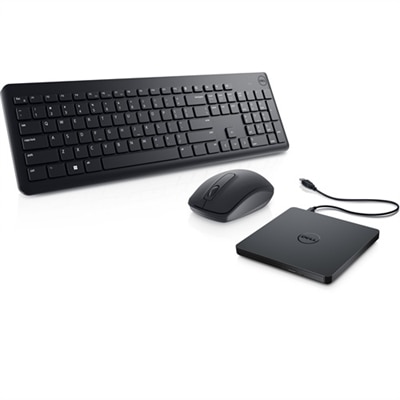
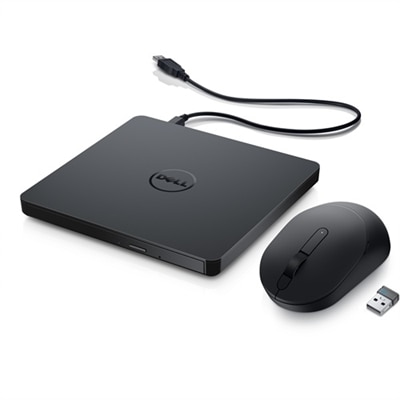
Replacement DVD drives for laptops provide a practical way to restore access to discs when an internal optical drive stops working, becomes unreliable, or is no longer included in a newer computer. Many current laptops are designed without a built-in disc slot, making a compact external USB DVD drive the simplest replacement for watching movie DVDs, opening archived files, installing older software, or creating personal backup discs. These drives typically connect through a USB cable and draw power from the laptop, so there is no separate power adapter to carry between rooms, offices, classrooms, or travel destinations. Their slim profiles fit easily beside a laptop in a sleeve or backpack, while tray-loading or slot-loading designs offer a familiar way to insert and remove discs. Before choosing a replacement DVD drive for a laptop, consider the computer’s available ports, operating system, and intended use. A laptop with standard USB-A ports can connect directly to a compatible drive, while a newer computer with USB-C ports may need a USB-C cable or adapter. Some external drives include more than one cable to support different computers, which can be especially useful in a household where one person uses an older laptop and another uses a newer model. A drive that reads DVDs may be enough for accessing movies and files, while a DVD writer or DVD-RW drive is the better choice for anyone who needs to write data, music, photos, or video to recordable discs. DVD and CD compatibility should be checked separately from Blu-ray support, since a standard DVD drive does not automatically read or write Blu-ray media.
An older laptop with a removable internal optical drive bay requires a different kind of replacement. Internal slim DVD drives must match the laptop’s physical dimensions and connection standard, with 9.5 mm thickness being common in many slim designs, although the exact fit varies by computer. The connector is often Slim SATA, but the drive bezel, mounting bracket, eject button position, and faceplate shape can also affect compatibility. Checking the laptop’s service information or comparing the existing drive with the replacement listing can help prevent ordering a part that fits the bay but does not align correctly with the chassis. Shoppers looking for internal options may also find useful information in the selection of SATA DVD RW Drives, particularly when the computer was designed with a removable optical drive. For many people, however, an external USB replacement avoids opening the laptop and is easier to move between computers. This can be helpful for a family that shares a single drive for old photo discs, tax records, software installers, or home-recorded videos. It is also convenient for someone returning to files stored on discs after a laptop upgrade. A bus-powered drive usually works from one USB connection, though performance can vary when connected through an unpowered hub or a crowded docking setup. For dependable operation, connect the drive directly to the laptop when possible and confirm that the computer recognizes it before inserting important media. Disc playback may require compatible software, particularly on newer operating systems, and certain commercially produced DVDs may include regional or copy-protection requirements that affect playback. Writing discs also depends on using compatible blank media and allowing the computer’s disc-burning software to complete the finalization process.
Replacement DVD drives for laptops can serve students, home-office users, families with stored media collections, travelers, and anyone maintaining an older computer for a specific task. A student may need one to access course materials distributed on discs, while a home user might use it to transfer family photographs from archived media to a newer computer. In a small office, an external drive can remain available for retrieving records, reading installation media, or making a physical copy of documents that need to travel without relying on an internet connection. It can also make a thoughtful practical gift for someone who has recently purchased a slim laptop but still owns shelves of DVDs and CDs; the compact size makes it easy to store alongside a computer, and the usefulness extends beyond a single project. During the cooler months, when more time is often spent indoors organizing files, watching a personal movie collection, or sorting through long-forgotten discs, a reliable drive can turn an otherwise inaccessible stack of media into usable content again. Look for clear information about read and write support, USB compatibility, operating-system requirements, dimensions, included cables, and warranty coverage. A quiet, lightweight design may matter for shared rooms or travel, while a sturdy enclosure and smooth disc tray can be valuable when the drive will be used frequently. Matching the drive to the laptop’s connection and the media being used is the most important step; once those details are settled, an external or internal replacement DVD drive can extend the usefulness of a laptop and keep older discs within easy reach.
FAQs:
When selecting a replacement DVD drive, consider compatibility with your laptop’s connection type, whether you need read-only or DVD burner capabilities, and plug-and-play support for your operating system. Additional features like M-DISC support for long-term data storage or dual-layer burning can also be helpful for those with specific archiving or media needs.
Yes, external DVD drives connect via USB and are designed for portability and versatility. They can be used with various devices, including laptops, desktops, and even some tablets, as long as the device supports the necessary USB connection and your operating system recognizes the drive.
Students, professionals, and anyone who works with legacy software, archived files, or multimedia collections will benefit from a laptop with CD drive or DVD burner support. It’s also a valuable tool for those who enjoy creating custom music or video discs, backing up important data, or accessing content that is only available on physical media.
To install an internal replacement DVD drive, power down your laptop and remove the old drive by unscrewing or unlocking its bay. You may need to transfer the bezel and mounting bracket from your old drive to the new one for a perfect fit. Slide the new drive into place, secure it, and power up your laptop. Most drives are recognized automatically by modern operating systems.
A replacement DVD drive can be a thoughtful gift for anyone who still enjoys using CDs or DVDs, whether for entertainment, sharing family memories, or preserving important data. It’s especially useful for tech enthusiasts, students, or family members digitizing old collections or working with archival content.