$2591.99
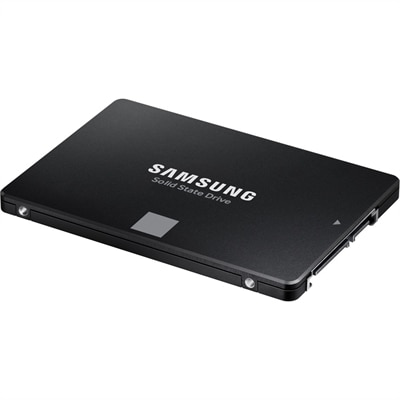
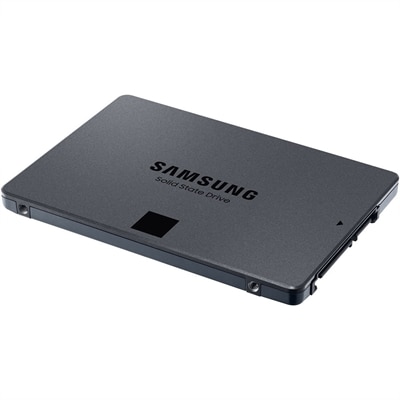
An SATA SSD offering 560MB/s read and 530MB/s write speeds with Intelligent TurboWrite and QLC storage.
SATA storage solutions are essential for anyone looking to expand their digital capabilities with reliable and efficient data management. As a cornerstone of modern computing, SATA technology offers a versatile platform for both personal and professional use, ensuring that your files, applications, and multimedia content are easily accessible. Whether you're upgrading your existing setup or building a new system from scratch, exploring the range of SATA storage options can provide the scalability and performance needed to keep pace with today's demanding digital environments. Dive into the world of SATA storage to discover how these devices can enhance your computing experience with seamless integration and robust data handling.
An SATA SSD offering 560MB/s read and 530MB/s write speeds with Intelligent TurboWrite and QLC storage.
SATA compatibility is one consideration when choosing a laptop or desktop for familiar applications, everyday projects, and a comfortable computing routine. SATA stands for Serial Advanced Technology Attachment, an internal connection standard found in many personal computers. It describes an interface rather than a computer’s overall speed, size, or capabilities. A system’s processor, memory, cooling design, and supported connections all contribute to how it feels in daily use, whether that means opening a morning’s worth of browser tabs, revising a presentation, or organizing a semester of assignments. SATA has appeared in several generations, with nominal signaling rates of 1.5, 3, and 6 gigabits per second; these figures describe the connection and should not be read as a promise of application performance. For shoppers comparing laptops and desktops around existing SATA requirements, the most useful details are the computer’s documented interface support, internal layout, and service options. A familiar connection name alone does not establish that every component will fit or function in every machine. Related categories such as Internal SATA Hard Drives should be considered alongside the host computer’s specifications, rather than as evidence that a particular laptop or desktop supports a particular installation. This distinction matters especially when two computers look similar from the outside but use different internal designs. One may provide accessible mounting locations and appropriate connections, while another may have a tightly integrated layout with little room for changes. A desktop used for household paperwork has different practical demands from a laptop carried between classrooms, and the right configuration reflects those differences. Connection compatibility is useful background, but the complete computer still needs to suit the person using it: responsive enough for regular tasks, comfortable for long sessions, and shaped to fit the space where work actually happens.
Physical fit becomes particularly important when a laptop or desktop needs to accommodate an existing setup. A full-size desktop tower may provide more internal working room than a compact model, but exterior dimensions are not a reliable substitute for the manufacturer’s specifications. Internal clearance, supported mounting arrangements, connector placement, and power provisions vary by design. Even when a motherboard supports SATA, an individual configuration may not include every cable, bracket, or other fitting needed for a change. Laptops introduce another layer of fit considerations because their interiors are designed around the battery, keyboard, cooling system, and chassis thickness. Some models offer accessible service compartments, while others require more extensive disassembly or do not support the intended modification at all. Documentation for the exact model is more dependable than assumptions based on screen size or product family. Beyond the interior, the computer should fit naturally into its surroundings. A desktop beneath a home-office desk needs ventilation clearance and enough room for cables without forcing connectors against a wall. A compact computer beside a monitor can leave more space for notebooks, a drawing tablet, or school materials, although its smaller enclosure may limit internal flexibility. A laptop carried every day benefits from a manageable weight, sturdy hinges, and a chassis that feels secure when lifted or packed away. Metal and polymer housings can both perform well; construction quality, reinforcement, and hinge design matter more than material names alone. Surface finishes also affect everyday ownership, from how easily fingerprints show to how readily minor scuffs become visible. A keyboard with comfortable spacing, a readable display, and well-positioned external ports can make a greater difference during an afternoon of work than an isolated interface specification. For someone replacing an older computer, the most satisfying fit often preserves familiar working habits while improving the parts of the experience that caused friction, such as awkward cable access, a cramped screen, or a machine that dominates the desk.
Intended use helps bring those technical and physical details into focus. A student moving between a library table and a shared apartment may value portability, dependable battery life, and a display that remains comfortable during extended reading. Someone working from a fixed desk may prefer a desktop paired with a larger monitor, a separate keyboard, and a mouse chosen for the available workspace. Households sharing one computer benefit from an arrangement that accommodates different users without constant adjustments, while creative hobbyists may need enough processing capability and memory for photo editing, illustration, or music projects. In each case, SATA support is only one part of a broader configuration, not a shorthand for suitability. A computer intended for occasional correspondence does not need to be assessed in the same way as one used for demanding applications throughout the day. Durability and care also deserve attention because even a well-matched system depends on sensible handling. Ventilation openings should remain unobstructed, and laptops work best on firm surfaces rather than blankets or cushions that can restrict airflow. Dust around external vents can be addressed according to the manufacturer’s cleaning instructions, with the computer powered down and liquids kept away from openings. A soft, appropriate cleaning cloth helps protect exterior finishes and screens without abrasive scrubbing. For travel, a padded sleeve or compartment can reduce everyday knocks, while careful cable handling helps avoid unnecessary strain on ports. Internal work requires additional caution: service procedures, electrical safety precautions, and component-handling requirements differ between models. A machine with accessible service information can be particularly useful for an owner who expects to maintain it over time, although accessibility should never be assumed from appearance alone. When a computer is intended as a gift for a college student, a graduate, or someone establishing a home workspace, matching the recipient’s software needs and preferred working style is more meaningful than choosing by a single technical term. A well-considered laptop or desktop brings together compatible connections, appropriate performance, comfortable everyday use, and a physical design that belongs in the recipient’s routine.
Add the products you would like to compare, and quickly determine which is best for your needs.